E Series Automated Dispensing System
127www.nordsonefd.com info@nordsonefd.com 800-556-3484 Sales and service of Nordson EFD dispensing systems are available worldwide.
# Click Step Reference Image
11
>
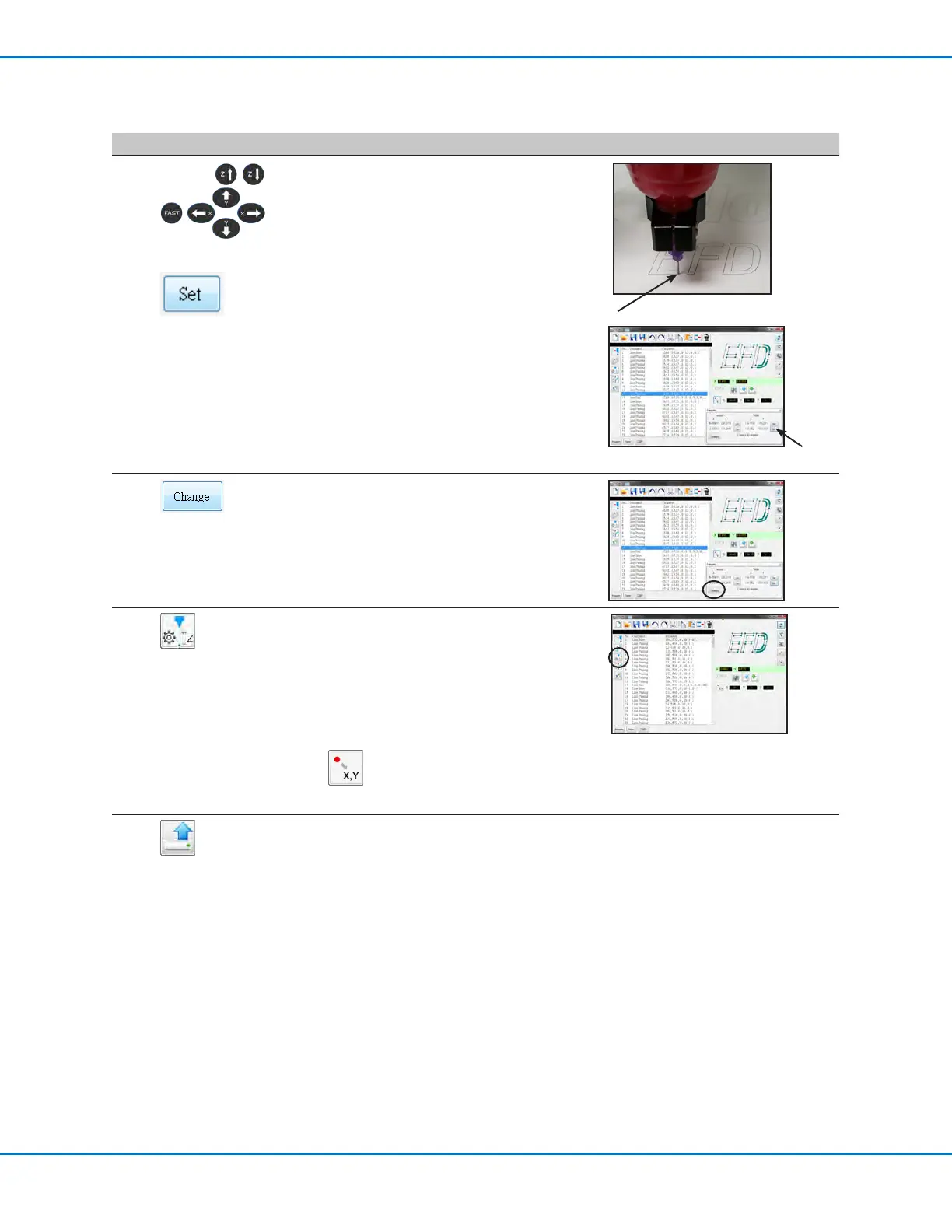
Use the Teach Pendant to jog the tip to
the top point on the actual workpiece and
then click the bottom SET button under
TABLE.
2
1
12
Click CHANGE.
The system updates all XY locations in
the program so they align with same XY
locations on the actual workpiece.
13
Select all the commands in the Option
screen command window and then click
CHANGE Z VALUE to change the Zheight
to match the actual tip-to-workpiece
distance.
NOTE: To determine the tip-to-workpiece
distance, jog the tip over the workpiece to
the desired height and then click Location
.
Use the displayed Z value as a reference.
14
Click UPLOAD to send the dispense
commands to the robot.
A progress bar displays the upload status.
When the upload is complete, the program
is available on the Teach Pendant for
further editing.
Importing a DXF File (continued)



 To Next Page