Chapter 7 Using Workbooks and off-line programming 93
ICS Remote Tools User Guide
6 If you chose Partial Programming, from the Regions box and associated settings, select any
specific regions of programming information to overwrite by holding down the control key
and clicking on the headings you want to program.
If you want to select all of any category, such as all B1s (Set DNs), click on the button above
the column. Notice that the Select All label above the button changes to Deselect all
.
7 Click OK.
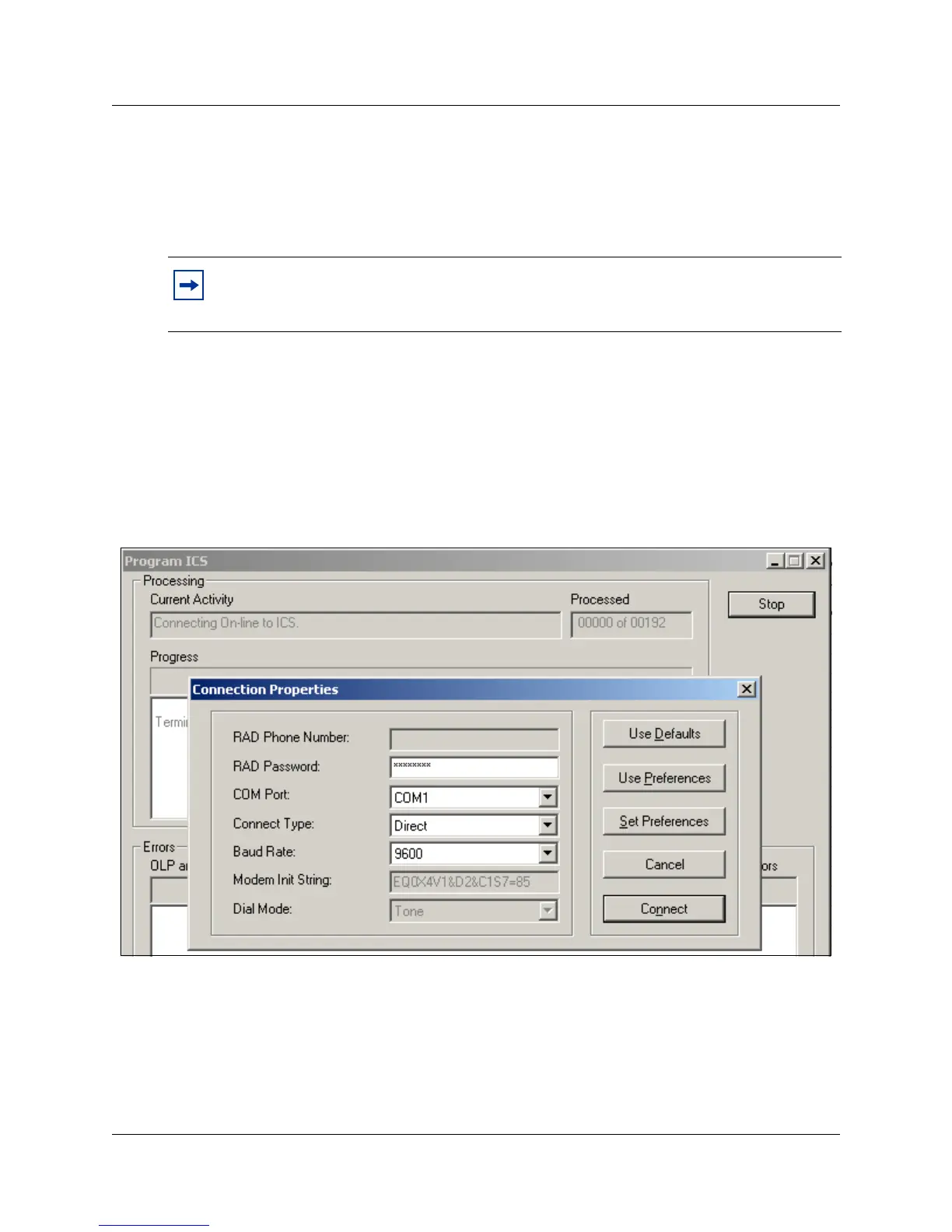
The Program ICS screen appears, then the Connection Properties screen appears on top.
8 Ensure that the connection properties are correct for the system you want to connect to, then
click on Connect.
The Current Activity field on the Program ICS screen displays information about the current
status of the connection. Once the connection is established, this field shows activity as the
ICS is updated from the workbook.
Figure 45 Program ICS and Connection Properties screens
The Progress field on the Program ICS screen indicates:
• which activity is being performed (display changes as activity changes)
• the number of data settings or regions to be processed
• the current number of processed regions (changes as the activity progresses)
• the names of the regions that have been processed (list expands as the activity progresses)
• the number of errors that are detected (changes as errors are encountered)
Note: You can deselect selected items in Regions boxes by holding the control key and
clicking the left mouse button. Be sure to have the cursor on the item you want to
de-select.



 To Next Page