Drive Setup CDHD
130 User Manual
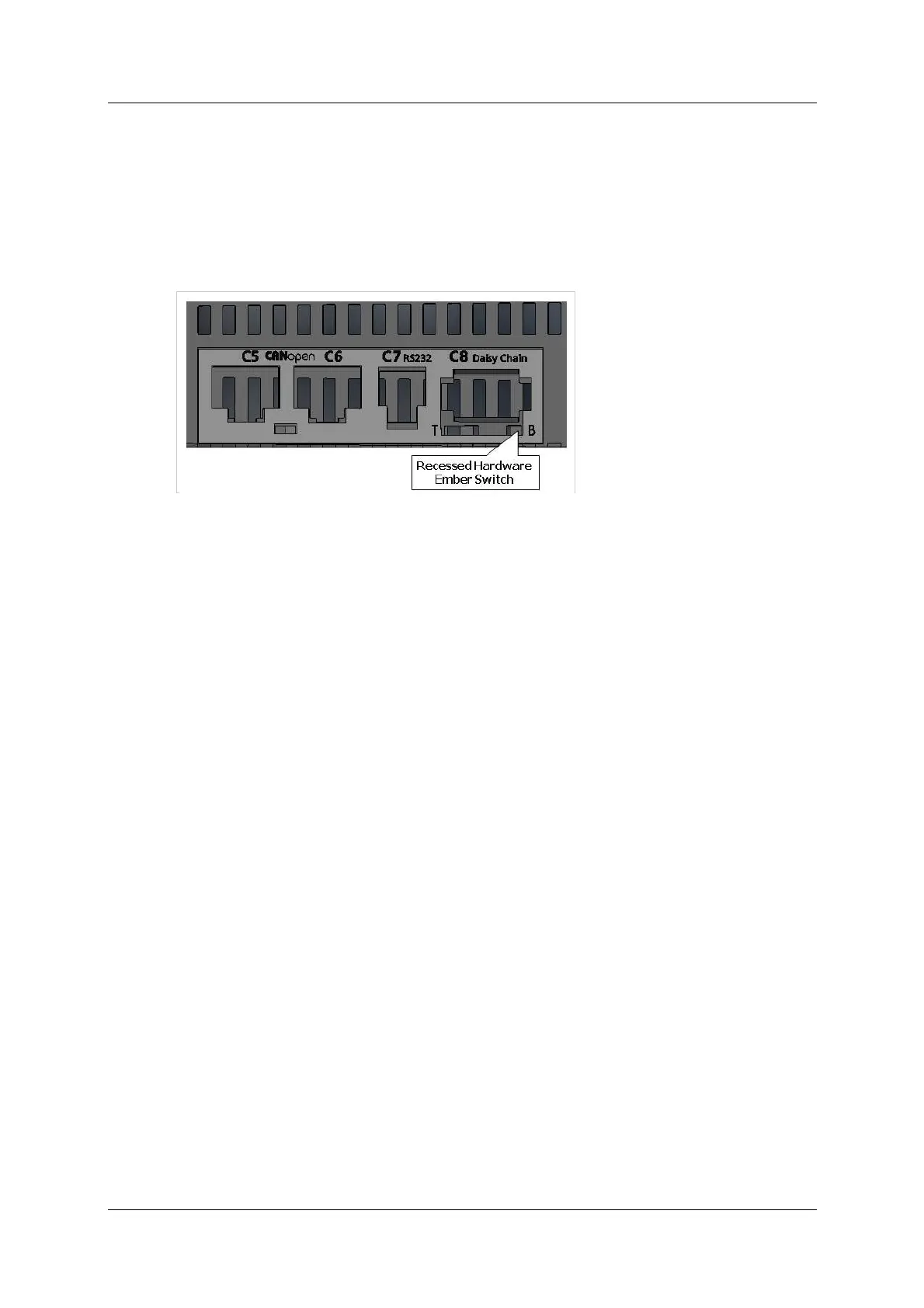
To activate the Hardware Em ber mode, use a small screwdriver or similar tool to
press the Hardware Em ber swit ch. This swit ch is located on the t op of the drive
next to the daisy chain connector (C8).
Pressing the switch set s the drive t o serial com m unication Boot -Up Mode. All
segm ents on the front panel 7- segment LED display light up (appears as “8 .”).
If the drive has a fan, the fan rotates at m aximum speed. The fan speed will
revert to norm al after the firm ware has been downloaded successfully and the
drive has restarted.
Figur e 5 - 3 8 . Locat ion of Ha r dw are Em ber Sw it ch
5 .1 1 Pow er Up
1 . After com pleting the hardware connections, turn on power to the drive.
N ote: I f logic and bus AC supplies are separat e, it is recomm ended that logic
AC be turned on before bus AC.
2 . Look at the 7-segment display on the CDHD front panel.
Upon initial power up, the status display shows a flashing e , indicating a
Param eter Memory Checksum Failure.
This fault will be cleared once the drive is configured and the param eters are
saved in the drive’s non-volat ile m em ory.



 To Next Page