Y070.302/EN Page 49
Operation instructions
SIPOS SEVEN: PROFITRON, HiMod
7
Commissioning
7 Commissioning
7�4 End positions– Signaling gear
■
If the value for the valve travel (rev/stroke) does not match the level value of the table,
adjust the slide wheel to the next higher level value.
■
Push the slide wheel in the desired direction, applying only little pressure. Adjusting the slide
wheel is facilitated by a slight movement of the centralwheel(g.3,item3).
■
If the number of revolutions/stroke is not known, proceed as follows, heeding the notes in
the display for operating step 16.
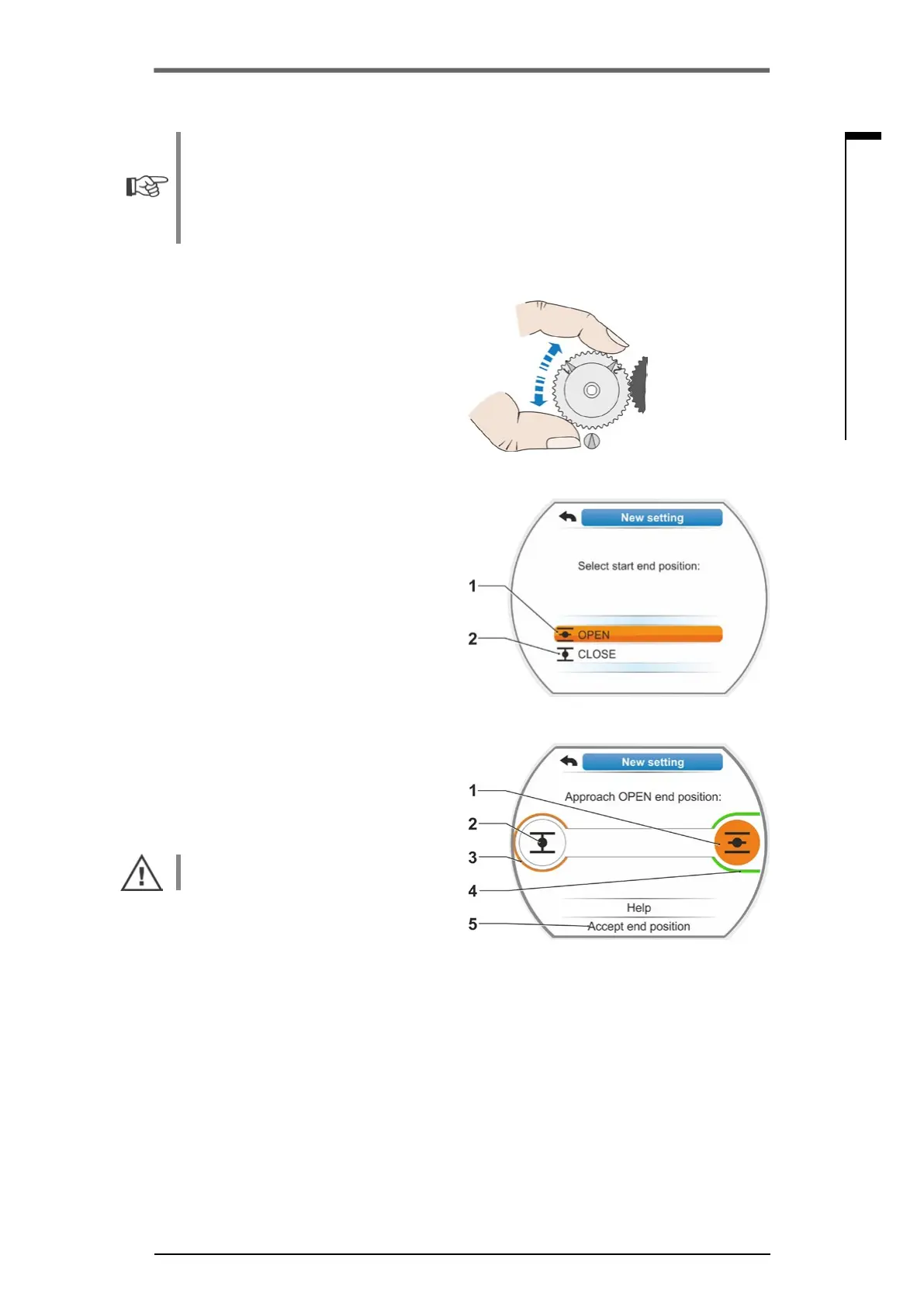
8. Select ‘Continue’ in the display.
You are prompted to adjust the central wheel
to mid-position.
9. Turn central wheel to mid-position.
Set the central wheel so that arrows 1 and 2
point in upward direction, see illustration 4.
Thecorrectpositionisconrmedinthe
display and the selection marker is set to
‘Continue’.
10. Conrm‘Continue’.
The display changes to the query which end
positionCLOSEDorOPENistobesetrst
(g.5).
The end positions must not be set according
toaspecicsequence.Adjustmentofend
position OPEN is described in the following.
End position CLOSED is adjusted accord-
ingly.
11. Selectendpositiontobesetrst(inour
exampleendpositionOPEN)(g.5,item1)
andconrm.
Display changes to end position adjustment
and you are requested to approach end
positionOPEN(g.6).OperationinOPEN
direction is suggested: End position OPEN
symbol is shaded in orange (g.6,item.1).If
operation in the opposite direction is desired,
turn Drive Controller and set orange selec-
tionmarkedtosymbolCLOSED(g.6,
item 2).
Generally, the end position selected in
operationstep11istobeadjustedrst!
Furthermore, the display indicates the set
cut-off mode. In our example
■
End position CLOSED = torque-dependent
(g.6,item3)and
■
End position OPEN = travel-dependent
(item 4)
12. Depending on whether the cut-off mode
for the end position is travel-dependent or
torque-dependent, select the following op-
eration sequence.
Fig� 4: Turn central wheel to mid-position
Fig� 5: End position selection
Fig� 6: Approach end position in OPEN
direction



 To Next Page