10.4.3 SELECTED CYCLE OPTIONS – ID. 1.6.1.0
Only staff well-trained in choosing the wash cycle and related options can have access to the following
functions.
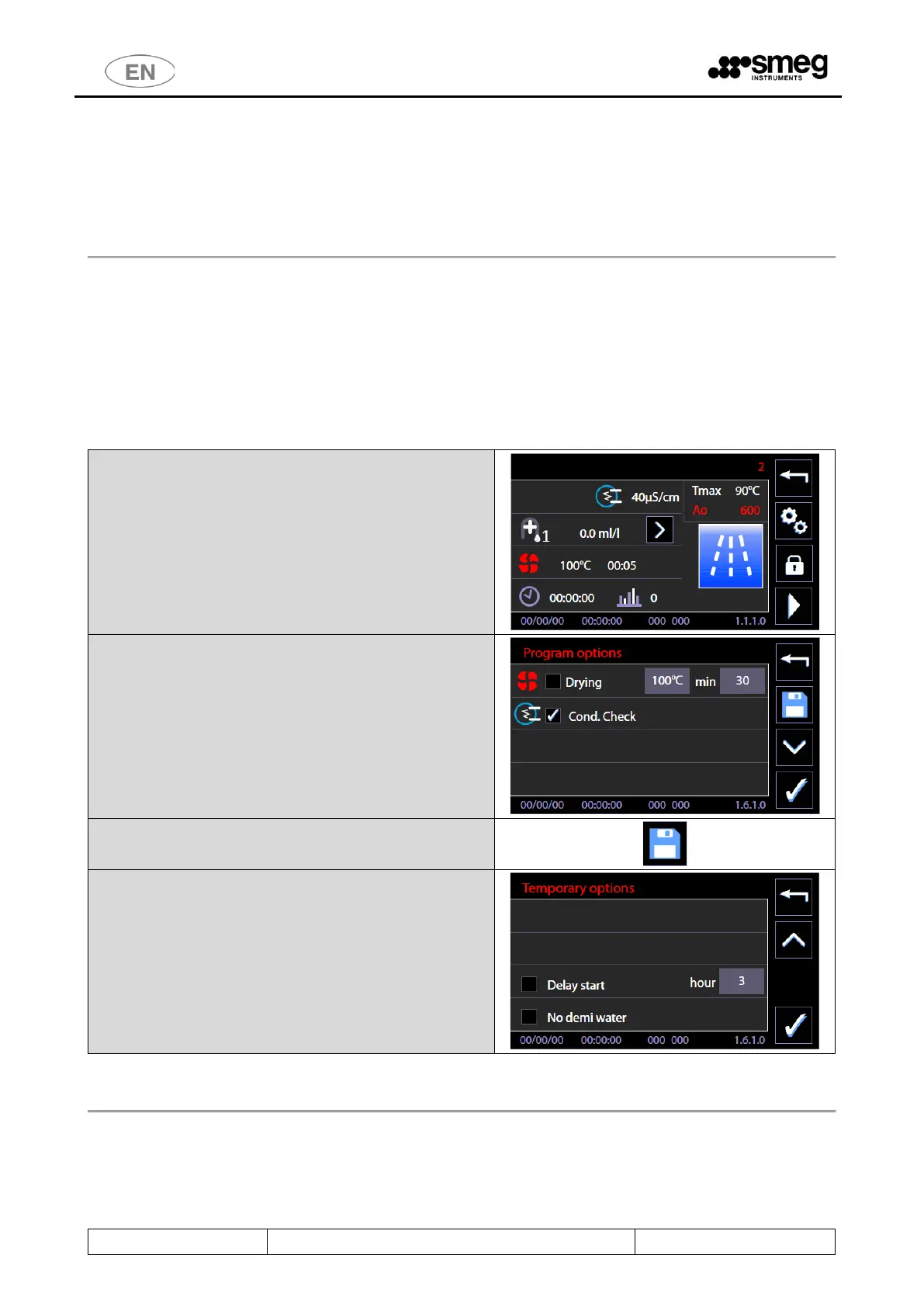
Through the button on the screen of the selected cycle it is possible to move on to “Cycle options” screen
to activate and regulate some options for the ongoing cycle.
Since 7.16.0 CPU Master version software (July 2017), the screens dedicated to the selected program
options (1610) have been modified.
In detail, you have the following new options for the cycle:
1. select/deselect the conductivity check “Cond. Check”
2. save the drying phase and conductivity check settings, to make them permanent for the selected
cycle;
3. the existing Delay start and No demi water options are still available: these options apply to the
current cycle and, given their meaning, cannot be saved as permanent settings.
Program options - screen 1610.
To do so, either check or uncheck the “Cond. Check”
box.
Use the “Save” button on the right to confirm this
option for the program in question.
For the preceding versions of firmware (before july 2017), the cycle options were:
1. Drying. The drying option is labelled with the symbol “fan”: it is possible to exclude the drying
phase from the cycle or to decrease target temperature and duration, within the limits fixed by the
device.



 To Next Page