10.5 BARCODE ACQUISITION – WD-CODESCAN
Barcode acquisition is performed only if the optional Scanner is installed, ref.prod.: WD-
CODESCAN.
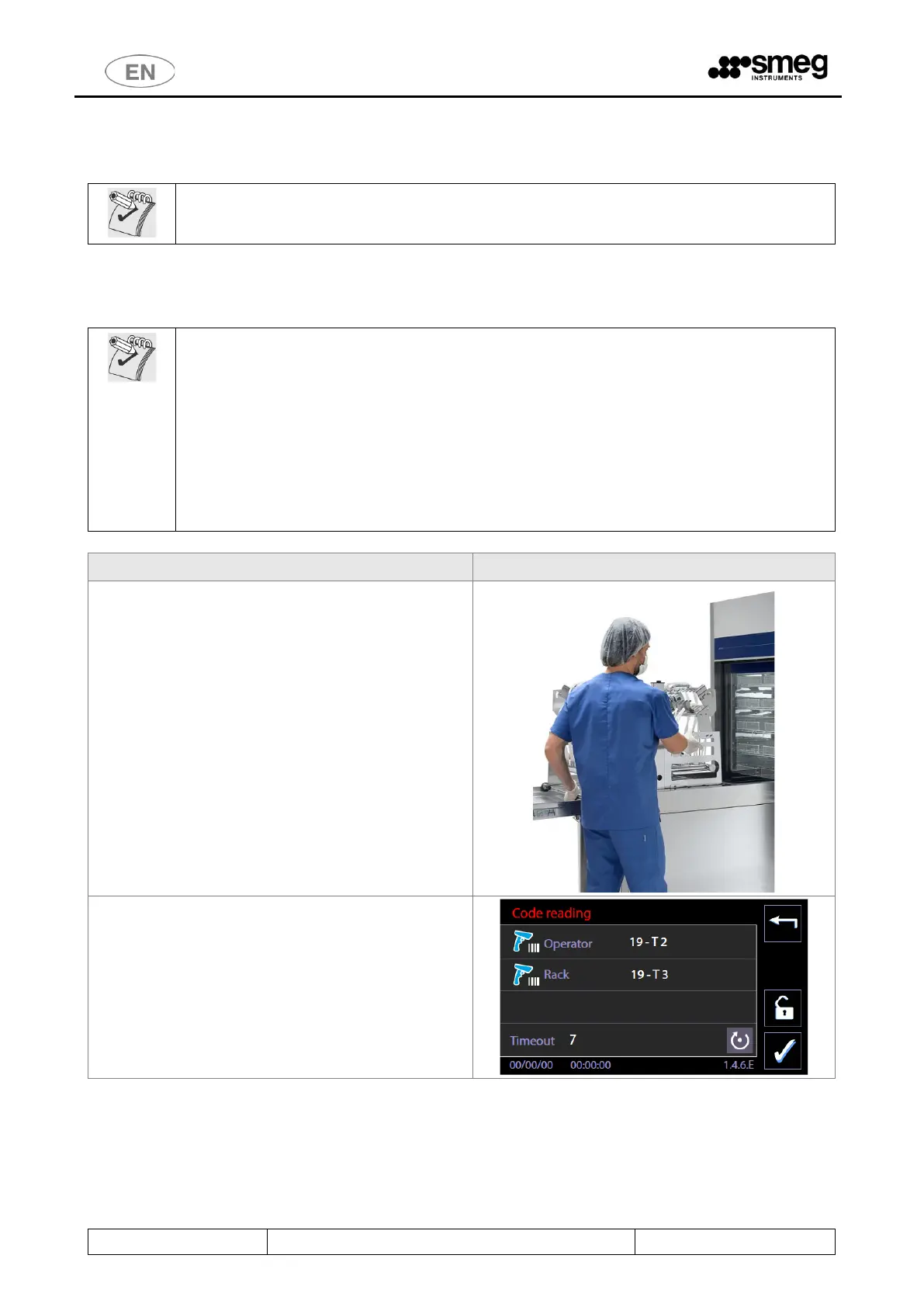
The typical procedure and screens for barcode acquisition are described below.
N.B.: The rack and/or user must be equipped with barcodes.
Useful advice:
In combination with the optional "Trolley recognition" (ref. Prod. RACKREC), the machine can
detect the insertion of the trolley in chamber and propose the code acquisition screen.
For fast reset of the codes acquired in case of problems with scanning or with automatic
operating sequences: remove the rack a small distance out of the chamber and then
reinsert it.
Reinserting the rack triggers a new RACKREC reading and effectively resets the operating
sequence.
When handling racks, always comply with the safety instructions in the user manual.
The user:
1. Opens the device’s loading door;
2. Places the washing rack close to the device,
using the multi-purpose trolley or other
suitable systems provided by the producer.
3. Inserts the rack in the washing chamber.
The multi-purpose trolley can now be disengaged
and moved away to give the user better access to
the device’s display and the scanner.
Aim the scanner at the barcode to be acquired and
press the scan button.
The device automatically switches to the “Code
scanning” screen 146E.



 To Next Page