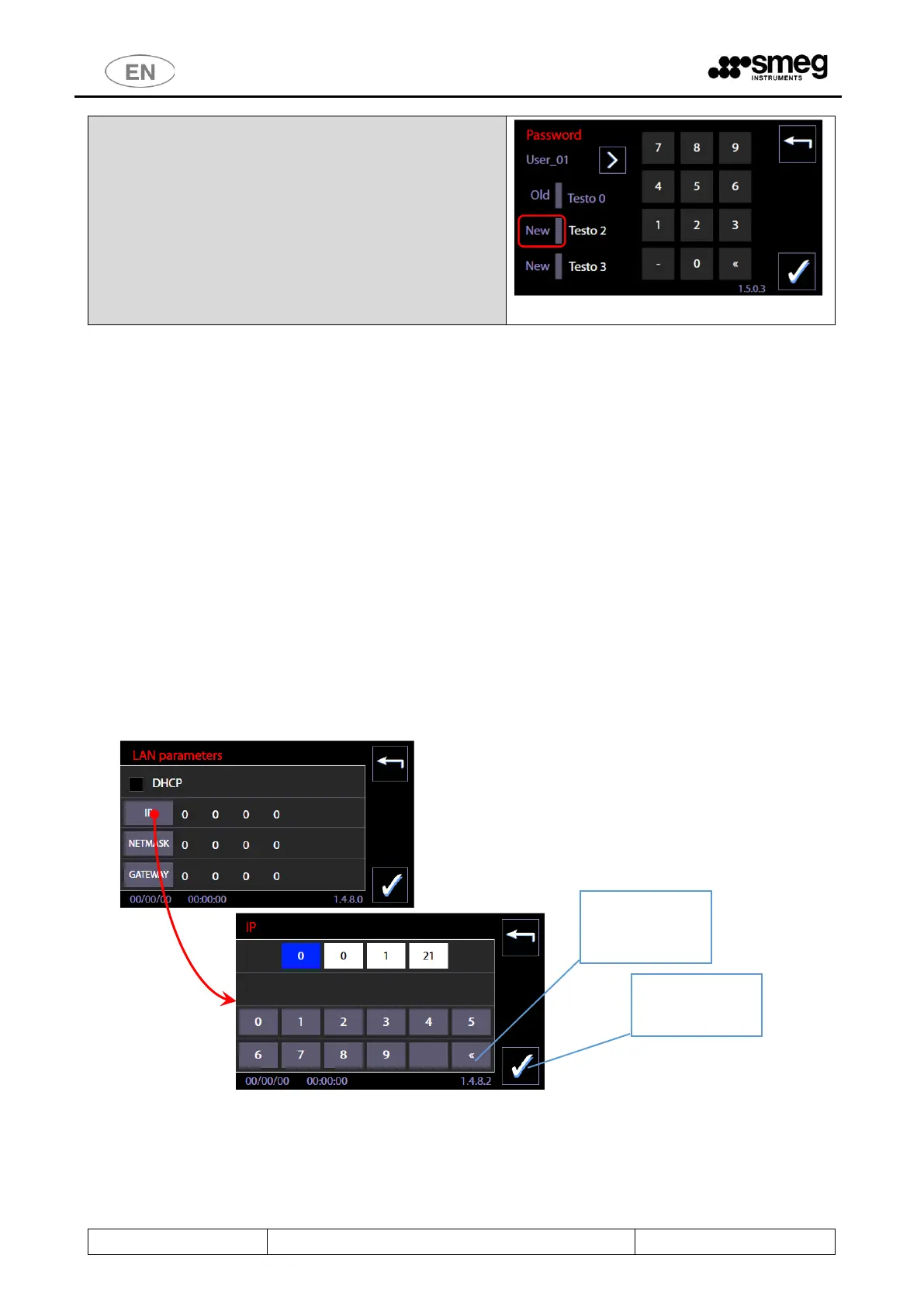
Change password.
In this screen, the superuser can modify his own and the
basic level user passwords.
Procedure:
1. Press next to New (the upper one) and enter the
new password.
2. Press next to New (the lower one) and confirm
the new password.
N.B.: a user password is a number between 0 and 999.
11.5.4 LAN PARAMETERS – ID. 1.4.8.0 – 1.4.8.2
Access with password Superuser.
The screen is used to manage and insert the parameters for communication in LAN network; it is accessible only if the
optional for communication is installed (WD-LAN60).
Fields to set up:
DHCP – enable/disable by touch-screen (flag)
IP - parameter
NETMASK - parameter
GATEWAY – parameter
Next to each parameter there is a key to insert and modify the parameter itself.
Next is an example of the IP parameter insertion:
1. Select the button “IP” -> you enter the screen for insertion of the field
2. The parameter consists of 4 fields. Touching a field you activate the modification mode of the field.
3. Field must be cancelled in order to be rewritten, cancellation by button “<<” of the numeric keypad.
4. Field insertion by numeric keypad.
5. Confirmation of the inserted button by lower right button “CONFIRM”.



 To Next Page