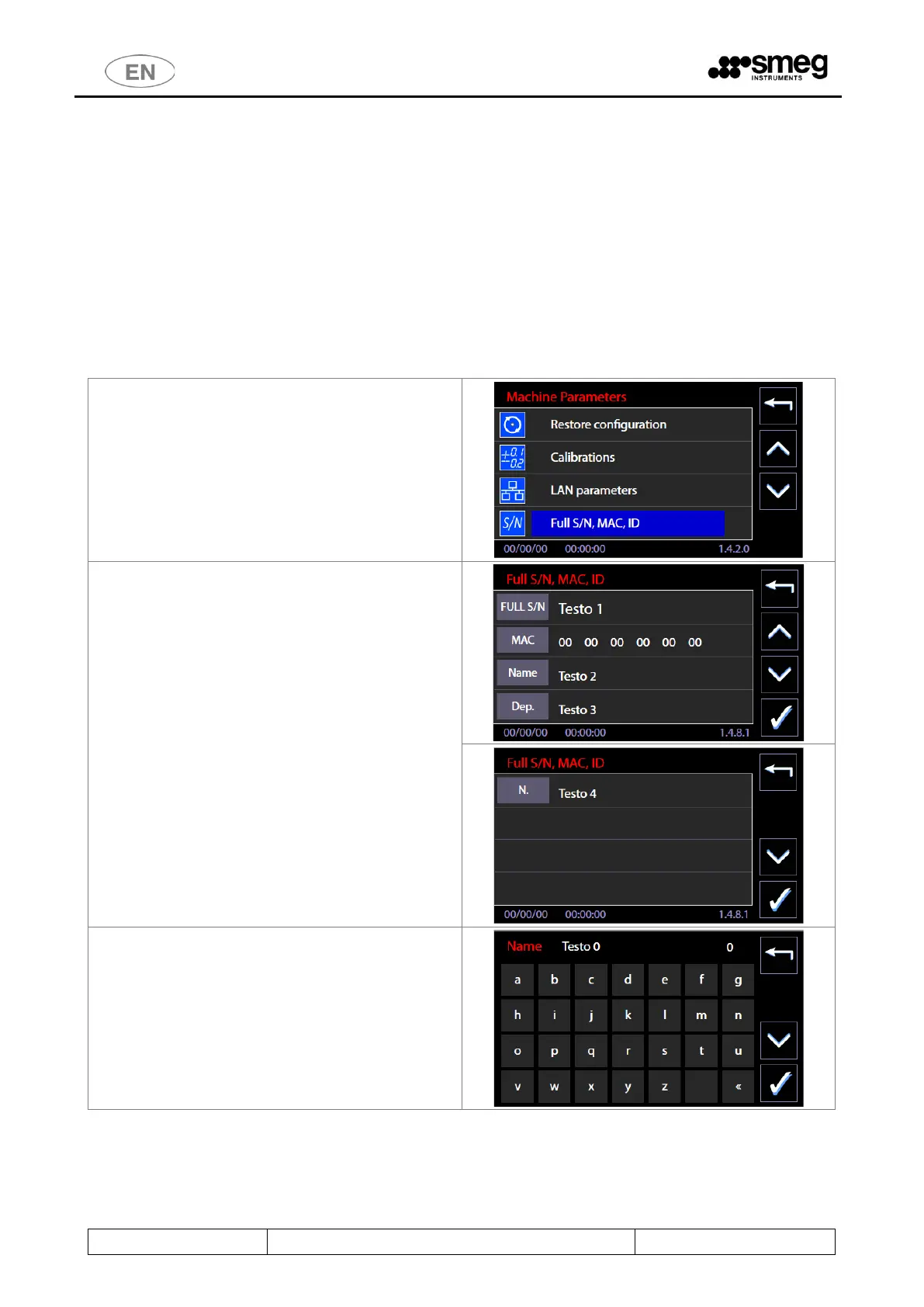
11.5.5 FULL S/N, MAC, ID (device labels) – ID. 1.4.8.1
This function is for the superuser staff, for visualization of FULL S/N (“Full serial number”) e MAC address related to
the device.
Full S/N and MAC are permanent parameters of the machine: the user can read Full S/N on the characteristic plate of
the equipment.
MAC address is defined only if the optional for communication in LAN network is installed. In case it is necessary to
know the values because of network settings, the authorized technician should be asked.
Features introduced with the firmware update, April 2016.
Identification labels - there are 3 alphanumeric label, editable by the superuser, useful for device identification.
1. Label machine: "Name"
2. Label Department: "Dep."
3. N.ro inventory: "N."
2. From the screen the following item are visible:
1. Full S/N (non-editable field)
2. MAC (non-editable field)
3. Name
4. Dep.
5. N.
3. To insert or change any of the 3 fields "Label"
(Name, Dep, N.): select the corresponding
button. You access the keypad that allows you
to assign an identification text.



 To Next Page