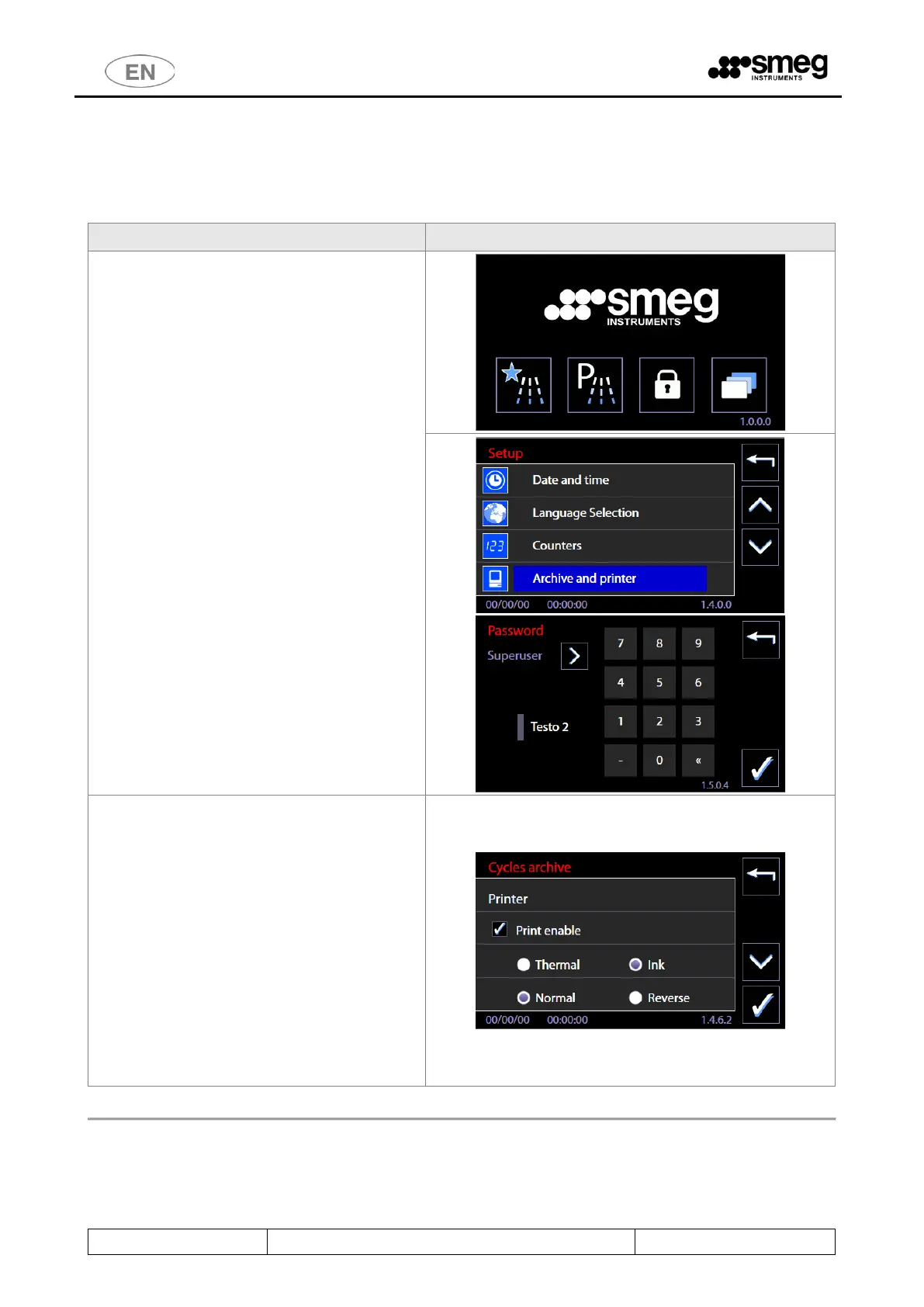
11.4 ARCHIVE AND PRINTER - ID 1.4.6.2
Access from “Setup” menu -> Archive and printer. Access to superuser.
Archive and printer parameter setup function.
Access the Setup menu.
Select “Archive and printer”, then enter the
“Superuser” password.
(N.B.: in firmware releases earlier than 5.6.0
Master Main, this option is called simply
“Archive”).
Step 2: this accesses the printer setup screen,
screen 1462 “Cycles archive”.
Commands available:
a) To enable printing: flag on “Print enable”;
b) select “Ink” for the WD-PRINTEINK thermal
ink transfer printer. Select “Thermal” for
purely thermal printer (e.g. PRINTS6010 or
WDPRINTP6010 panel printer).
c) Choose “Reverse” or “Normal” to print the
text in the standard or "upside-down"
direction. Default: “Reverse”.
d) Confirm with the tick button in the bottom
right-hand corner of the screen.
The Master CPU firmware 7.16.0 (July 2017) updates the format in which the archive displays, as acquired
by the WD-CONNECT application.
The update is intended to improve the legibility of the data.



 To Next Page