EasyManua.ls Logo

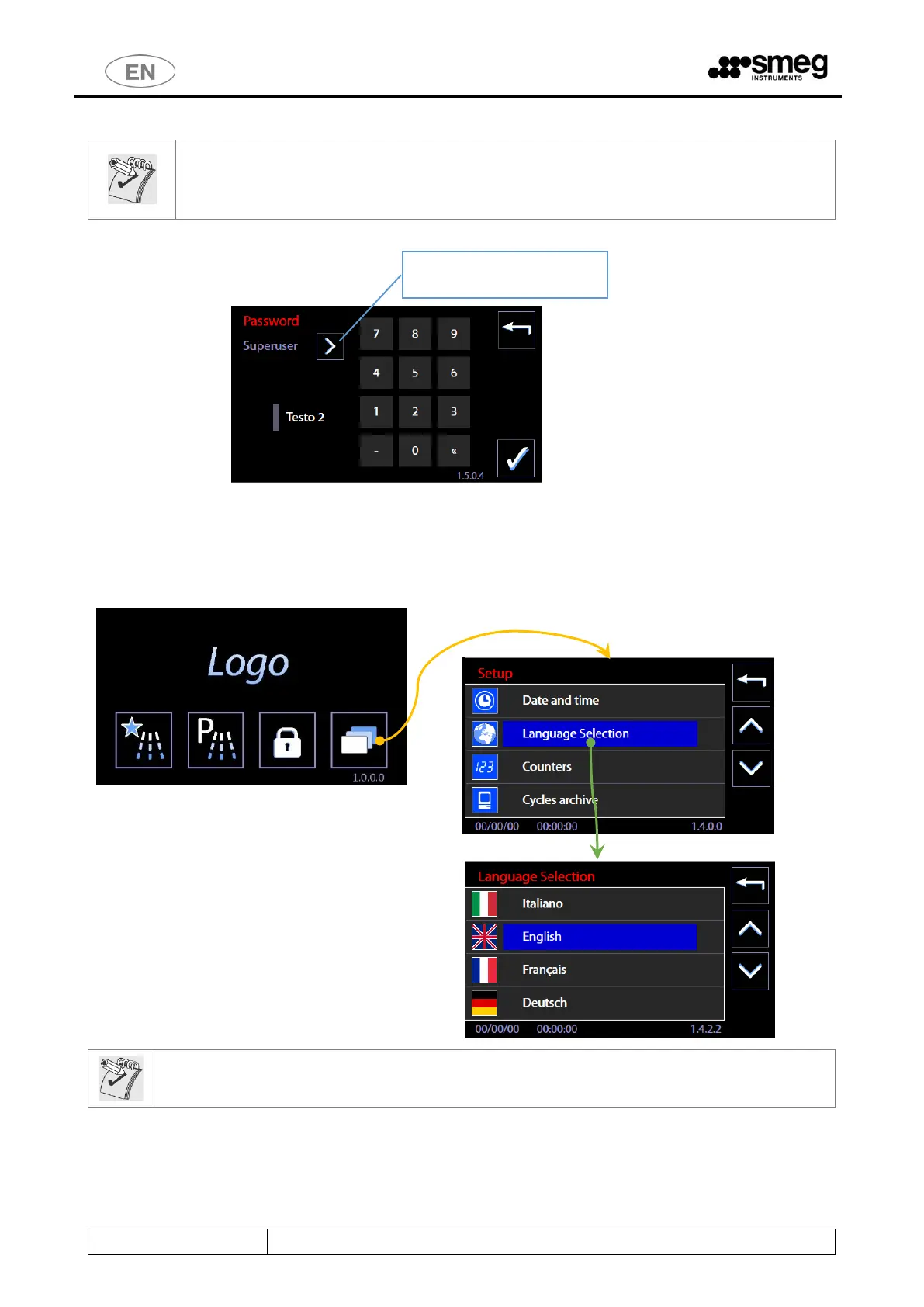
Smeg WD7010 - Enter Password - ID.1.5.0.4; Language Selection - ID. 1.4.2.2

Smeg WD7010
168 pages
Print Icon
To Next Page IconTo Next Page
To Previous Page IconTo Previous Page
Loading...
WD6010 WD7010 WD7015
Page 71 - 168
11.1.1 ENTER PASSWORD ID.1.5.0.4
N.B.:
From the Master CPU 5.6.0 (and later) firmware version, the password input screen requires selection
of the current user. The device's manager must select "superuser" to enter the relevant password and
then confirm the input.
11.2 LANGUAGE SELECTION ID. 1.4.2.2
No password is required to set up this function.
On the screen: sequence of touch-screen operations to select the device LANGUAGE.
Note on "Russian" language setting
When the language selected is Russian, the display will show the Russian text correctly but the printer will
use the English language strings.
User selection button

Table of Contents

Other manuals for Smeg WD7010

Related product manuals