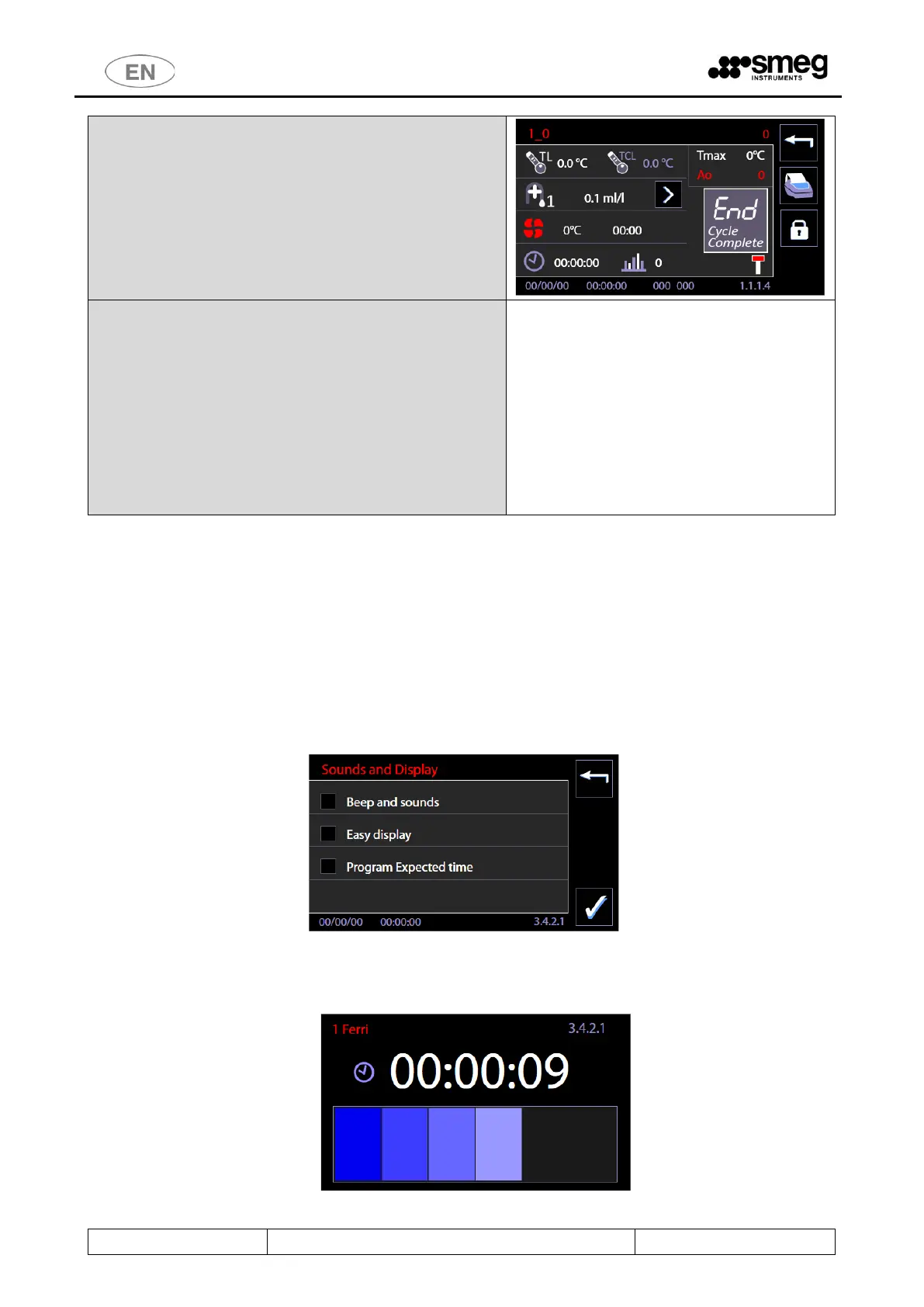
In the "Cycle completed" screen, the same icon is used to
provide the user with information on the type of cycle.
No icon is displayed in that position if the program is a
"Passing" type.
Non-Passing Program - Archive and receipt.
If the program is a "Non-passing" one: in the archive
and receipt this information is recorded.
E.g.:
[ … ]
14:12:22 Cycle Completed Successfulluy
Non-passing Program
11.8 DISPLAY AND SOUNDS – ID. 3.4.2.1
Functions accessible at the level “user” or superior.
Starting from menu “Setup”, skim menu entries and select “Display and sounds”.
Available entries:
1. “Active sounds” -> if flagged, it enables acoustic signals.
2. “Display easy” -> if flagged, it enables simplified visualization of the cycle in progress.
3. “Cycle remaining time” (or “Program Expected time”) ->
a. If flagged, the visualized time with cycle in progress is the estimated time left.
b. If not flagged: the visualized time with cycle in progress is the progressive time from the start of the
cycle (instant 00:00) to the end of the cycle.
Display easy: In the simplified visualization of the cycle in progress, the display only shows:
4. Program name
5. Time of the cycle in progress (time left or progressive time depending on the settings).
6. The progress bar



 To Next Page