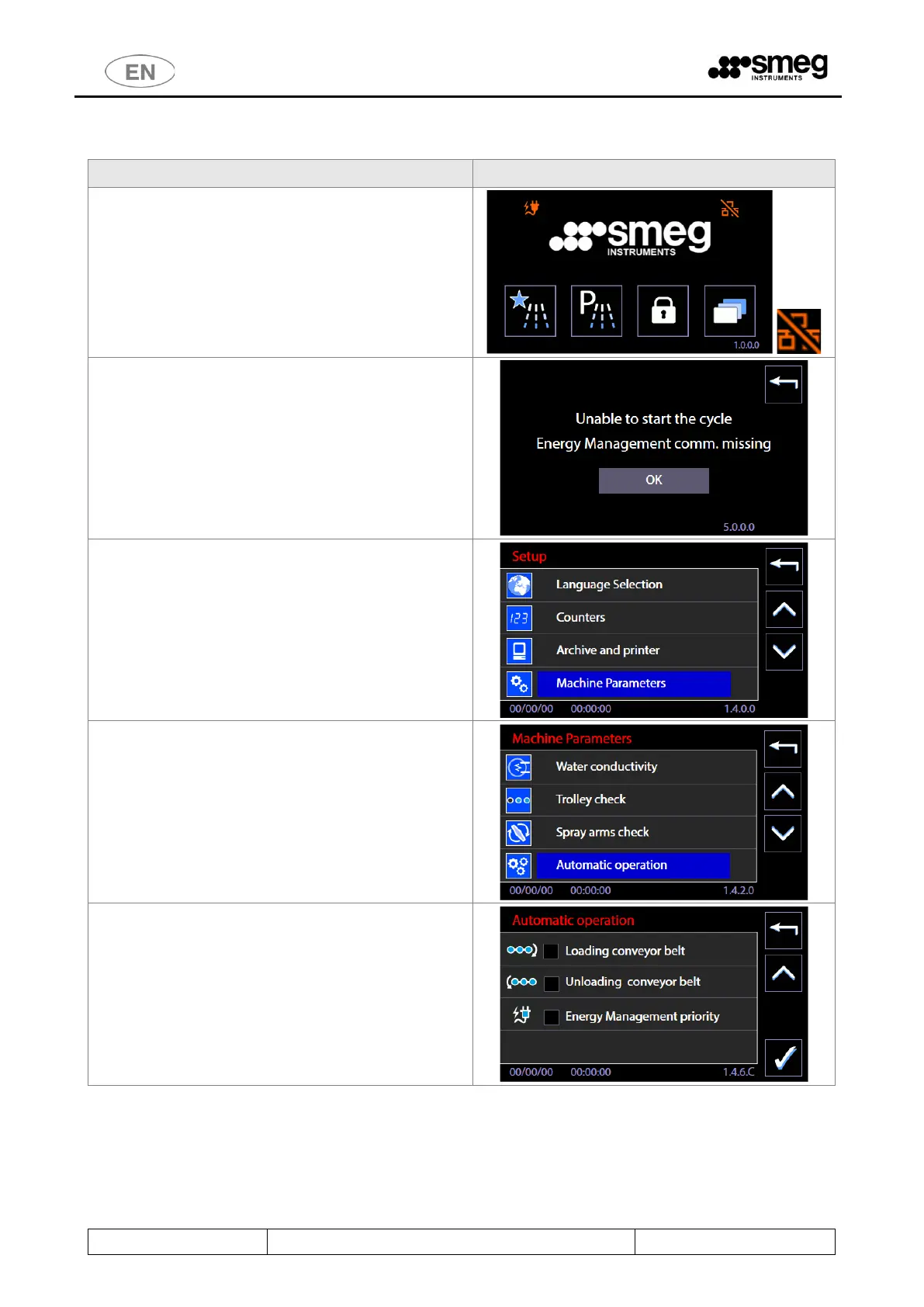
10.9.2 NETWORK PROBLEMS AND DISABLING THE SYSTEM - SUPERUSER
If the network connection between the device and
the energy management system is not functioning
correctly, the device cannot receive consent to start
the program and remains in lockout status.
In this condition, there is a bar across the specific
network icon.
The device provides specific Warning messages to
alert the user to network connection problems.
In addition to the attempt to start the cycle, if the
connection to the program is missing alert screen
5000 displays the “No Energy Man. communication”
message.
The superuser can disable control of the consent
between the program and the device by removing
the “Energy Management Priority” flag.
This is done by accessing “Setup” model and selecting
“Machine Parameters”.
[The Superuser password has to be entered].
Select the "Automatic Operation" option.
Go to the automatic function enabling screen.
Remove the flag from the
“Energy Management Priority” option.
This disables control by the program: the device can
start irrespective of the software signals.



 To Next Page