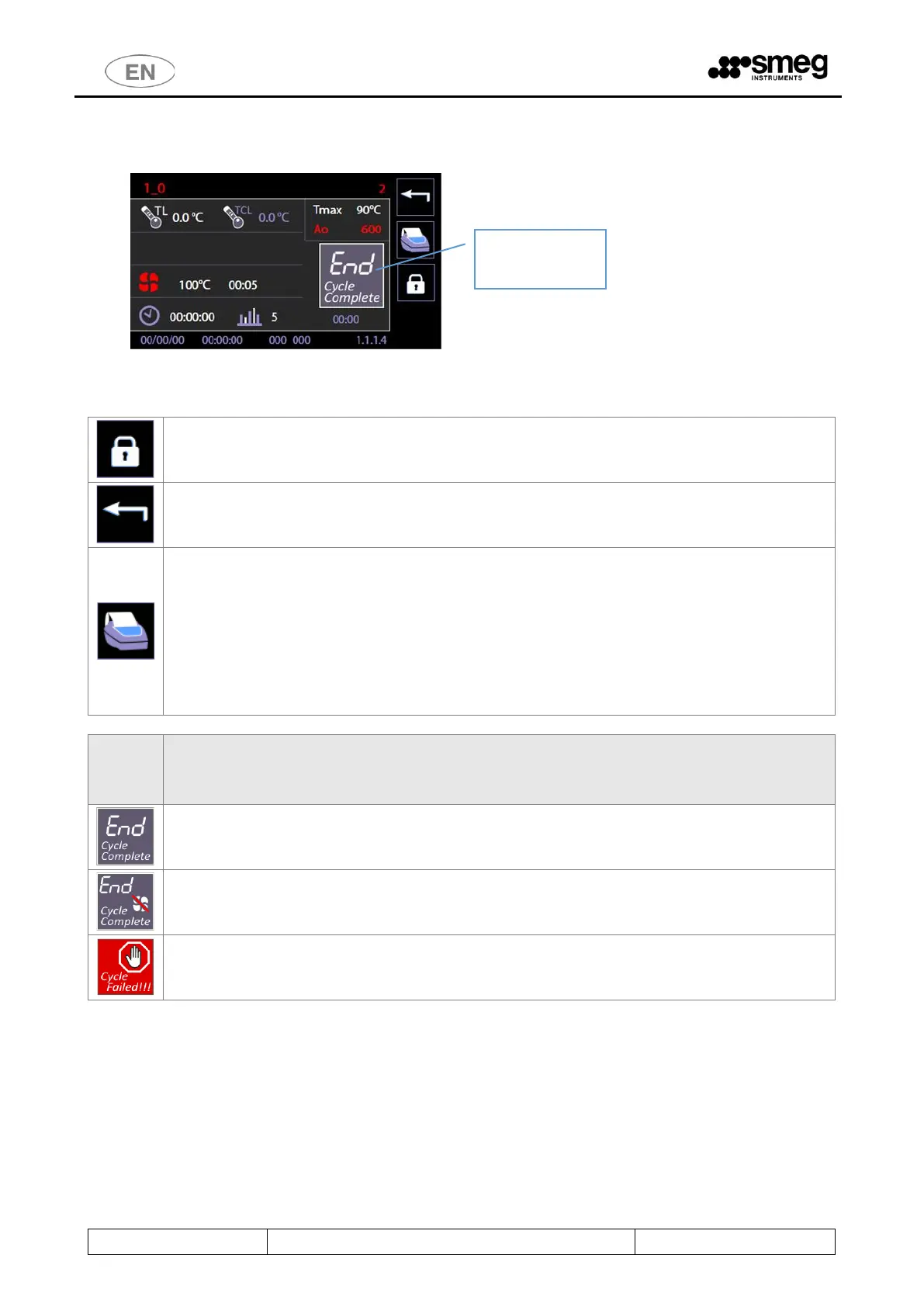
10.8 COMPLETED PROGRAM - 1.1.1.4
At the end of the cycle, the screen displays an icon to indicate the status of the completed cycle (“END – Cycle complete”)
relevant data about the cycle performed.
It is possible to execute only the following options:
1. Unlock the door through “lock/unlock” button to open it and extract load – ordinary operation.
2. Go back through the “Home” button to select a further additional cycle without unlocking or opening
the door – only useful in case a load must undergo additional consecutive cycles.
3. Last cycle reprint button.
This function, which reprints the last cycle, is available from July 2017 (Master CPU firmware
release 7.16.0), and it is only active if the printer is present and enabled.
The function reprints a completed program if the previous printout was incomplete, due to
lack of paper, for instance.
If the printer is enabled but not present on the machine, the button is still present and
enabled, but has no effect.
The cycle was successfully completed.
The washing part of the cycle was successfully completed, but the drying was interrupted or
some problems occurred during the drying.
The cycle failed. Anomalies occurred during operation or the user forced the cycle to stop.
Icon that shows the
end of the cycle.



 To Next Page