30 Installation and Setup
2005995 Rev O – 210712
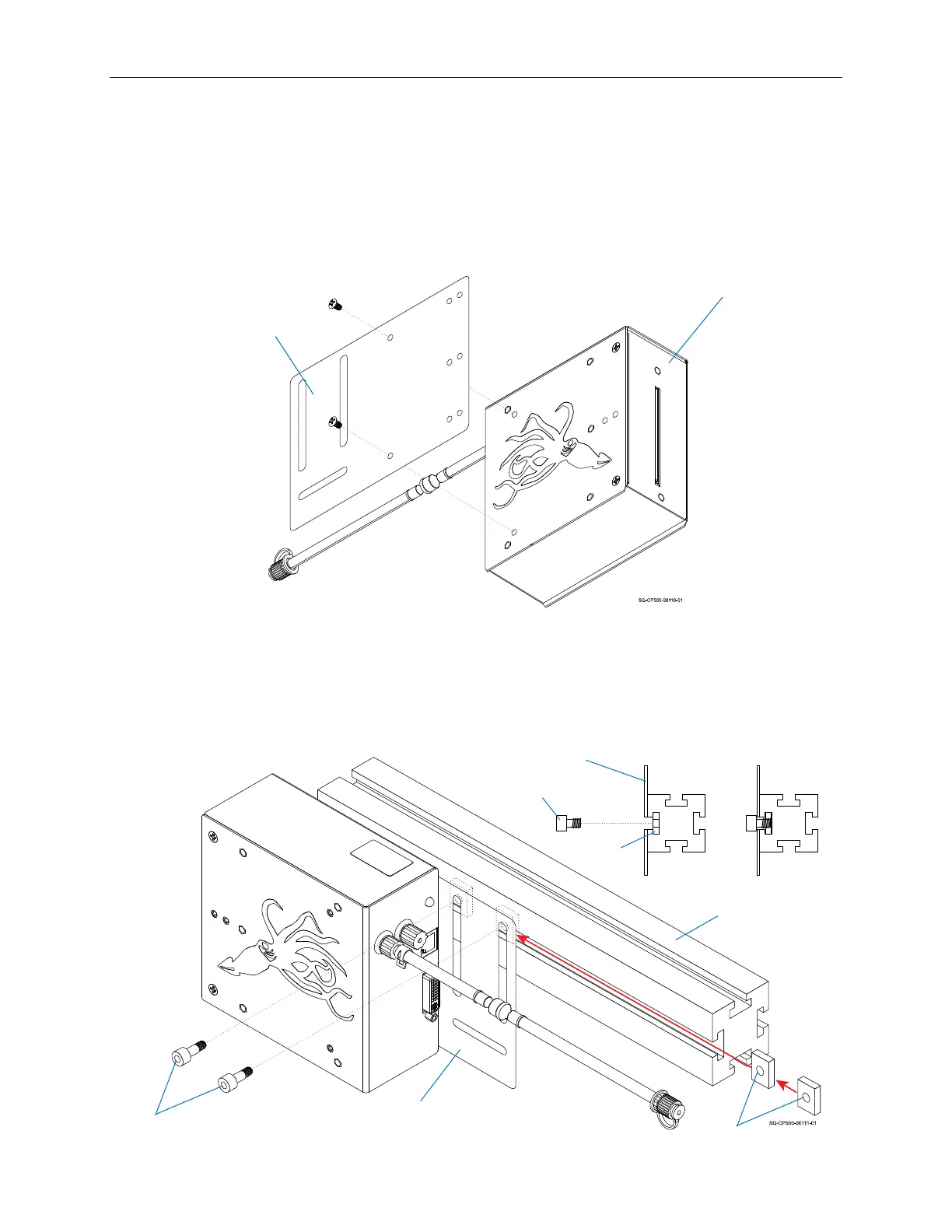
To Mount a Printhead on a Conveyor Mount or Floor Stand:
1. Use the supplied Screws to attach the Mounting Bracket to the downstream side of
the Printhead.
2. Use the T-Nuts and accompanying Screws to attach the Mounting Bracket (through
the two vertical slots) to the Mounting Arm, and then tighten the T-Nuts.
Mounting
Bracket
Printhead
Attaching the Printhead to a Conveyor Mount or Floor Stand
(Left-to-Right Product Flow)
Mounting
Bracket
Mounting Arm
Attaching the Mounting Bracket to the Mounting Arm
Screws
T-Nuts
Cross Section of Mounting Arm
Screw
T-Nut
Mounting
Bracket



 To Next Page