54 Installation and Setup
2005995 Rev O – 210712
Printhead Data Cable
WARNING: Ensure that the Controller Power Switch is turned OFF and the
Controller is disconnected from the power source when connecting a Printhead.
VIDEO: Connecting the Data Cable
To see a video of this procedure, click this link:
https://youtu.be/zSjTfhCmU8M?t=1064
Or scan the QR code at right using the camera app on your mobile
device.
View Time: 17:44 – 18:32
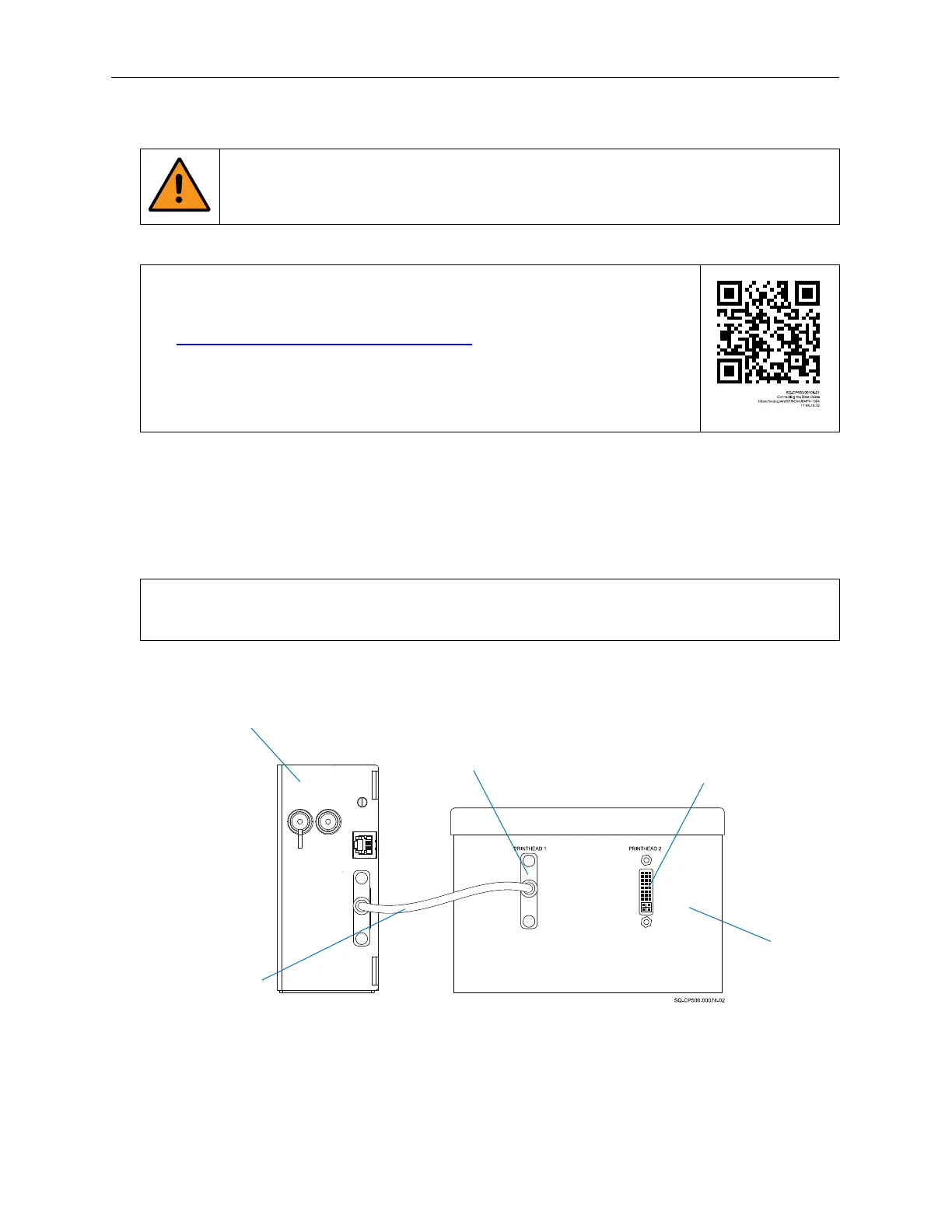
On the front of the Controller, there are Data Connections for two Printheads. They are
labeled “PRINTHEAD 1” and PRINTHEAD 2”.
Connect a Data Cable to “PRINTHEAD 1”. Connect the other end of the Data Cable to the
Printhead that will be designated “Printhead 1.”
NOTE: A single printer setup MUST always connect to the PRINTHEAD 1 Port, as the
system will not work if nothing is plugged into the PRINTHEAD 1 Port.
The Data Cable also carries power from the Controller to the Printhead. There is no Power
Switch on the Printhead. The Printhead will power up when the Controller is turned on.
Printhead 1
Connecting Printhead 1
Controller
Printhead
Data Cable
Printhead 2 Data
Connection
Printhead 1 Data
Connection



 To Next Page