56 Installation and Setup
2005995 Rev O – 210712
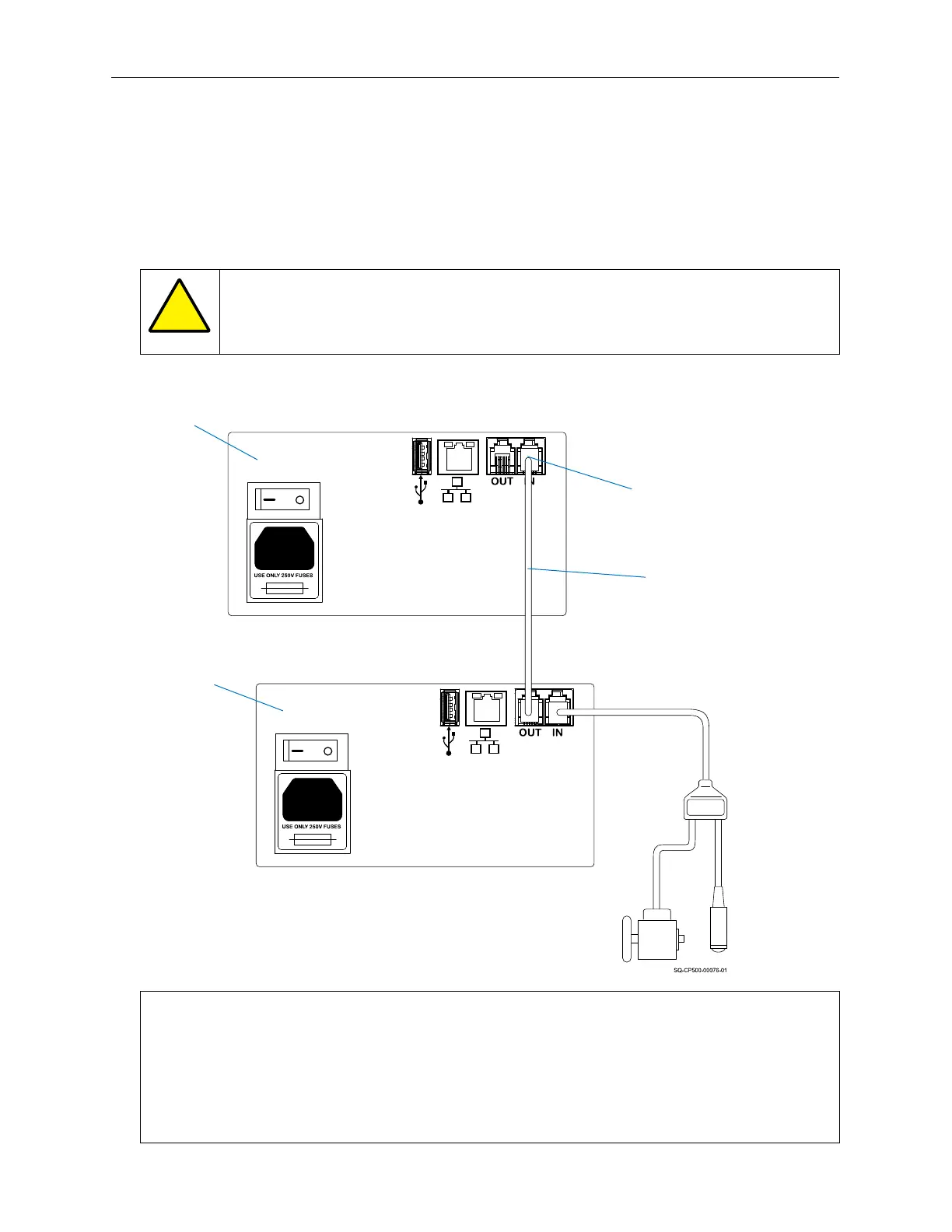
Connecting a Second CoPilot 500 Printing System
Connecting a second CoPilot 500 system allows two different messages to be printed on the
same box at the same time – for example, when printing on both sides of a box. If using a
second CoPilot 500 printing system, connect an RJ12 Sensor Cable between the first and
second CoPilot 500 Controllers. Connect the Sensor Cable from the “OUT” Connection Port
on the first Controller to the “IN” Connection on the second Controller.
ATTENTION: Do not connect the “IN” and “OUT” Ports to the Ethernet Port.
The “IN” Port of the second Controller must be connected to the “OUT” Port on
the first Controller.
NOTE: Theoretically an infinite number of CoPilot 500 printing systems can be attached
using the “IN” and “OUT” Data Connection Ports. However, the number of printers
chained through a single triggering device would be limited by the specific installation and
use. Other Squid Ink printing systems can also be connected downstream from the
controller. For example, there could be a CoPilot, AutoPilot, and an SQ-2 printing system
all attached to a single triggering device.
Second
Controller
RJ12 Sensor
Cable to Second
Controller
Sensor “IN”
Connection on
Second Controller
First
Controller
Connecting a Second System



 To Next Page