Installation and Setup 31
2005995 Rev O – 210712
Mounting the Ink System
Because the CoPilot 500 uses a passive ink system that relies on a specific relationship
between the height of the Printhead and the Ink System, both of these items should be
attached to the same Mount, whether that is a Conveyor Mount or Floor Stand.
Cartridge Ink System
VIDEO: Mounting the Ink System
To see a video of this procedure, click this link:
https://youtu.be/zSjTfhCmU8M?t=370
Or scan the QR code at right using the camera app on your
mobile device.
View Time: 6:11 – 6:44
Items Needed to Mount a Cartridge Ink System:
• Alan Wrench
• Phillips Head Screwdriver
To Mount a Cartridge Ink System:
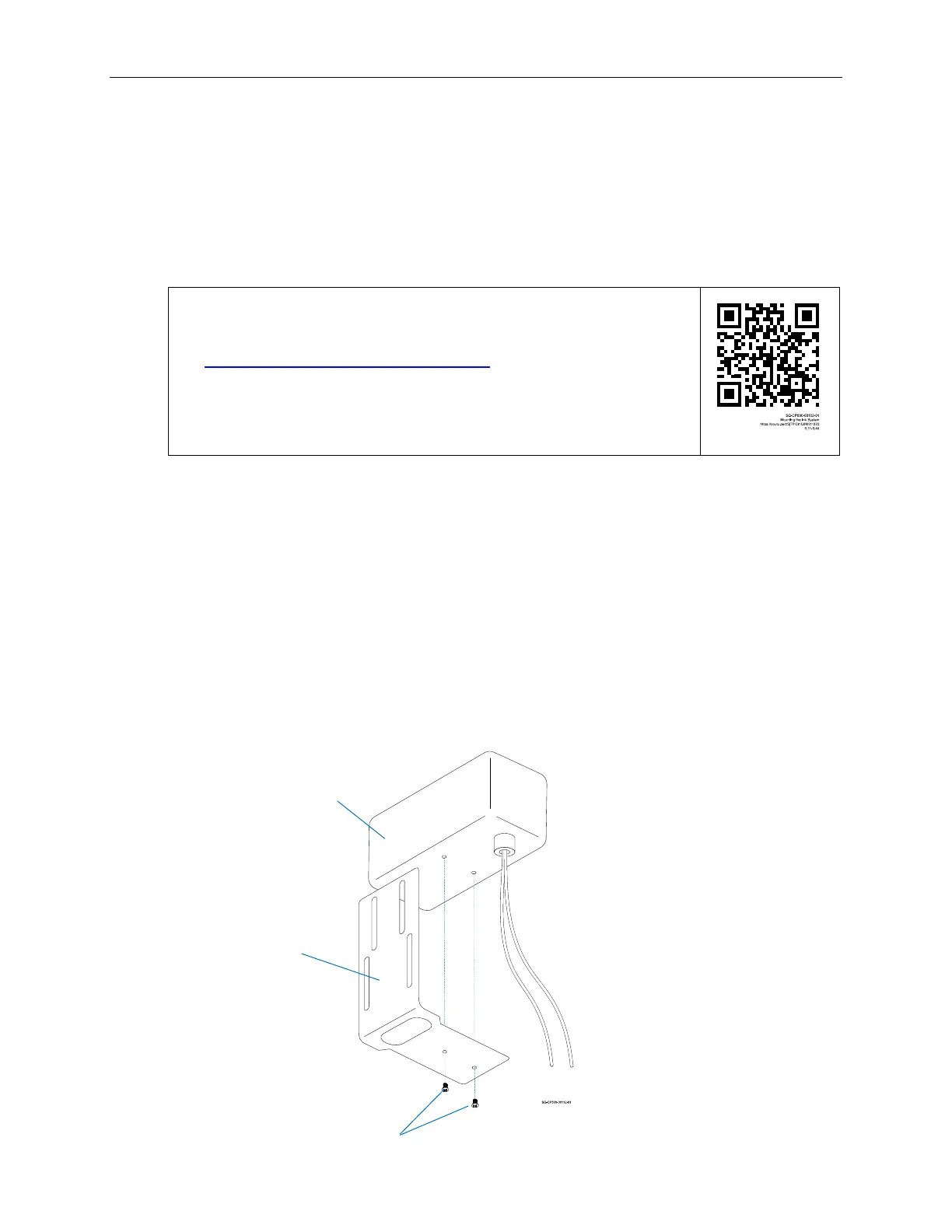
1. Use the supplied Screws to attach the bottom of the Ink Reservoir to the L-
shaped Ink System Mounting Bracket.
Attaching the Ink Reservoir to the Mounting Bracket
Screws
Mounting
Bracket
Ink
Reservoir



 To Next Page