EasyManua.ls Logo

Summa S3 Series - Page 50

Summa S3 Series
111 pages
Print Icon
To Next Page IconTo Next Page
To Previous Page IconTo Previous Page
Loading...
S Class 3 User’s Manual
Setup 1-41
Step two: activation of Wi-Fi (if available in your region) and/or the barcode feature
1. Go to the webpage and register your cutter. The webpage will show a 6-digit activation code which
will also be sent to you via email, along with the cutter’s serial number. Save this email for future
reference.
2. Power on the machine and load the media (see section 1.5).
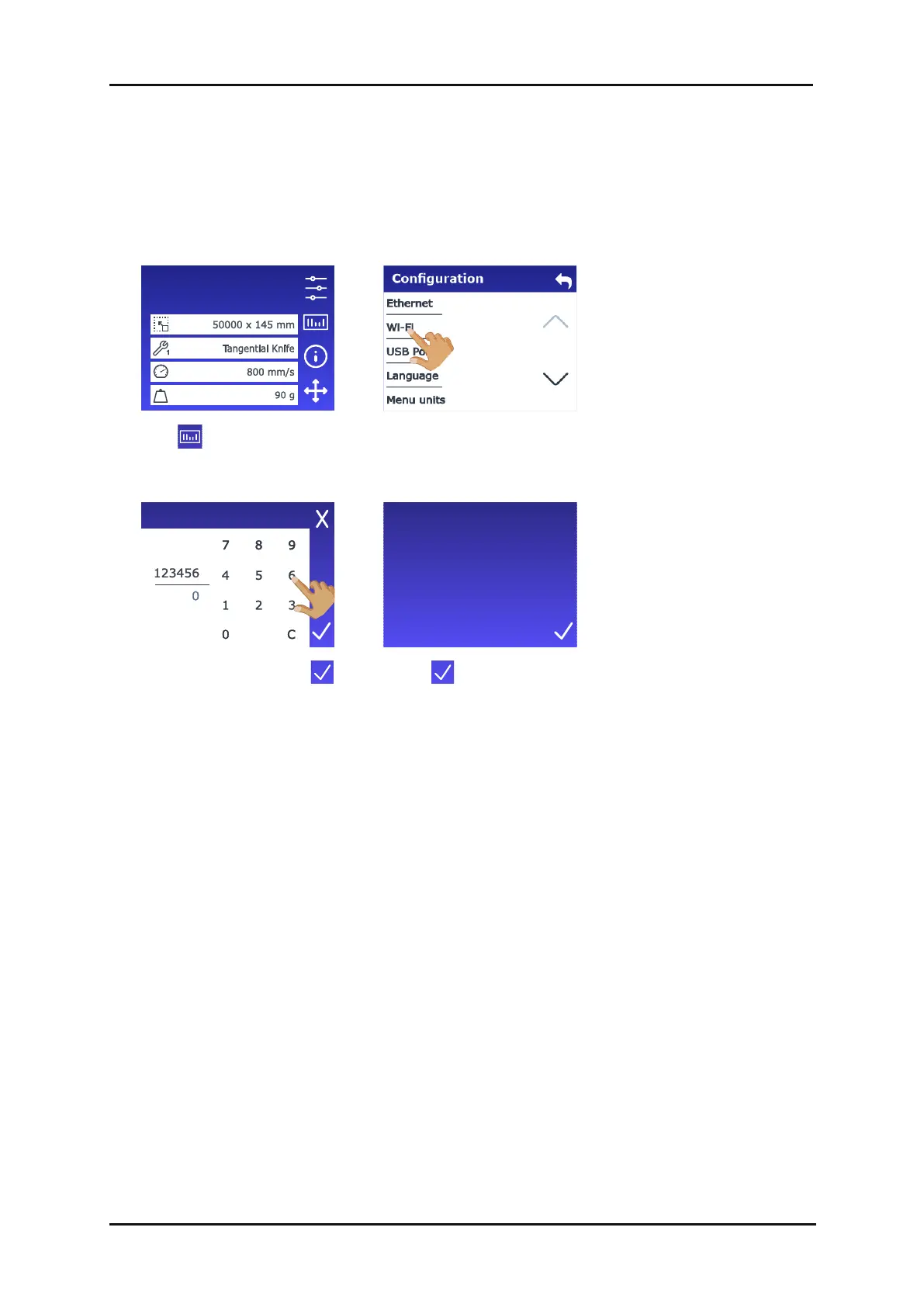
3. Tap for the barcode
feature…
… or navigate to
Configuration > Wi-Fi for Wi-
Fi.
4. Enter the code and tap .
5. Tap .
Configuration 1
LAN 192.168.10.2
Registration code
Your product has been
successfully registered!

Table of Contents

Related product manuals