CHAPTER 9 Cleaning and Maintenance
9-26 Sysmex XE-5000 Instructions for Use
Revised April 2007 EU
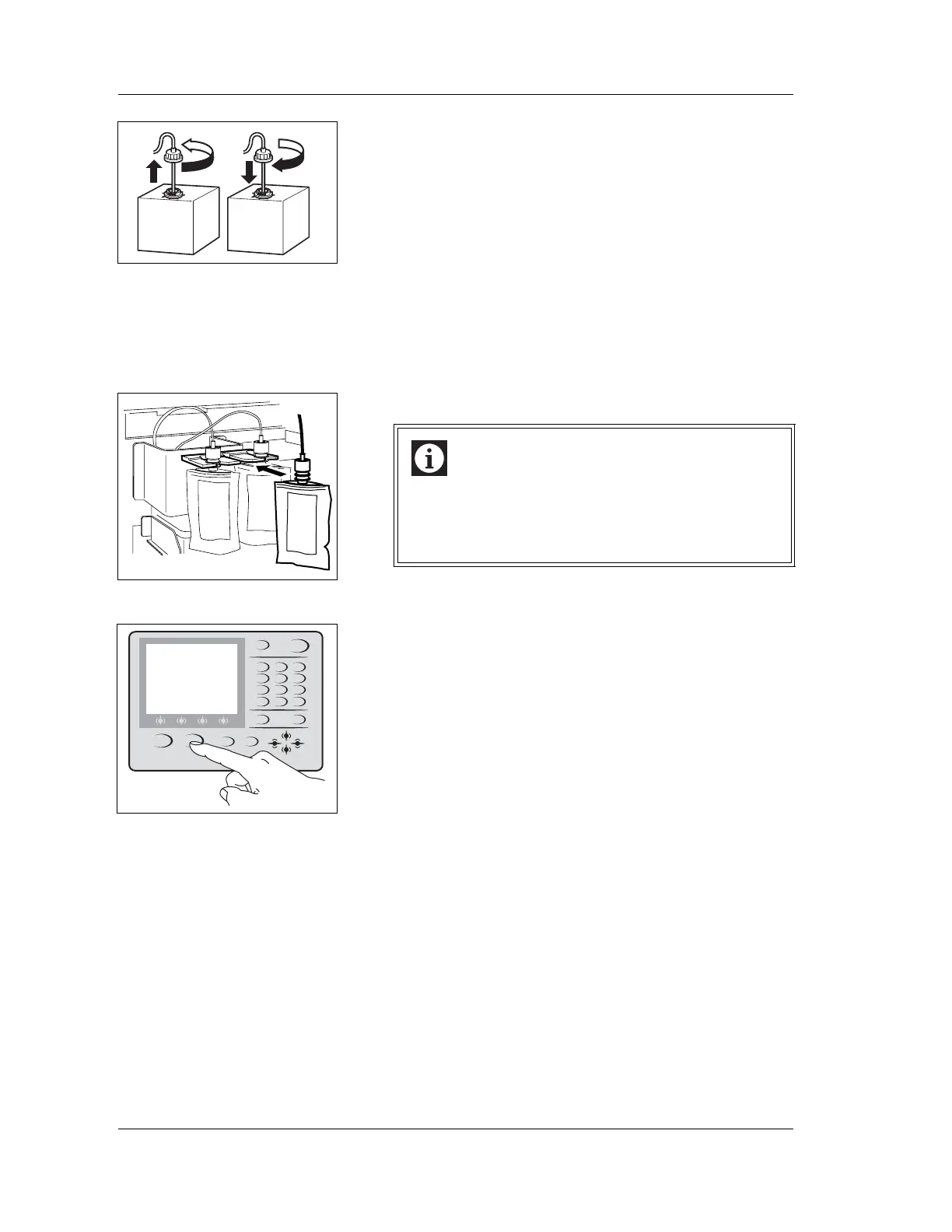
4. Insert the cubitainer spout kit straight into the new
STROMATOLYSER-NR(L) and tighten the cap.
5. Open the Main Unit front cover.
6. Remove the empty STROMATOLYSER-NR(S) from the
holder, remove the cap, and pull out the pipe straight up.
7. Remove the cap of a new STROMATOLYSER-NR(S),
insert the pipe straight into it, and tighten the cap.
8. Insert it all the way into the holder.
9. Close the Main Unit front cover.
10. Press the HELP key on the Main Unit panel keypad. The
HELP screen will appear.
11. If you select “OK” on the function menu of the HELP
screen, the Reagent setting screen will appear.
See “Chapter 9: 9.13 Replacing and registering reagents”
for explanation of the Reagent setting screen.
Information
Insert the STROMATOLYSER-NR(S) all the way into
the holder.
If it slants, air bubbles could enter, making it
impossible to obtain correct analysis results.
Loosen Tighten
Empty
New
SHUTDOWN HELP
SAMPLER
RETURN MORE
NUM./ALPH. ENTER
MANUAL
QZ
0 -/. C
PRS
1
TUV
2
WXY
3
GHI
4
JKL
5
MNO
6
7
ABC
8
DEF
9



 To Next Page