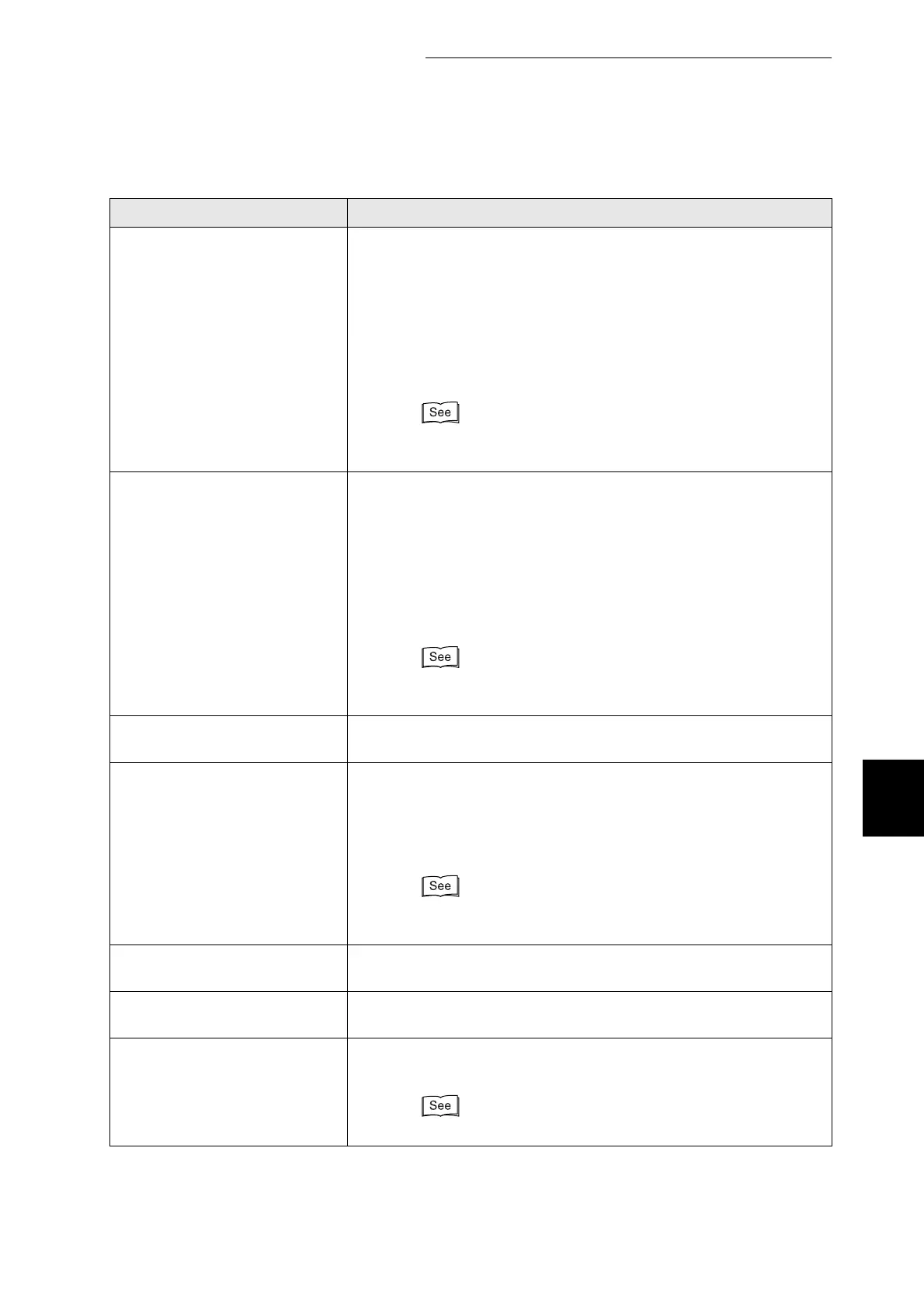
6.7 When an Error Message Appears on the Control Panel
157
6
Troubleshooting
Load xxx
in Tray N
Paper size xxxx is not loaded in tray N or is different from that
specified on the computer.
Action: Load paper xxxx into tray N. If the computer settings are
incorrect, cancel printing.
Check the following settings on your computer, reconfigure
any that are incorrect, and reprint.
●
Is the correct paper tray specified?
●
Is the correct paper size specified?
"4.2.1 Loading Paper in the Paper Tray"
"3.4.2 Canceling Printing at the Control Panel"
Check Paper
in Tray N
Paper is not properly loaded in tray N or is different from that
specified on the computer.
Action: Pull out tray N and check the paper. If the computer
settings are incorrect, cancel printing.
Check the following settings on your computer, reconfigure
any that are incorrect, and reprint.
●
Is the correct paper tray specified?
●
Is the correct paper size specified?
"4.2.1 Loading Paper in the Paper Tray"
"3.4.2 Canceling Printing at the Control Panel"
Push in
Tray N
Tray N is not properly inserted.
Action: Push tray N completely back into the printer.
Load xxxx
in a Tray
The paper specified on the computer is not loaded into any of the
trays.
Action: Load paper xxxx into a tray. If size specified on the
computer is incorrect, cancel printing. Specify the correct
paper on the computer and reprint.
"4.2.1 Loading Paper in the Paper Tray"
"3.4.2 Canceling Printing at the Control Panel"
Push in
the Tray
None of the trays are properly inserted.
Action: Push the all paper trays completely back into the printer.
Empty
Exit Tray
The face down tray is full.
Action: Remove the paper from the face down tray.
Replace Black
Toner (K)
The black toner cartridge is empty.
Action: Replace the black toner cartridge.
"8.1.2 Replacing Toner Cartridges"
Message Meaning and Action
"N" represents a number.
"xxx" represents a paper size or paper orientation.



 To Next Page