Home
Tally
Printer
T8024
Page 74
Tally T8024 - Page 74
266 pages
Manual
Save Page as PDF
To Next Page
To Next Page
To Previous Page
To Previous Page
Loading...
2.4
Installing the
Printer Driver
48
Installing the Printer Driver
2
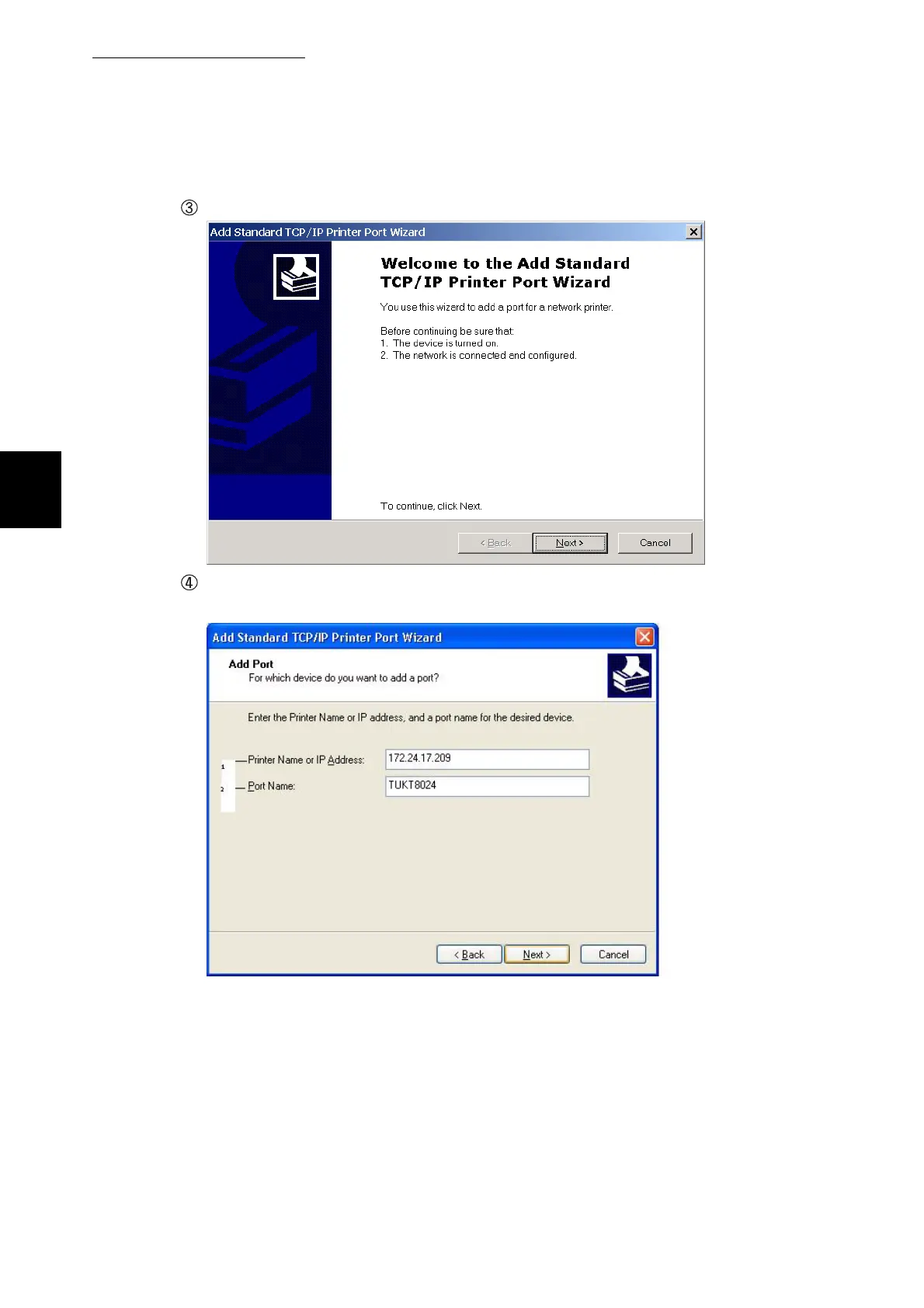
The following screen
is displayed. Click
Next
.
Enter the item
s at each t
ext box.
Example:
For IP address, "172.24.17.
209", and the port name "TUKT8024".
73
75
Table of Contents
Main Page
Default Chapter
6
Adjusting Colors
6
Print on both Sides of the Paper
6
Setting the Power Saver Mode
6
Managing the Printer
7
Printing with Various Functions
7
Table of Contents
8
Quick Start Guide
13
Using this Guide
14
Safety Notes
16
Safety Precautions
17
Chapter 1 Printer System Settings
27
Adjusting Color Registration
28
Determining Values
29
Entering Values
29
Configuring the Printer
31
Compatible Systems
31
Usb Cable Connection
32
Printing from a Macintosh Computer
35
Printer Configuration Flow
36
Setting the IP Address
38
Setting the Subnet Mask
41
Setting the Gateway Address
41
Setting the Protocols
42
Checking Settings
45
Chapter 2 Installing the Printer Driver
48
After Setting up the Printer
48
The PCL6 Printer Drivers
48
Obtaining the Latest Printer Driver
49
Using the TCP/IP Direct Print Utility
50
Installing the Printer Driver
51
Installing the Printer Driver (Windows 95/Windows 98/Windows Me)
51
Windows 95/Windows 98/Windows Me)
52
(Windows 95/Windows 98/Windows Me)
52
Configuring the TCP/IP Direct Print Utility
58
Installing the TCP/IP Direct Print Utility
58
Setting the Port
61
(Windows NT 4.0/Windows 2000/Windows Xp/Windows 2003)
65
Installing the Printer Driver
65
Setting up the USB Port
77
Chapter 3 Basic Printer Operation
88
Printer Part Names and Functions
88
Operation Panel
89
Switching On/Off the Power
92
Switching on the Power
92
Switching off the Power
93
Printing from a Computer
94
Printing from a Program
94
Changing Default Printing Functions
96
Using Online Help
98
Canceling Printing
102
Canceling Printing from the Computer
102
Canceling Printing at the Control Panel
103
Changing the Configuration for Options
104
Printing on Envelopes, Transparencies, and Custom-Size (Long) Paper
106
Printing on Envelopes
106
Printing on Transparencies
108
Printing Custom-Size (Long) Paper
111
How to Print
113
Two-Sided Printing
114
Two-Sided Printing
115
Two-Sided Printing on Specialty Paper
116
Chapter 4 Loading Paper and Usable Paper Types
119
Suitable and Unsuitable Paper Types
120
Suitable Paper Types
120
Unsuitable Paper Types
124
Storing Paper
125
Loading Paper
126
Loading Paper in the Paper Tray
126
Loading Paper in the Multi Purpose Tray
130
Loading Transparency Sheets in the Multi Purpose Tray
132
Loading Postcards in the Multi Purpose Tray
133
Loading Envelopes in the Multi Purpose Tray
134
Chapter 5 Control Panel
135
Control Panel Part Names and Functions
136
LED Indicators
136
Display
137
Print Screen
137
Menu Screen
137
Buttons
138
Basic Menu Operation
139
Configuration of Basic Menu and Basic Operations
139
What to Do if You Make a Mistake
141
Example Operation
142
List of Menu Items
143
System
143
Power Saver
144
Error Alarm
145
Panel Language
145
Auto Log Print
145
Text Print
146
Maintenance
147
Parallel
149
Report/List
149
Network
150
Ipx Frame Type
151
Chapter 6 Troubleshooting
156
Type of Problems
156
Problem List
156
No Power
158
The Printer Does Not Print
159
Indicators Are Illuminated, Blinking or off
159
Cannot Print in Windows
162
Print Quality Is Not Good
165
Blank or Completely Black Pages Are Output
165
Faded or Dirty Printouts, White Areas (Drop-Outs), Creases, Blurs
166
Unsatisfactory Printing
171
Paper Does Not Feed Properly
172
Other Problems
174
Network Problems
174
Other Problems
176
When an Error Message Appears on the Control Panel
178
The Error Indicator Is on or Blinking
186
The Error Indicator Is on
186
The Error Indicator Is Blinking
186
Forcing the Printer to Print Remaining Data (When Printing Is Halted)
187
Cleaning the Density Sensor
189
If the Multi Purpose Tray Comes Loose
192
Clearing Paper Jams
195
Chapter 7 Clearing Paper Jams
196
Paper Jams
196
Paper Jams in Multi Purpose Tray
198
Paper Jams in the Paper Tray
199
Paper Jams between the Drum Cartridge and Fuser Cartridge
201
Paper Jams in the Duplexer
204
Paper Jams in the Tray Module (1 or 2 Cassettes)
205
Daily Care
207
Chapter 8 Daily Care
208
Replacing the Toner Cartridges
208
8.1.1 Toner Cartridge Handling Precautions
208
8.1.2 Replacing Toner Cartridges
209
Replacing the Drum Cartridge
212
8.2.1 Drum Cartridge Handling Precautions
212
8.2.2 Replacing the Drum Cartridge
213
Replacing the Transfer Roller
217
Transfer Roller Cartridge Handling Precautions
217
8.3.2 Replacing the Transfer Roller
218
Printing Reports and Lists
220
Confirming Printer Configuration and Network Settings
221
8.4.2 Checking the Print Log
223
Confirming Printer Status from Your Computer
225
Checking Status and Remaining Amounts of Consumables with a Web Browser
225
8.5.2 Checking Status from the Desktop
229
Cleaning the Printer
230
Moving the Printer
231
Storing the Printer
235
Appendix
237
A Introduction to Options and Consumables
237
Introduction to Options and Consumables
238
Options and Installation
238
Consumables
245
Drum Cartridge
245
Toner Cartridges
245
Control Panel Menu List
246
B Control Panel Menu List
247
Specifications
250
Printer Specifications
250
C Specifications
251
Network Specifications
252
Common Specifications
252
Netware Specifications
252
Printable Area
253
C.3 Printable Area
253
Life Span of Consumables
254
Obtaining Product Information
255
Precautions and Limitations
256
Glossary
258
G Glossary
259
Index
263
Related product manuals
Tally T2030
100 pages
Tally T2040
204 pages
Tally T2240
124 pages
Tally T6215
164 pages
Tally T6090
202 pages
Tally T2380
2 pages
Tally T2150
134 pages
Tally T2240/24
28 pages
Tally T2265plus
196 pages
Tally T2265 SprintPro
30 pages
Tally Dascom 1125
104 pages
Tally DT-230
69 pages



 To Next Page