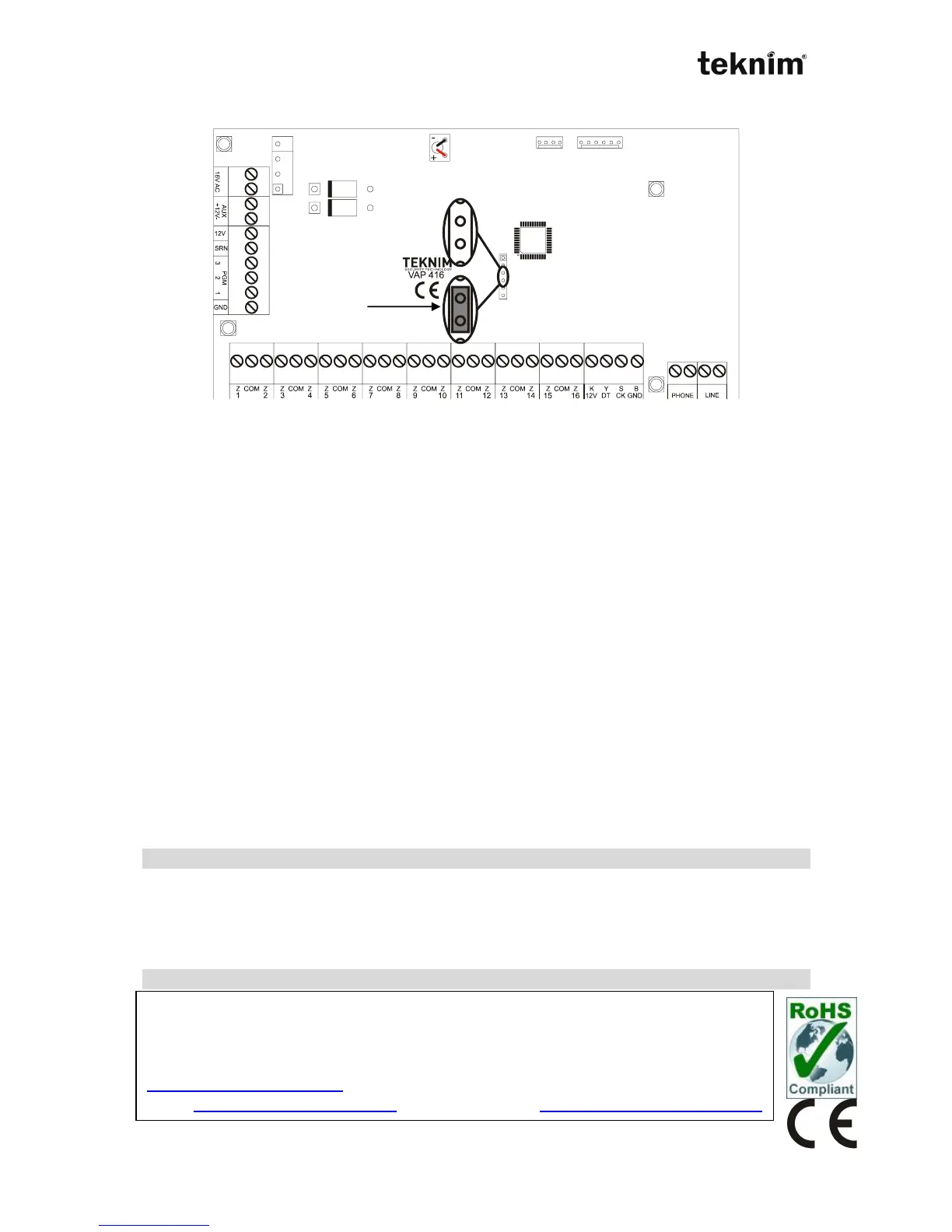
9.2. Restoring Panel Settings To Factory Defaults
Jumper settings must be made properly to restore panel settings to factory
defaults.(place jumper as picture above).
!!! WARNING !!!
1. If siren is connected to the panel, take necessary measures to prevent siren
alarming before resetting panel settings.
2. Central Monitoring Station, Account numbers, Phone numbers and event codes
can’t be reseted.
3. Don’t forget to remove jumper after loading factory defaults.
Enter the Engineer program.
1. Press long to 4 (program) button until you hear long "beep" sound
2. Enter the engineer code (Engineer: 9999)
Enter the resetting address.
a) For LED Keypad,
1. Enter the <10 04>.
2. Select the option 2. (The option of program resetting)
3. Press the "" key
b) For LCD Keypad,
1. 1-PANEL SETTINGS→GENERAL SETTINGS→RESET TYPE
2. Select the option 2. (The option of program resetting)
3. Press the "" key
Disconnect the battery and power, then connect these connections again.
MAINTENANCE ON YOUR OWN
Do not try to fix the device on your own, Removal of cover may end up with electricity shock.
In case of any defect or malfunction, contact with your dealer or with authorized service. All
the technical interventions has to be done by technicians of service company. Device must
be cleaned up with a dry fabric. No-chemicals are allowed for cleaning
MANUFACTURER
Bilgi Elektronik A.Ş.
Address :
Dudullu Organize Sanayi Bölgesi 1. Cadde İsmet Tarman İş Merkezi No:1 Kat:2 No:32 Ümraniye/İstanbul
Tel: +90 216 455 88 46 Fax: +90 216 455 99 06
www.bilgielektronik.com.tr
Sales: sales@bilgielektronik.com.tr Technical Support: support@bilgielektronik.com.tr



 To Previous Page