Chapter 19: Communication Link 551
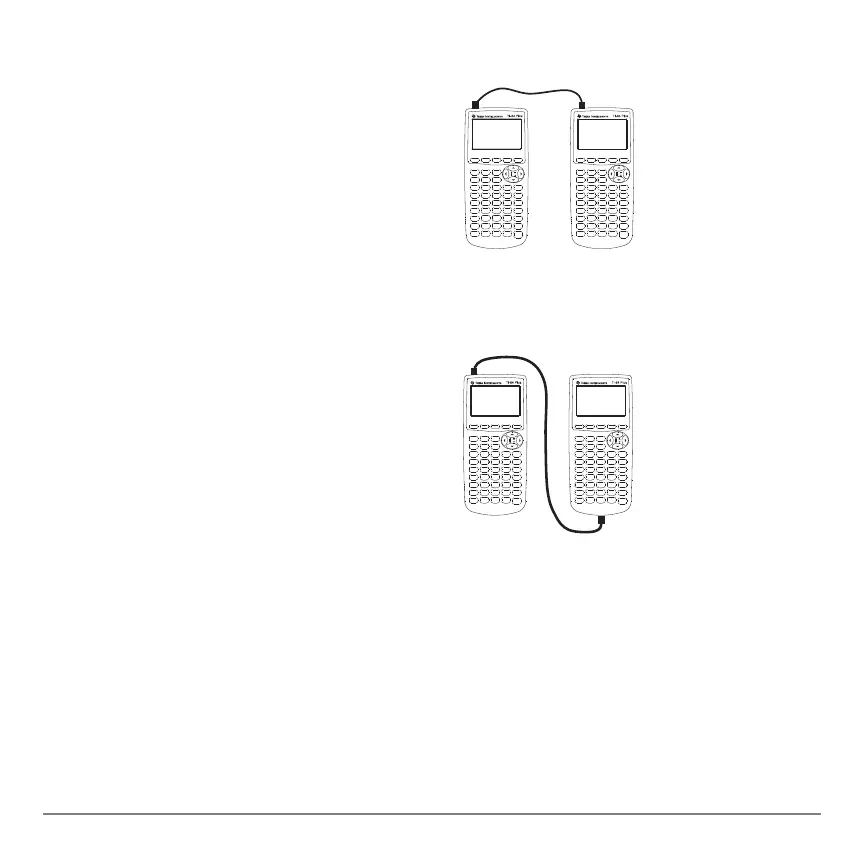
I/O Unit-to-Unit Cable
TI-84 Plus to a TI-83 Plus using I/O Unit-to-Unit Cable
Linking to the CBL/CBR System
Linking to the CBL/CBR SystemLinking to the CBL/CBR System
Linking to the CBL/CBR System
The CBL 2™ and the CBR™ are optional accessories that also connect to a TI-84 Plus
with the I/O unit-to-unit cable. With a CBL 2 or CBR and a TI-84 Plus, you can collect
and analyze real-world data.
The TI-84 Plus I/O link port is located at the
top left edge of the graphing calculator.
1. Firmly insert either end of the I/O
unit-to-unit cable into the port.
2. Insert the other end of the cable into the
other graphing calculator’s I/O port.
The TI-84 Plus I/O link port is located at the
top left edge of the graphing calculator. The
TI-83 Plus I/O link port is located at the
bottom edge of the graphing calculator.
3. Firmly insert either end of the I/O
unit-to-unit cable into the port.
4. Insert the other end of the cable into the
other graphing calculator’s I/O port.



 To Next Page
 Loading...













