Installing the Encompass 4 Reader
4-17
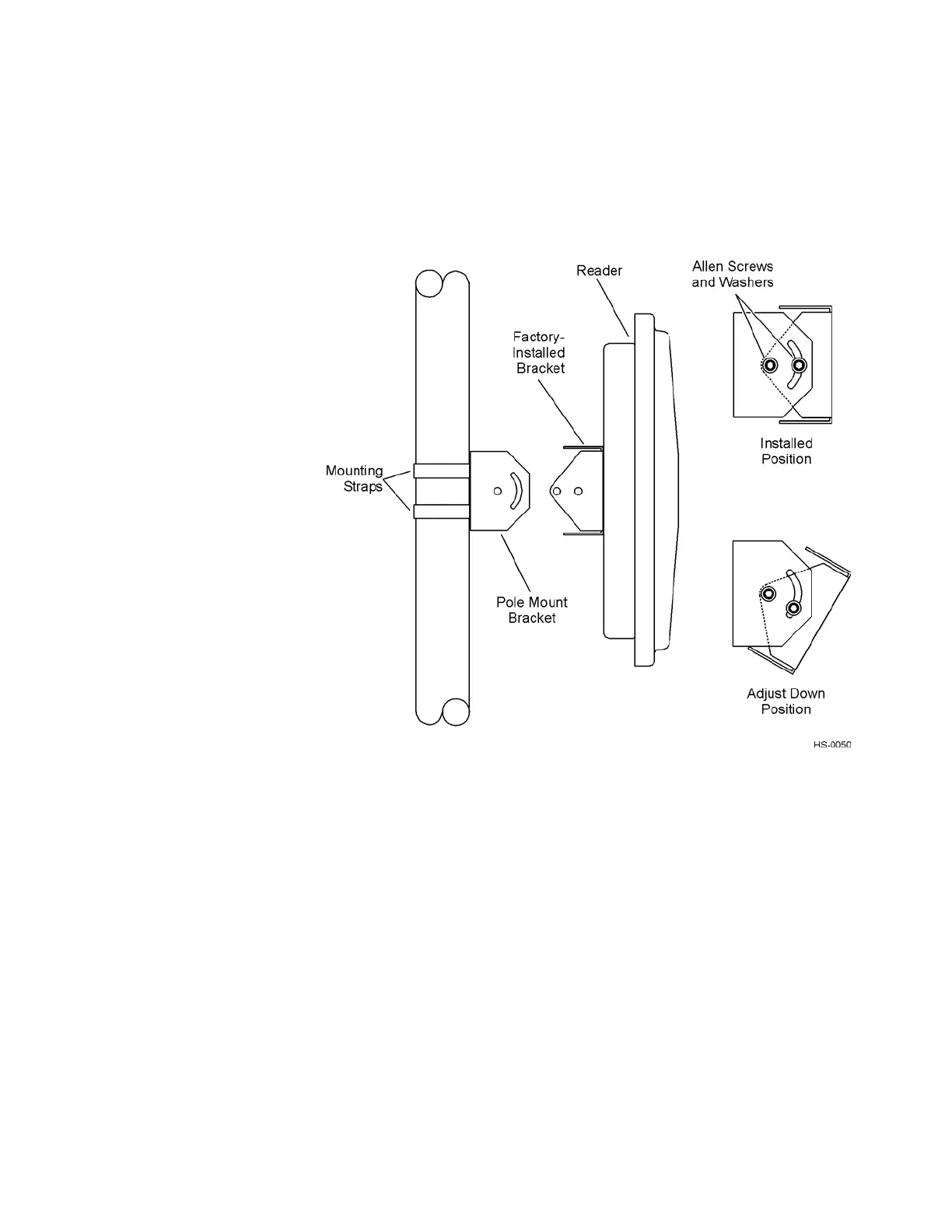
3. Using the four Allen screws and washers, attach the Encompass 4
Reader to the
pole mount bracket as shown in Figure 4-9. Tighten the screws slightly so
that the Encompass 4 Reader can be adjusted up
or down, but not so slightly the
mounting assembly slips.
Figure 4-9 The Encompass 4 Reader Attached to the Pole Mount Bracket
4. Adjust the assembly by pointing the Encompass 4 Reader to the middle of the
area where tags will be read, and tighten all screws and straps slightly.
Note: Ad
just the Encompass 4 Reader to provide the most direct line of sight to
the tags.
Figure 4-10 illustrates front and top views of a pole-
mounted Encompass 4 Reader
with the approximate measurements for sites where tags wou
ld be mounted on the
interior driver-side windshield. eGo WSTs may be mounted on the interior upper cen-
ter or upper corner of the windshield, eGo Plus S
ticker and Security Sticker tags may
be mounted on the interior upper center of the windshield.
Note: Determine the r
ead zone before you tighten all screws and straps permanently.
Refer to the section “Marking the Read Zone” on page 4-38.



 To Next Page