Installing the Encompass 4 Reader
4-9
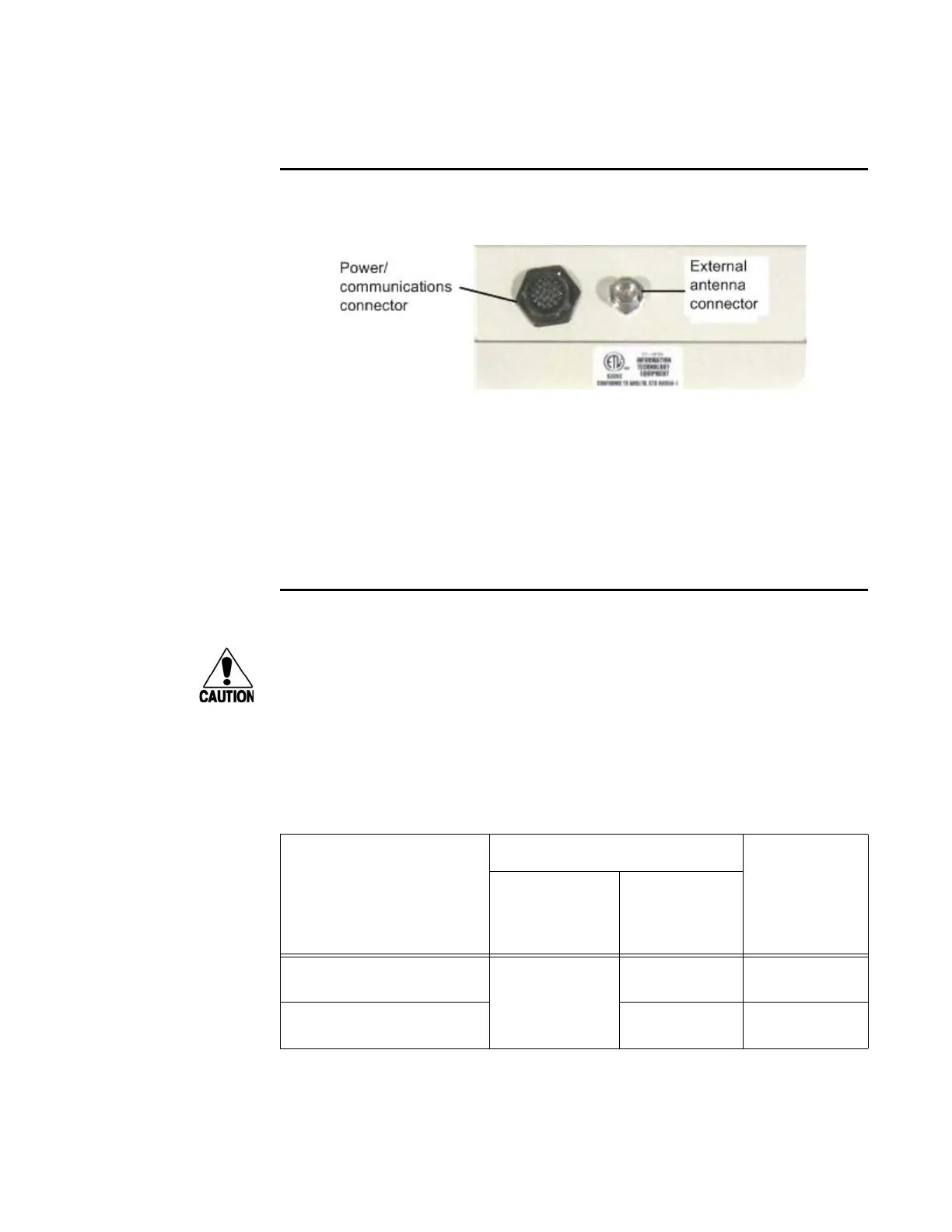
Connecting the External Antenna
Use these instructions to connect the Encompass 4 Reader and external antenna.
Figure 4-4 Back of Encompass 4 Reader Showing Antenna Connector
To connect the reader and antenna
1. Ensure the reader is turned off and unplugged.
2. Connect one end of the RF interface cable to the antenna.
3. Connect the other end of the RF interface cable to the antenna connector on the
ba
ck of the Encompass 4 Reader. See Figure 4-4.
Connecting the AC Power Supply
Caution
If you are using an external antenna, to avoid damage to the Encompass 4 Reader,
you
must connect the antenna before applying power to the reader.
To connect the Encompass 4 Reader to a low-voltage AC power supply
1. Connect the Encompass 4 power wires from the cable to the transformer usi
ng
the color coding as described in Table 4-2.
Table 4-2 AC Transformer Connections for Colored-Wire Pair Cable
Signal from
Encomp
ass 4
Colored-Wire Pair Cable
Connect to
T
ransformer
Terminal Strip
Wire Pair from
Encomp
ass
4 Reader
Cable
Color Used
Main power input Brown/Red and
Orange/Red
Orange and
Brown
L1
(16 to 20V AC)
Main power return Red and Red L2
(16 to 20V AC)
2. Complete the power connections at the power supply.



 To Next Page