82
5.7.3.1. Oxygen sensor calibration
CAUTION: Remove the oxygen sensor from the breathing system and expose the
sensor for at least three minutes before calibration.
Note: If the calibration of the oxygen sensor keeps failing, please contact Aeonmed for
service.
The oxygen sensor calibration calibrates the
oxygen sensor at 21% oxygen
concentration.
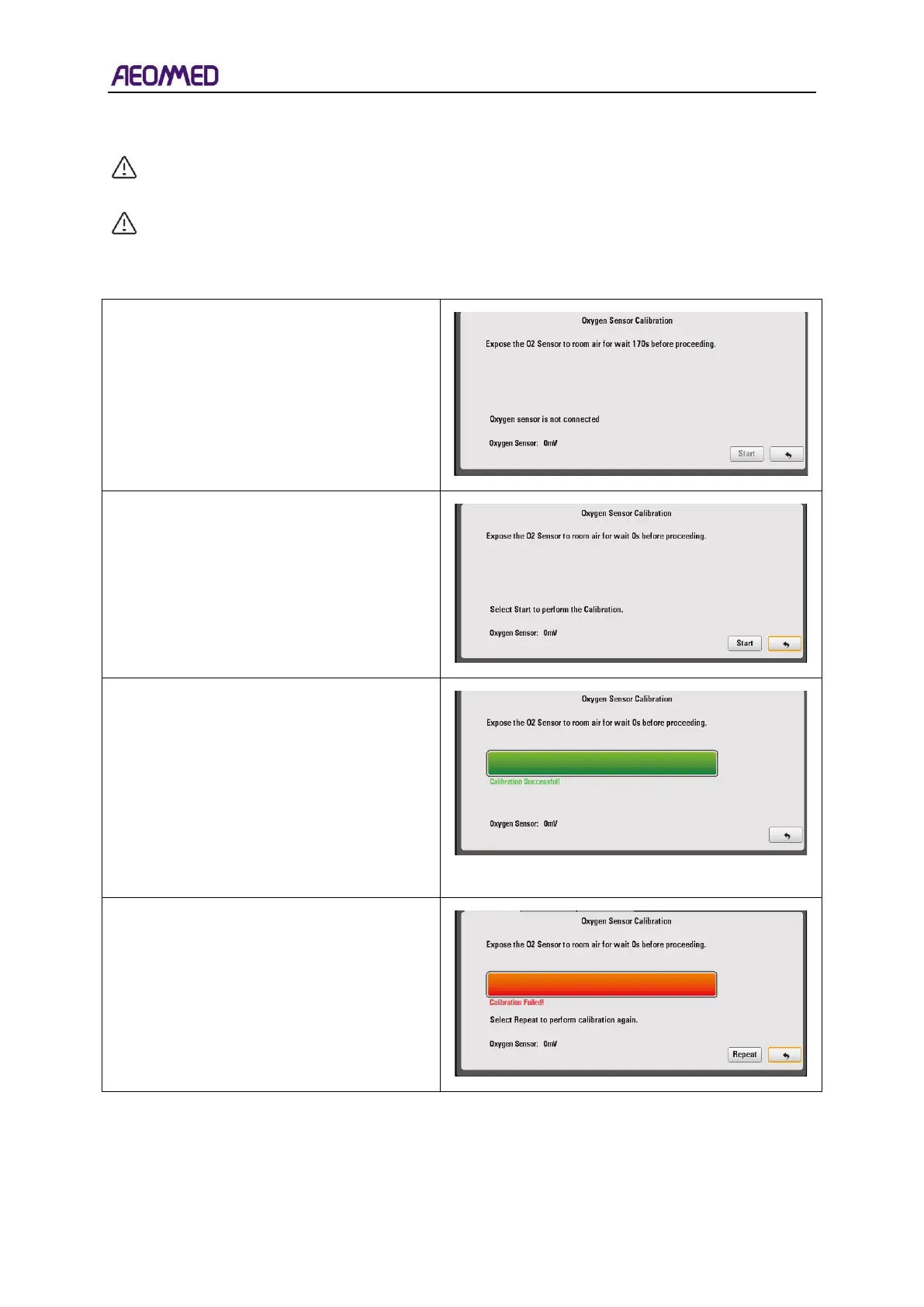
If the oxygen sensor is not connected, the
interface will display “Oxygen sensor is not
connected”.
Select “Start” to calibrate.
Remove the oxygen sensor from the
breathing system and expose the sensor to
room Air for at least three minutes before
proceeding.
Select “Start” to proceed.
When the calibration is successful, the
interface will display “Calibration Successful”
and the running bar will be completely green.
On the calibration interface, there is a
voltage value (300~360mV). After
calibration, if the voltage value is lower than
300mV, then the sensor should be replaced;
if the voltage value is higher than 360mV,
repeat calibration a second time.
If the calibration fails, the interface will
display “Calibration Failed” and the bar will
be completely red.
To perform the calibration again, press the
“Repeat” button.



 To Next Page