CPS100 SERIES OPERATION MANUAL
SECTION 10:
LAN Interface Configuration
Entire Contents Copyright 2018 by Adaptive Power Systems, Inc. (APS) • All Rights Reserved • No reproduction without written authorization from APS.
APS CPS100 Series Power Source Operation Manual Page 196 of 231 PN 160953-10
10 LAN Interface Configuration
Overview
This sections provides information on setting up a direct Ethernet connection to the power
source.
Note following provisions that apply to the LAN interface:
• The CPS100 Series used UDP protocol over it’s LAN interface.
• The TCP/IP protocol is not supported.
• UPD protocol is not supported by National Instruments™ VISA.
Local LAN use
There are several situations where a user may want to avoid using a corporate LAN network
when connecting a power source like the CPS100 Series. A direct LAN connection between
the power source and a PC or Laptop using a RJ45 network cable eliminates the need for an
actual network and avoids network security issues.
To do so, it is necessary to set up a static IP address on the PC. If the PC has a DCHP server,
other network resources such as a WIFI device may lay claim to a previously used IP address
lease.
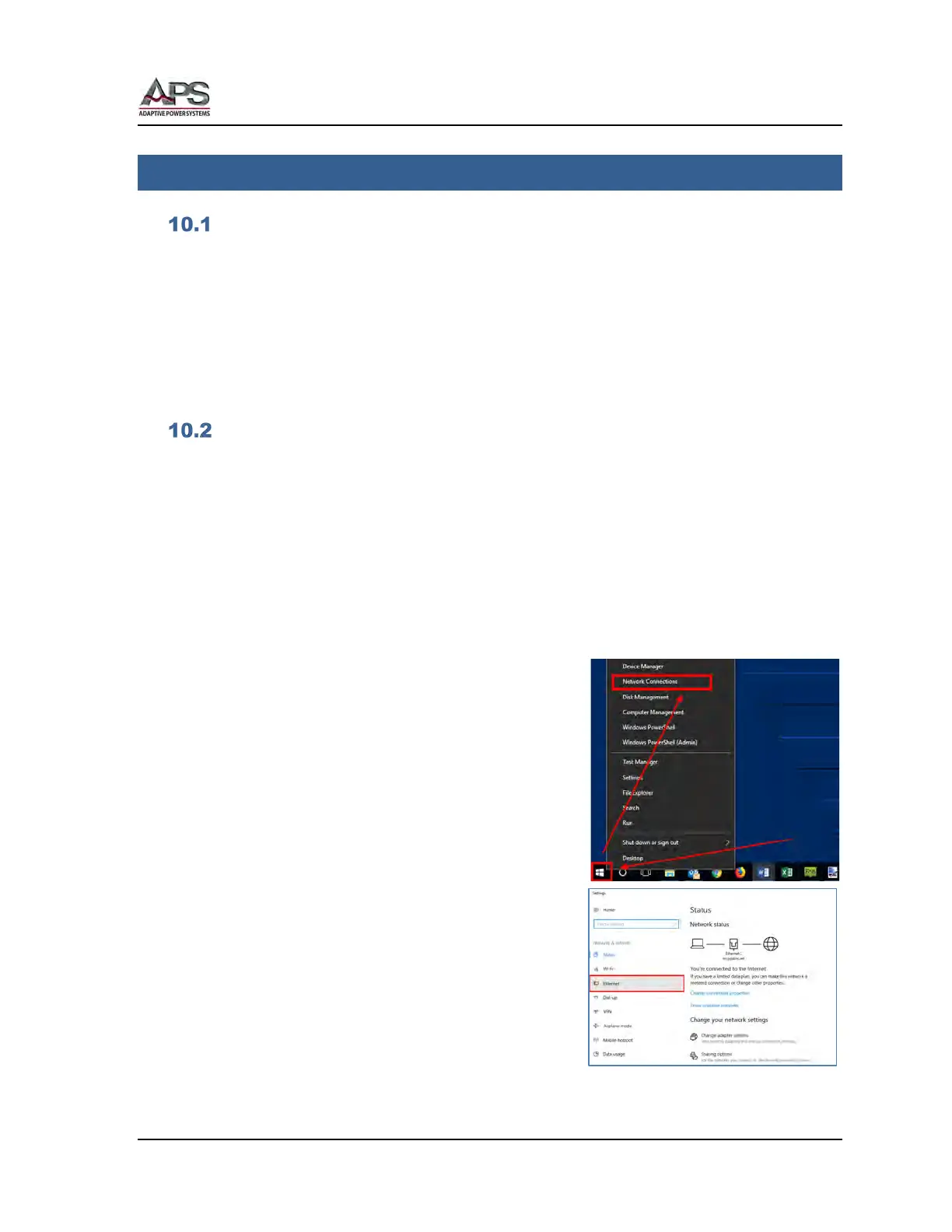
10.2.1 Setting a Static IP address – Windows 10
To access network setting, right-clock on the Windows
symbol in the lower left corner of the screen and
select “Network Connections”.
This will display the network-setting screen shown to
the right.



 To Next Page