4.19.3 LOCKER SYSTEM VIEWER
This topic describes some of the features shown from the System Viewer page more specifically for lockers. For a
complete overview of the System Viewer page refer to the System Viewer Overview section.
System Display
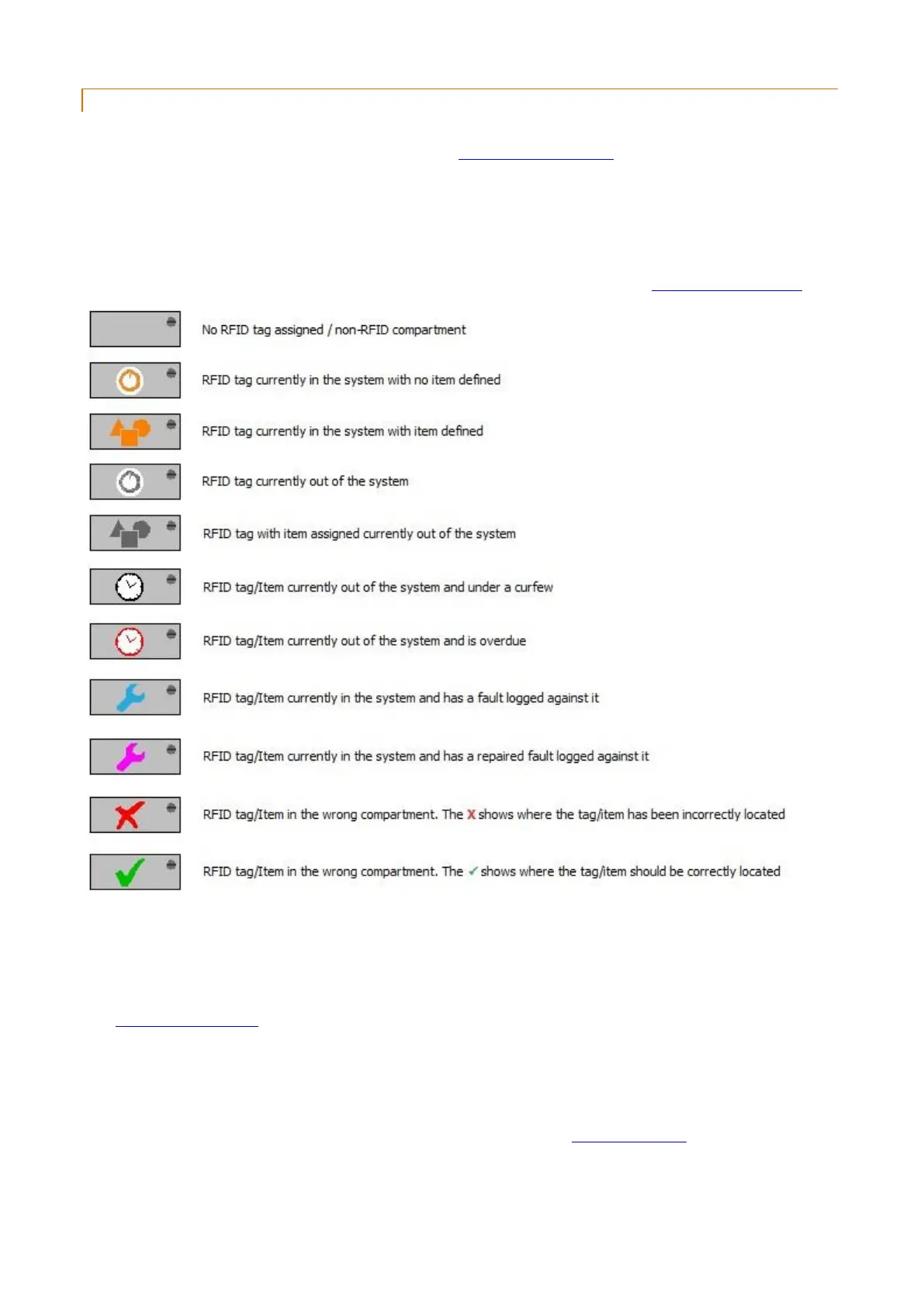
The icons shown on each compartment on the system image change depending on their current status.
NOTE: The icons may vary slightly depending on the system type selected in the System Configuration.
iFob/Locker Events Tab
This tab shows all event history for the past 1 month only for the currently selected compartment. To view events
older than one month, go to Reports>Crystal Reports>iFobs>Standard iFob Event Report and filter as required.
See Crystal Reports - iFobs for more details.
Item Events Tab
By default this tab is called 'Key Events'. When using lockers in Traka32 it makes sense to change this term for a word
of your choice (such as 'Item') to better suit your requirements. Refer to the Synonym for 'Key' section for details on
how to do this.



 To Next Page