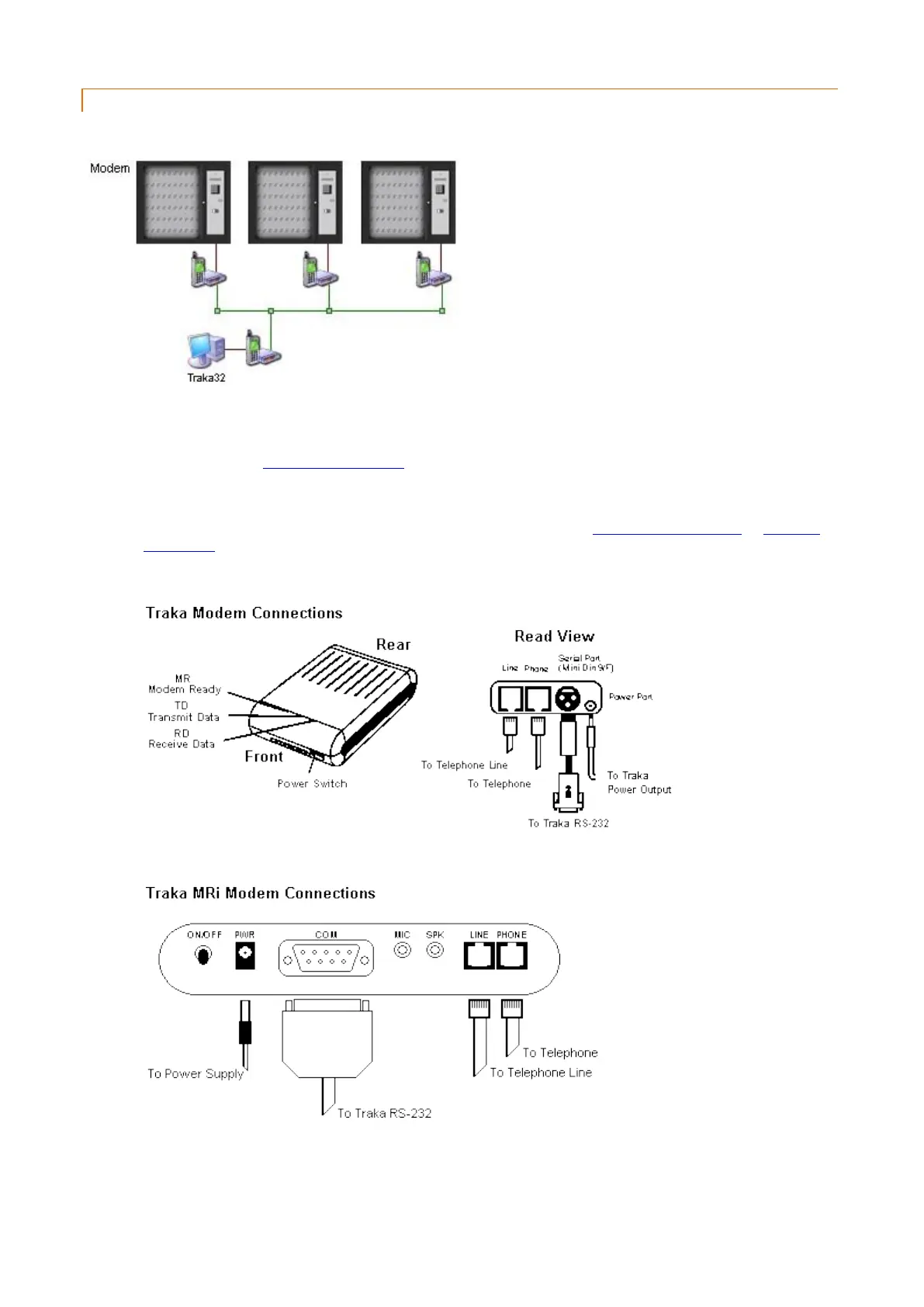
2.4.3 MODEM INSTALLATION
When using a modem with Traka you will require a Modem in each Traka system and one connected to your PC.
To install a modem in Traka please follow the instructions below. To attach a modem to your PC, please refer to the
user guide supplied with your modem.
1. Please refer to the Anti Static Precautions before configuring the Traka systems.
2. Using the Master Key, unlock the Control Panel and tilt forward to gain access to the system electronics.
3. Ensure the On/Off Switch on the Control PCB is set to Off. Refer to the 8bit Control PCB Layout or 16bit I/O
PCB Layout diagrams to locate the On/Off Switch.
4. Please refer to the following diagrams on how to connect the modem…
or…
5. Fit the modem behind the Control Panel of the Traka system, feeding the Modem Telephone Lead out through
any of the cable knockout holes on the Pod/cabinet and connect to an Approved British Telecom Telephone
Socket.



 To Next Page