2.3.6 S-SERIES
2.3.6.1 S-SERIES PREPARATION
Before attaching an S-Series Traka system to the wall you will need to remove various parts in order to access the
various fixing holes. Please refer to the anti static precautions before preparing the system.
NOTE: Any plastic protective film should be removed after installation in order to protect the stainless
steel finish and polycarbonate door.
1. Carefully unpack your Traka system and ensure your all the necessary parts are there using the checklist.
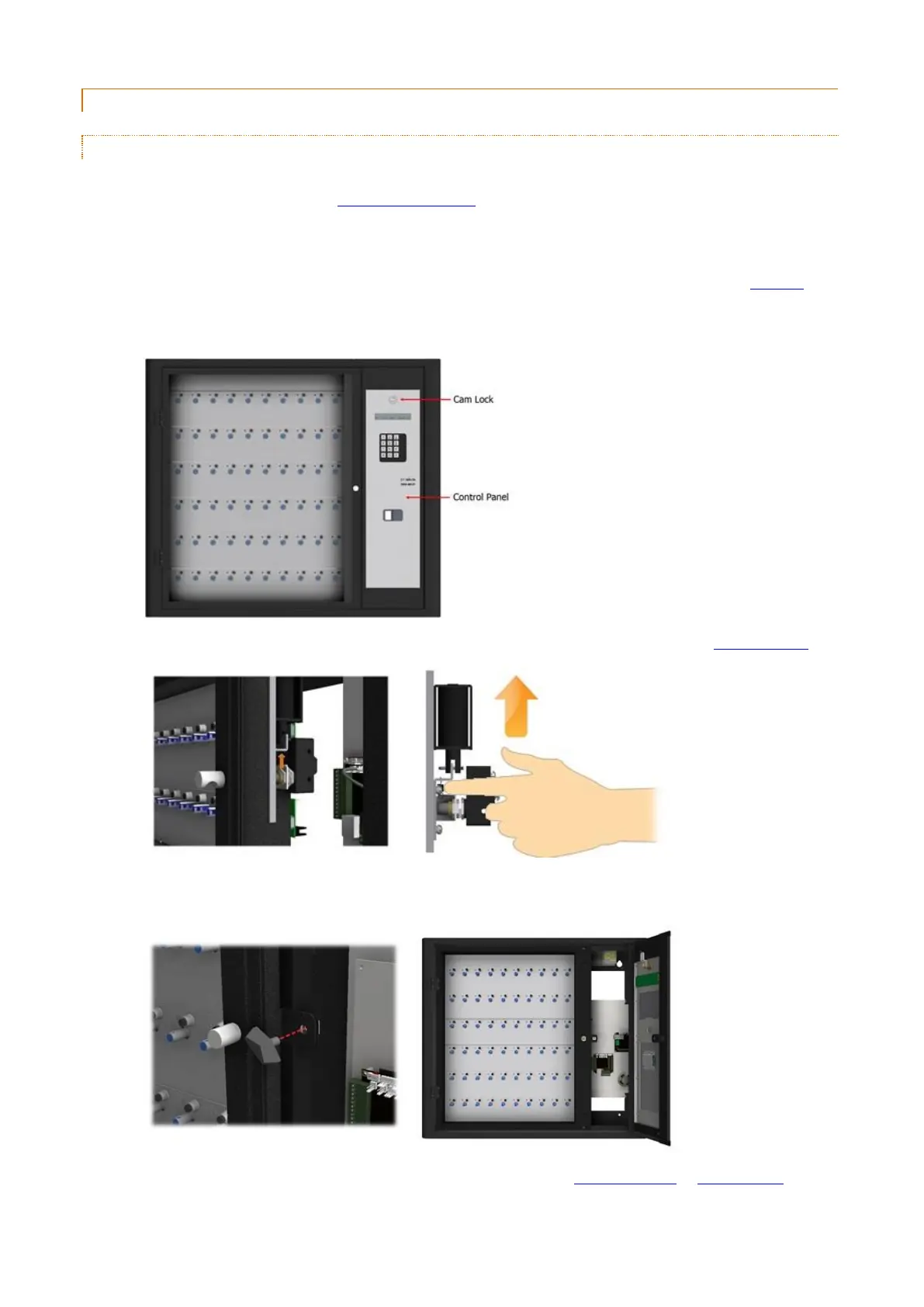
2. The Control Panel is hooked in at the bottom and locked at the top. Using the Master Key, unlock the Control
Panel Cam Lock.
3. Tilt the Control Panel forward and reach inside and open the door manually by moving the door lock catch up.
4. Undo the plastic Wing Bolt then close and lock the Control Panel. You will now be able to swing open the
Control Panel Door.
5. Disconnect the Receptor Ribbon cable and Door Lock cable from the 8bit Control PCB or 16bit I/O PCB
respectively.



 To Next Page