52 Chapter 3 Aircraft
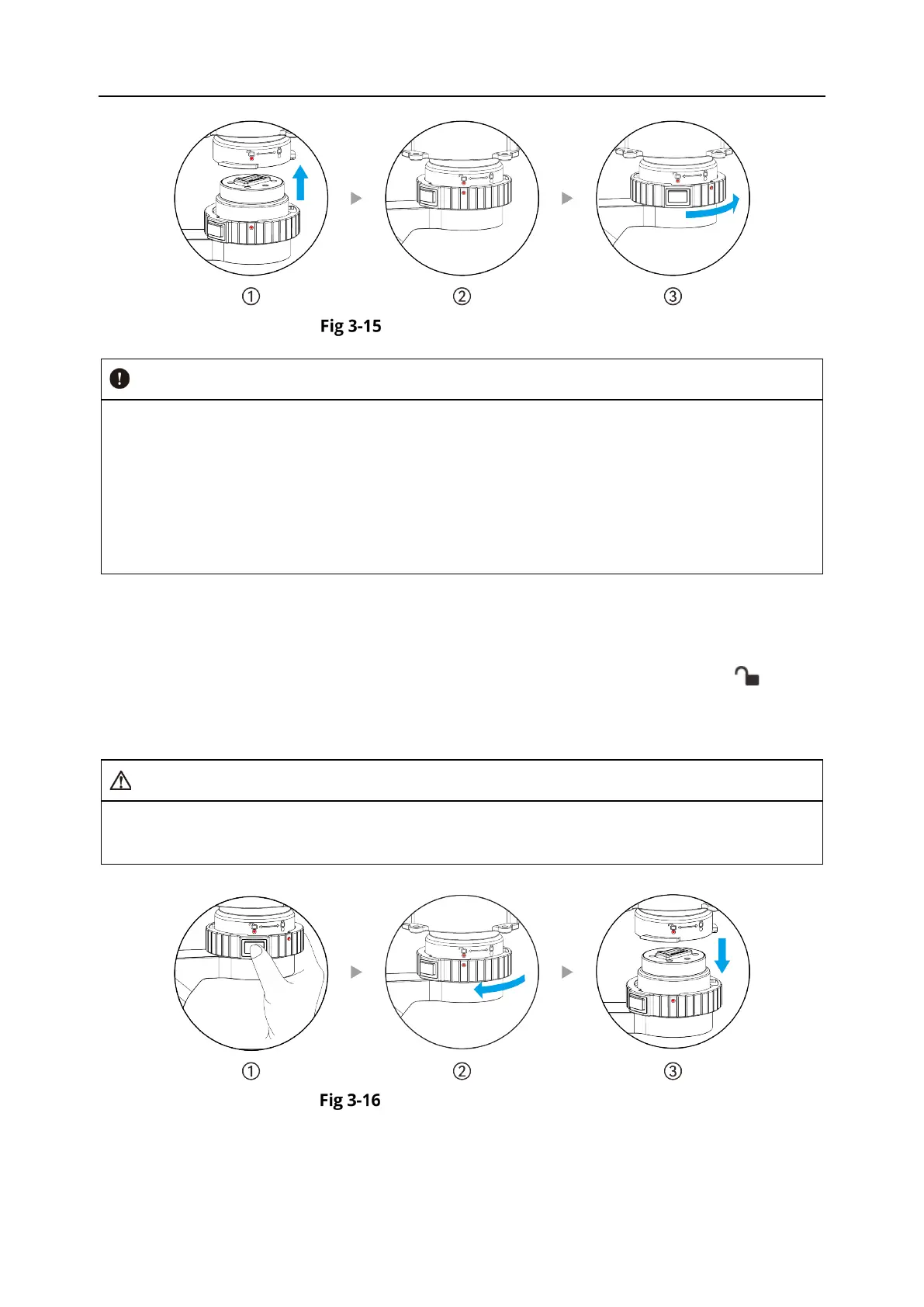
Mounting the Gimbal
After installed the gimbal camera, you can try to rotate the gimbal lock ring in the reverse
direction (do not press the gimbal unlock button). If the gimbal lock ring cannot rotate,
means the gimbal is well installed.
After installing the gimbal camera, please remove the lens cover on the gimbal camera.
Please power on the aircraft for a self-check to ensure the gimbal camera is functioning
correctly. During the self-check, the gimbal camera will automatically rotate for calibration.
Please make sure there are no obstacles near the gimbal camera.
Removing the Gimbal
1. Make sure the aircraft is powered off. Hold the gimbal camera with one hand and press the
gimbal unlock button with the other hand.
2. Rotate the gimbal lock ring to the unlocking direction with the unlocking symbol " " on the
aircraft's gimbal interface.
3. After unlocking, the gimbal camera will release from the aircraft's gimbal interface.
When removing the gimbal, please hold the gimbal camera to prevent it from falling and
causing damage.
Removing the Gimbal












 To Next Page