Chapter 4 Remote Controller 73
Charging the Remote Controller
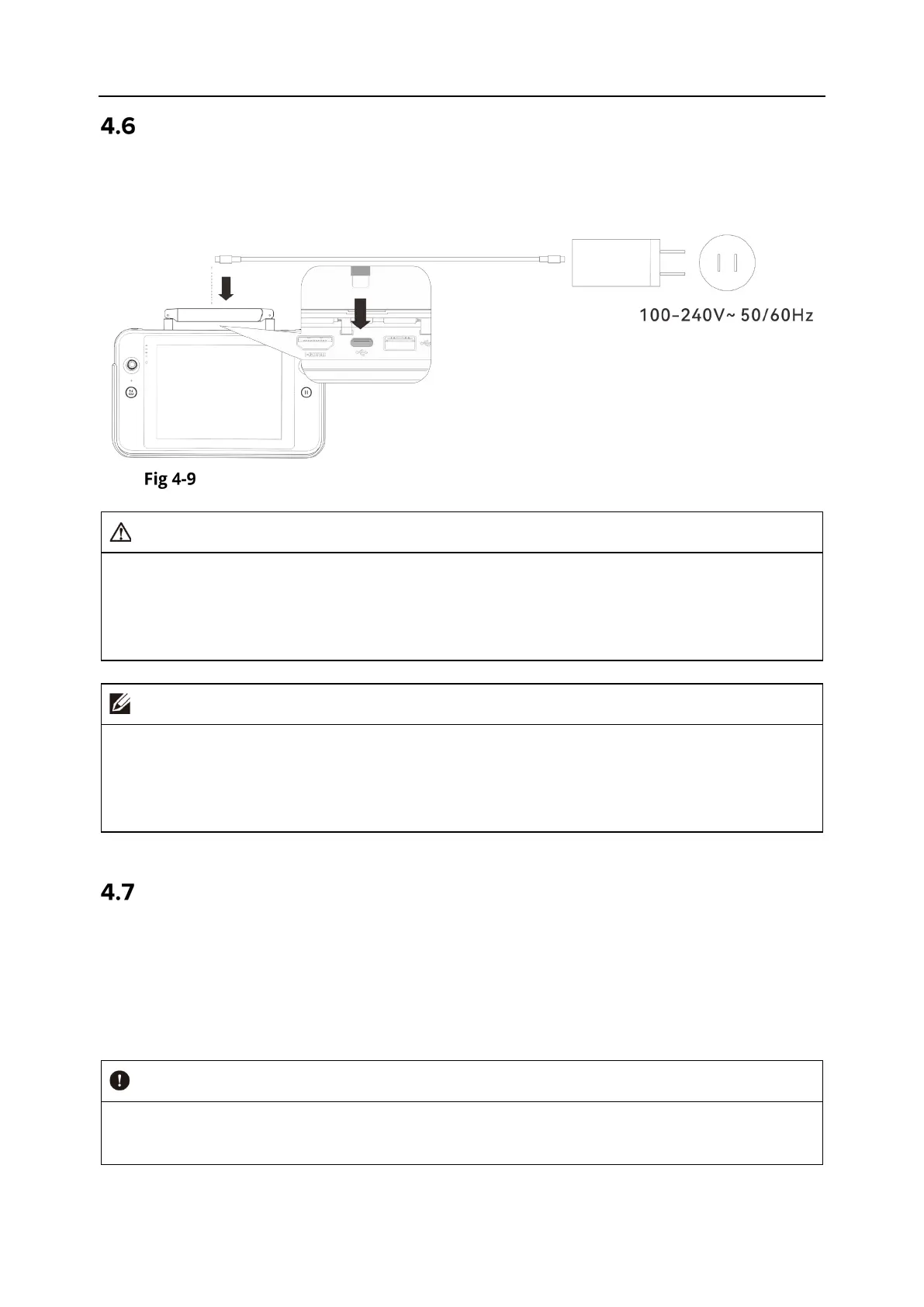
Connect the output end of the official remote controller charger to the USB-C interface of the
remote controller by using a USB-C to USB-A (USB-C to USB-C) data cable and connect the plug
of the charger to an AC power supply (100-240 V~ 50/60 Hz).
Use the remote controller charger to charge the remote controller
Warning
Please use the official charger provided by Autel Robotics to charge the remote controller.
Using third-party chargers may damage the battery of the remote controller.
After
charging is complete, please disconnect the remote controller from the charging
device promptly.
It is recommended to fully charge the remote controller battery before the aircraft takes
off.
Generally, it takes about 120 minutes to fully charge the aircraft battery, but the charging
time is related to the remaining battery level.
Adjusting the Antenna Position of the Remote Controller
During flight, please extend the antenna of the remote controller and adjust it to an appropriate
position. The strength of the signal received by the antenna varies depending on its position.
When the angle between the antenna and the back of the remote controller is 180° or 270°, and
the plane of the antenna faces the aircraft, the signal quality between the remote controller and
the aircraft can reach its best state.
When you operate the aircraft, make sure that the aircraft is in the place for the best
communications.












 To Next Page