Chapter 4 Remote Controller 79
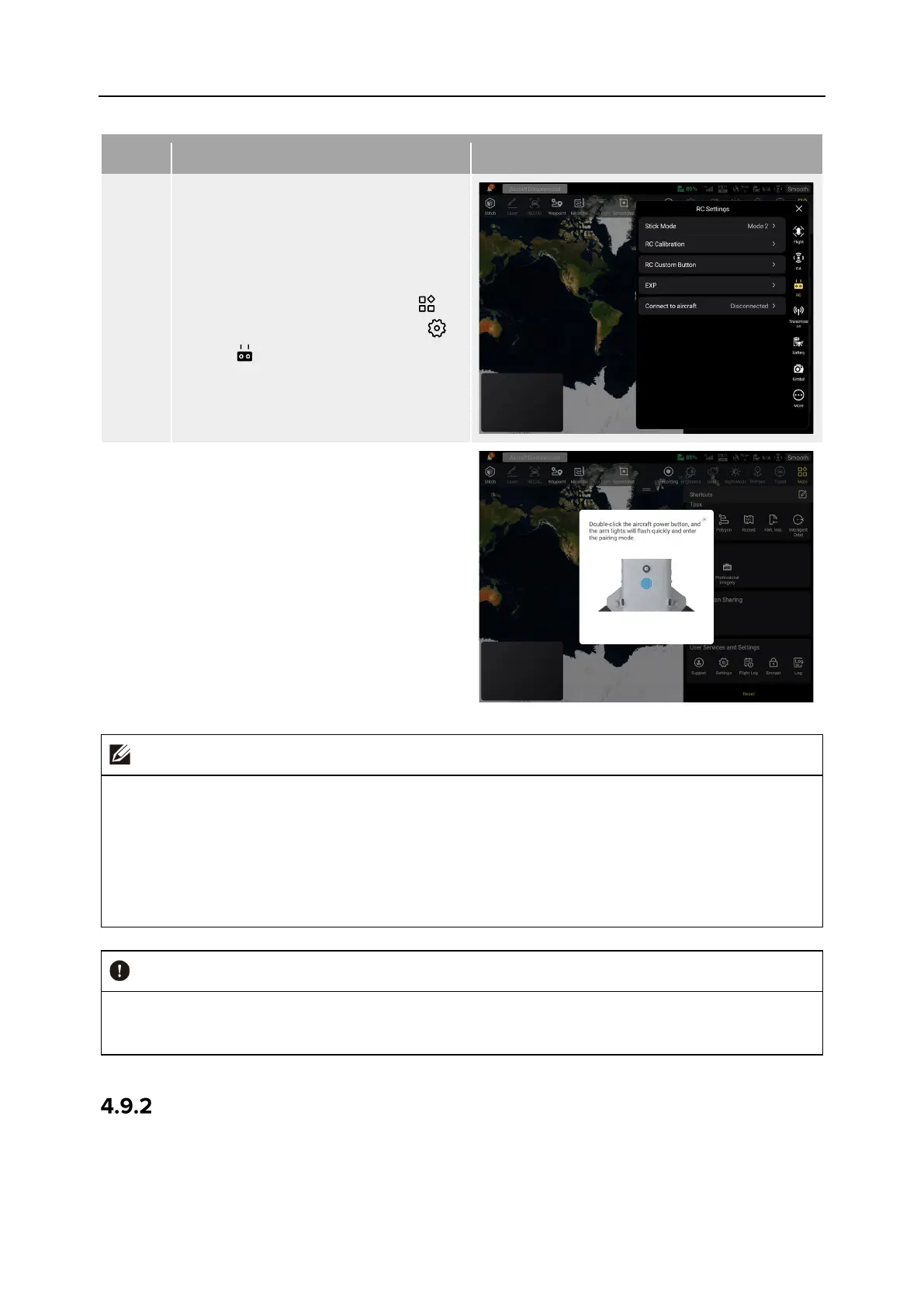
Table 4-10 Frequency Pairing Process in the Autel Enterprise App
1
Turn on the remote controller and
the aircraft.
After entering the main interface of
the Autel Enterprise App, tap “ ” in
the upper-right corner, tap " ",
select “ ”, and then tap "Connect to
aircraft".
2
After a dialog box pops up, double-
click
on the smart battery power
button on the aircraft to complete the
frequency pairing process with the
remote controller.
The aircraft included in the aircraft kit is paired with the remote controller provided in the
kit at the factory. No pairing is required after the aircraft is powered on. Normally, after
completing the aircraft activation process, you can directly use the remote controller to
operate the aircraft.
If the aircraft and the remote controller become unpaired due to other reasons, please
follow the above steps to pair the aircraft with the remote controller again.
When pairing, please keep the remote controller and the aircraft close together, at most 50
cm apart.
Using Combination Keys (For Forced Frequency Pairing)
If the remote controller is turned off, you can perform forced frequency pairing. The process is
as follows:












 To Next Page