Chapter 3 Aircraft 35
Aircraft
Aircraft Activation
When unboxing the product for the first time, you need to activate the Autel Alpha aircraft before
using it. By default, the aircraft is pre-paired with the remote controller at the factory. After
turning on the aircraft and the remote controller, you will see an activation prompt in the Autel
Enterprise App. Please follow the steps in the Autel Enterprise App to activate the aircraft.
Make sure that the remote controller is connected to the Internet before starting the
activation process. Otherwise, activation may fail.
If activation fails, please contact Autel Robotics After-Sales Support for assistance.
For how to pair the aircraft with the remote controller, see “4.9 Frequency Pairing With the
Remote Controller” in Chapter 4.
Aircraft Components
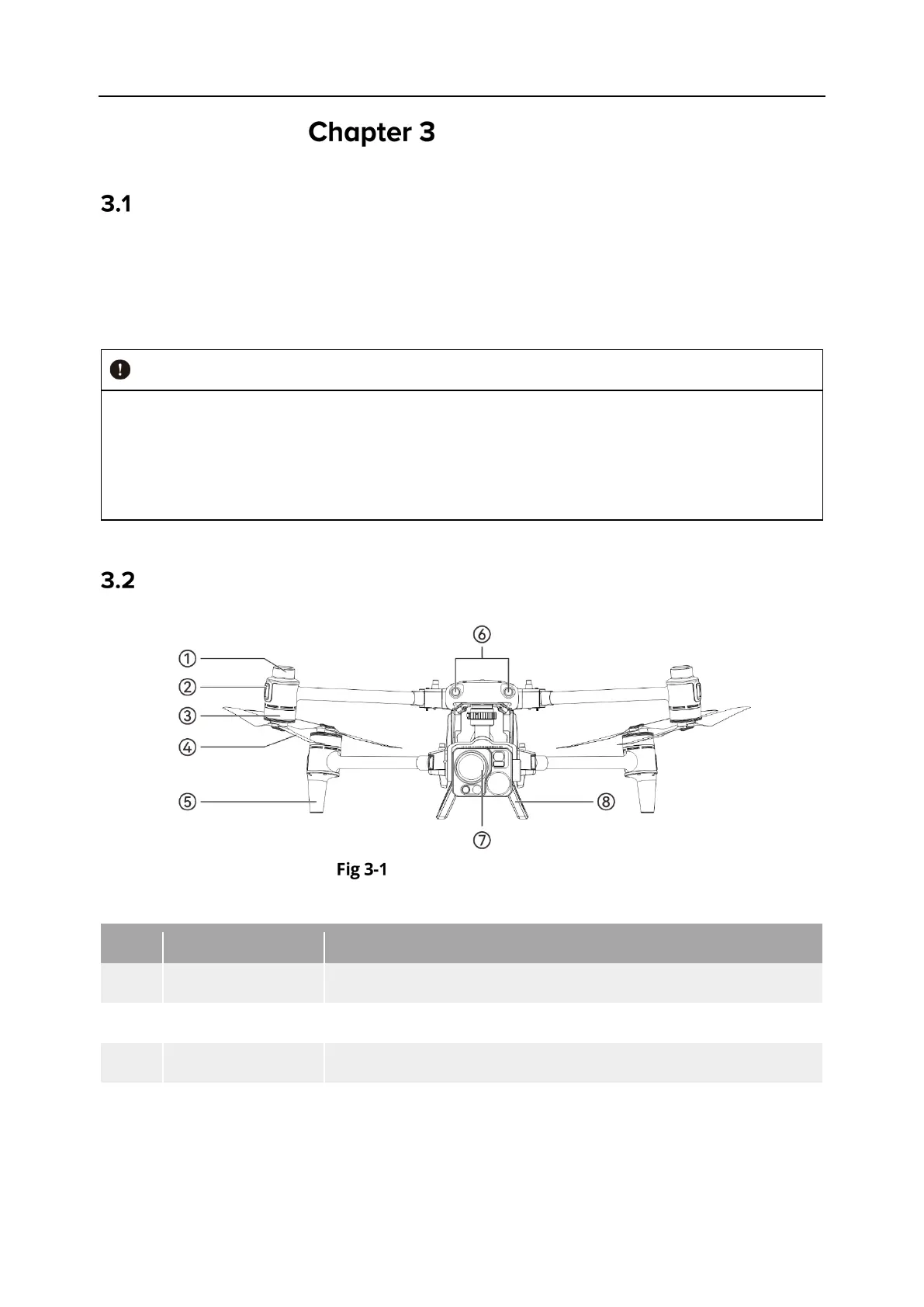
Aircraft Front View
Table 3-1 Aircraft Front View Details
Used to realize centimeter level accurate positioning.
2 Front Arm Light Used to identify the nose direction of the aircraft.
Used to drive the propeller to rotate.
4 Propeller
Rotates in the air to generate thrust to propel the aircraft
forward.












 To Next Page