84 Chapter 4 Remote Controller
Starting/Stopping the Aircraft Motor
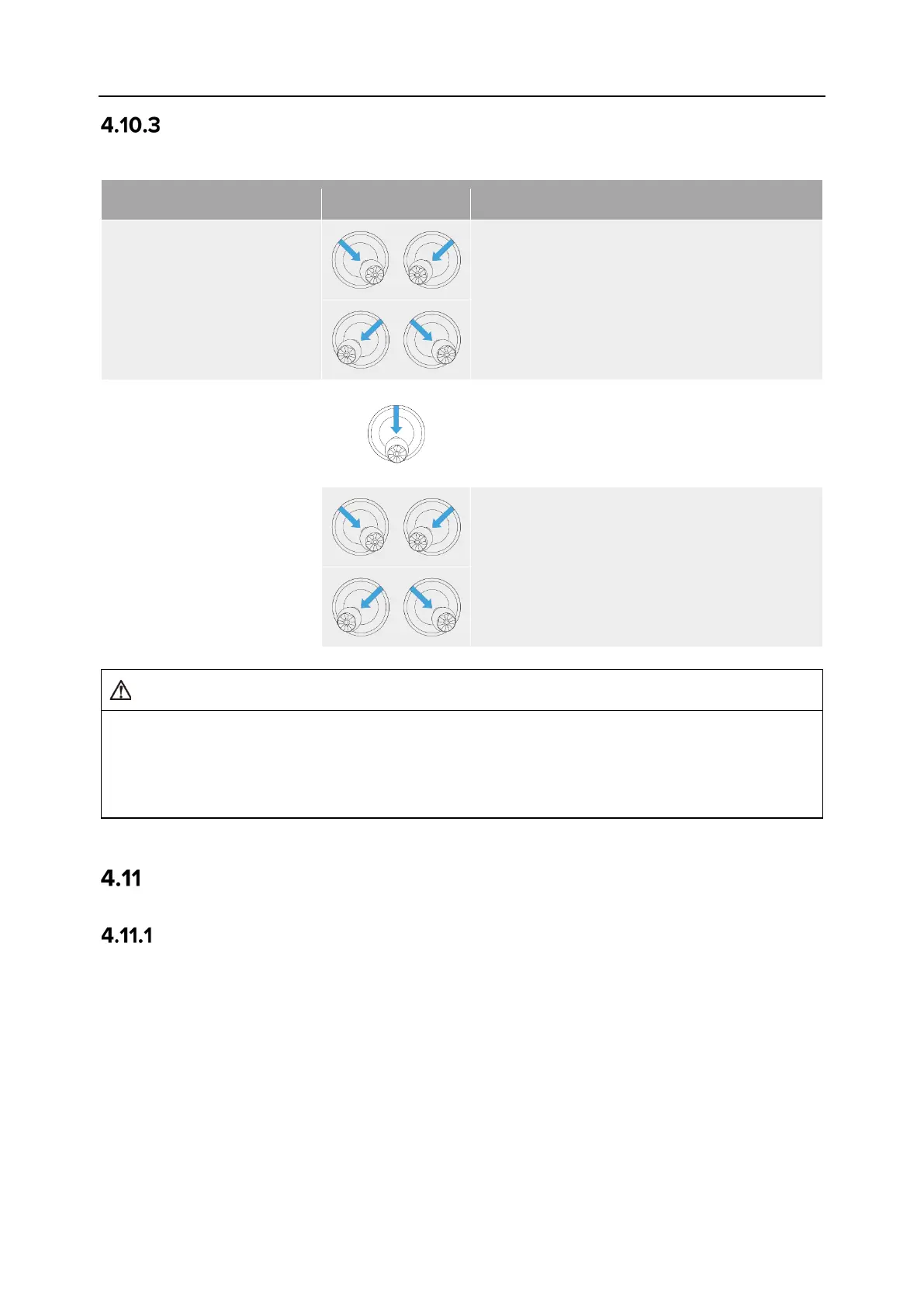
Table 4-15 Start/Stop the Aircraft Motor
Start the aircraft motor
when the aircraft is
powered on
Power on the aircraft, and the aircraft will
automatically perform a self-
check (for
about 30 seconds). Then simultaneously
move the left and right sticks inward or
outward for 2 seconds, as shown in the
figure, to start the aircraft motor.
Stop the aircraft motor
when the aircraft is
landing
When the aircraft is in landing state, pull the
throttle stick down to its lowest position, as
shown in the figure, and wait for the aircraft
to land until the motor stops.
When
the aircraft is in landing state,
simultaneously move the left and right sticks
inward or outward, as shown in the figure,
until the motor stops.
When taking off and landing the aircraft, stay away from people, vehicles, and other moving
objects.
The aircraft will initiate a forced landing in case of sensor anomalies or critically low battery
Remote Controller Keys
Custom Keys C1 and C2
You can customize the functions of the C1 and C2 custom keys according to your preferences.
For detailed setting instructions, see “6.5.3 RC Settings” in Chapter 6.












 To Next Page