44 BD FACSCalibur Instructions for Use
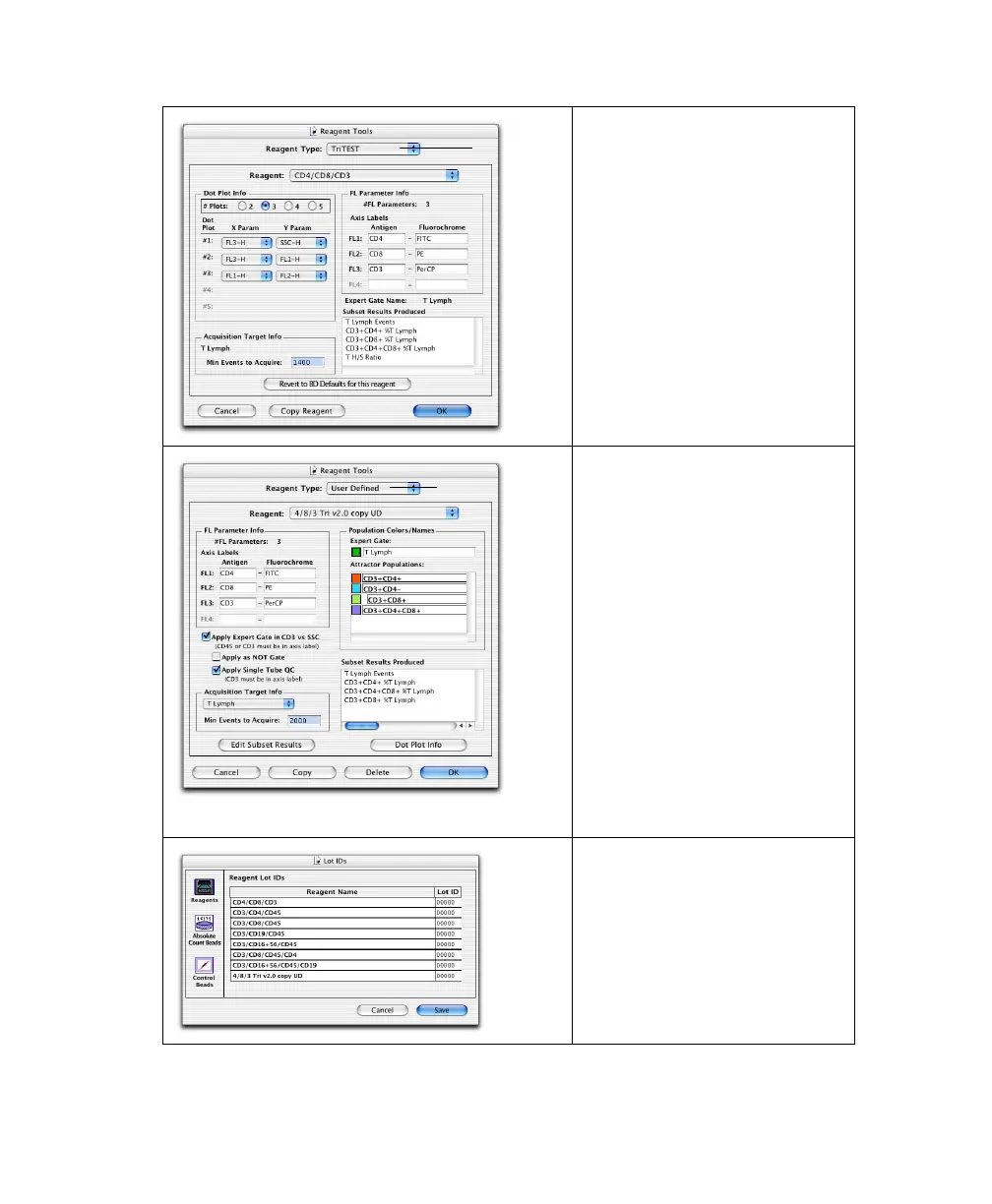
Use Reagent Tools to customize
Dot Plot Info (number and types
of plots associated with each
reagent), Acquisition Target Info
(minimum number of events to
acquire), and FL Parameter Info
(antigen or fluorochrome for each
parameter) for BD-defined
reagents.
Click Revert to BD Defaults... to
restore the original values.
Default values are the BD-
preferred values.
Use Reagent Tools to define
custom reagents by:
• Copying a BD-defined reagent
and customizing FL Parameter
Info, Acquisition Target Info,
Population Colors/Names, Edit
Subset Results, and Dot Plot
Info.
• Customizing one of 15
provided Attractor Templates
(BD Applications > MultiSET
folder > Templates Reagents
folder).
• Customizing an Attractor Set
created in BD Attractors™
software.
Use Lot IDs to enter lot
information for reagents,
controls, and BD Trucount beads.
Lot information is found in or on
the product packaging; enter it
manually or use a barcode
scanner.
BD reagent
user-defined reagent



 To Next Page