With thermocouples, connections and reference junction settings are crucial for
getting accurate results. Reference Junction Modes available:
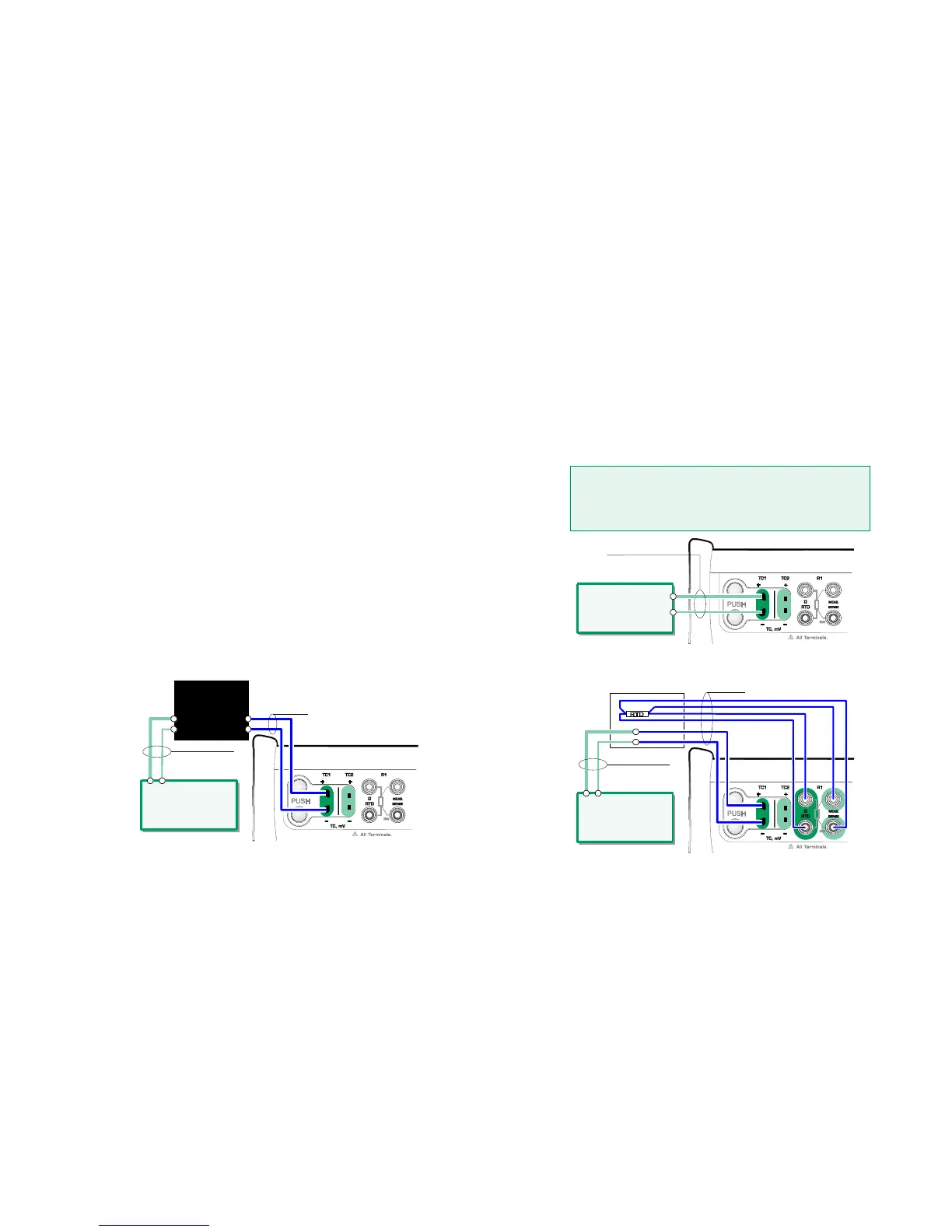
Internal is the simplest. Use suitable thermocouple, extension or compensation
wires to connect to MC6. MC6 takes care of the Reference Junction compensa-
tion. The upper picture to the right presents the connection to TC1 terminals.
You may optionally also use the TC2 terminals.
External R1 and External R2 use an external RTD sensor measuring the Ref-
erence Junction temperature, connected to selected terminal. The lower picture
to the right presents the connections to TC1 and R1 terminals.
Fixed (0°C) and Manual are used when a compensation box, a temperature
controller or similar method is utilized for fixing the Reference Junction tempera-
ture. Manual allows you to enter any temperature. Fixed (0°C) is a quick way of
"entering" zero degrees centigrade. Connection picture to TC1 below.
Fixed/Manual Reference Junction temperature.
Before measuring, ensure that MC6's temperature has sta-
bilized. Temperature differences between MC6 and the en-
vironment affect the accuracy of TC measurements. In ex-
treme conditions, wait up to 90 minutes.
Internal Reference Junction.
An RTD connected to R1 terminals measures the
Reference Junction temperature.



 To Next Page