MC6's communication with External Controllers (Pressure and Temperature)
connected to the USB-A ports is optional. Check what options your MC6 has
from the Settings window. Tap on the About button and browse to page with
Installed Options information.
WHAT CAN BE DONE WITH CONTROLLER COMMUNICATION
Ways of using an External Controller with MC6:
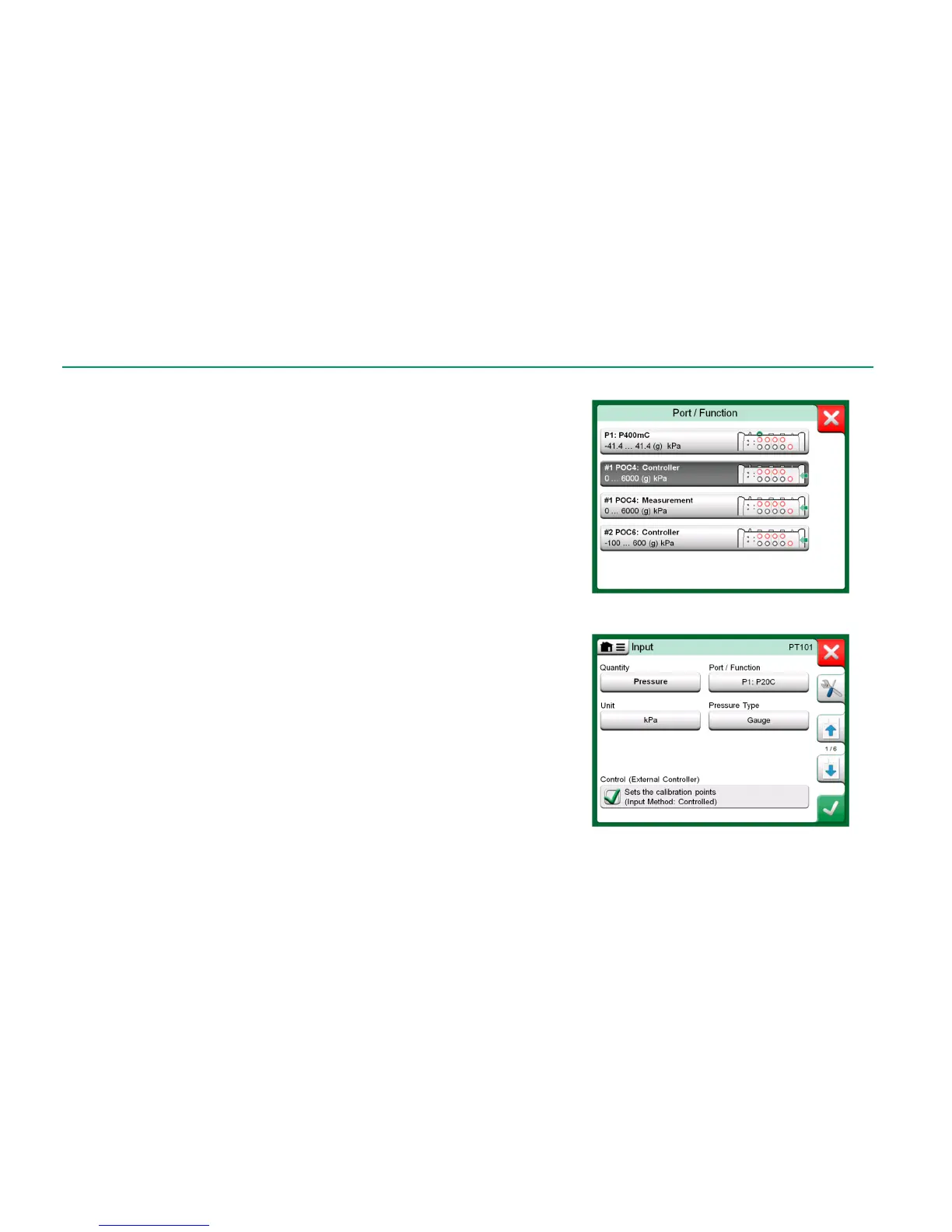
Controller (full use).
MC6 uses the External Controller to set and measure the signal. Con-
troller can be taken into use in MC6's Port/Function list in MC6's Cali-
brator, Documenting Calibrator and Data Logger. See example in
uppermost picture to the right. In Beamex CMX Calibration Software,
this corresponds to Input Method Controlled and Measured.
Measurement (only).
The External Controller acts like an external measuring device (compa-
rable to an EXT External Pressure Module). This feature needs to be ac-
tivated in MC6's Controller Presets window. More of Controller Pre-
sets window further on. When activated, Measurement is available in
Port/Function lists in MC6's Calibrator, Documenting Calibrator and
Data Logger. Again, see uppermost picture to the right.
Control (only).
MC6 uses the External Controller to set calibration points. It is measured
by some other means, e.g. MC6's Pressure Module. This is available in
MC6's Documenting Calibrator only. See lowermost picture to the
right. In CMX, this corresponds to Input Method Controlled.



 To Next Page