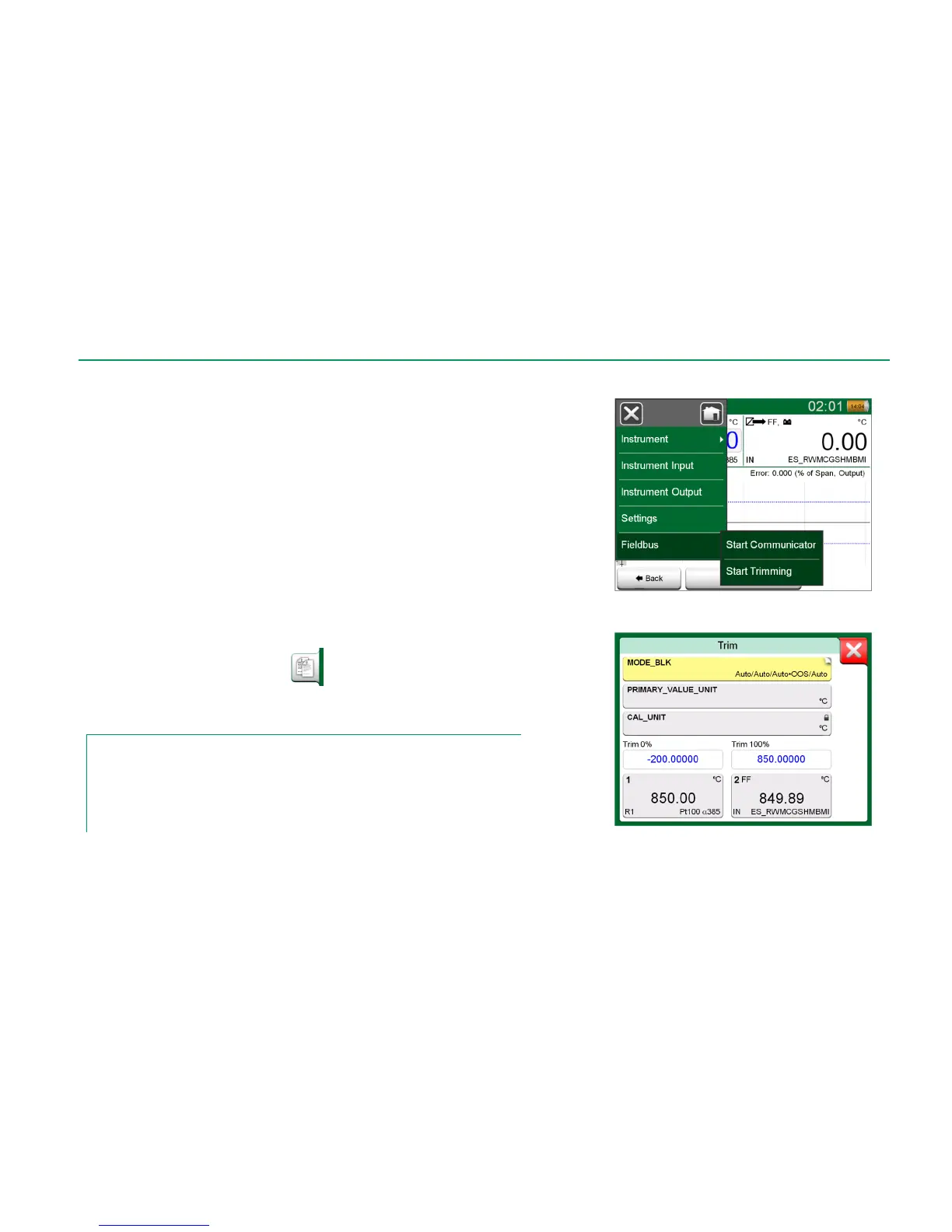
Trimming a FOUNDATION Fieldbus or a Profibus PA instrument can be initi-
ated from the Documenting Calibrator, provided the relevant communicator op-
tion is enabled and the instrument's Device Description contains information of
parameters needed for trimming. See picture to the right.
Menu option Start Trimming opens a window similar to the lowermost picture to
the right. The list of Blocks and Parameters depends on instrument's Device De-
scription. The lower part of the window has areas were the instrument's input (1)
and output (2) readings are shown.
Refer to the instrument's user manual for detailed information on how the trim
procedure progresses. Usually you first set the Mode Block to OOS (Out Of Ser-
vice) and then start editing the other data.
The actual trim is done by tapping on Trim 0 % or Trim 100 % values after a
valid input signal is generated/simulated/measured. A window for editing the nu-
meric value opens. The window includes a button for copying the input reading
as the correct value.
Copy button
Notes.
Some fieldbus instrument manuals and user interfaces use the term "calibration" when they
actually mean a trimming procedure. Be aware of this pitfall when trimming a fieldbus instru-
ment.
Be careful during the trimming procedure. Follow the instructions in the instrument's user man-
ual. Skipping a step in the procedure may result in an unsuccessful trim.
Menu in Documenting Calibrator when
calibrating a fieldbus instrument.
Fieldbus instrument's trimming window, example.



 To Next Page