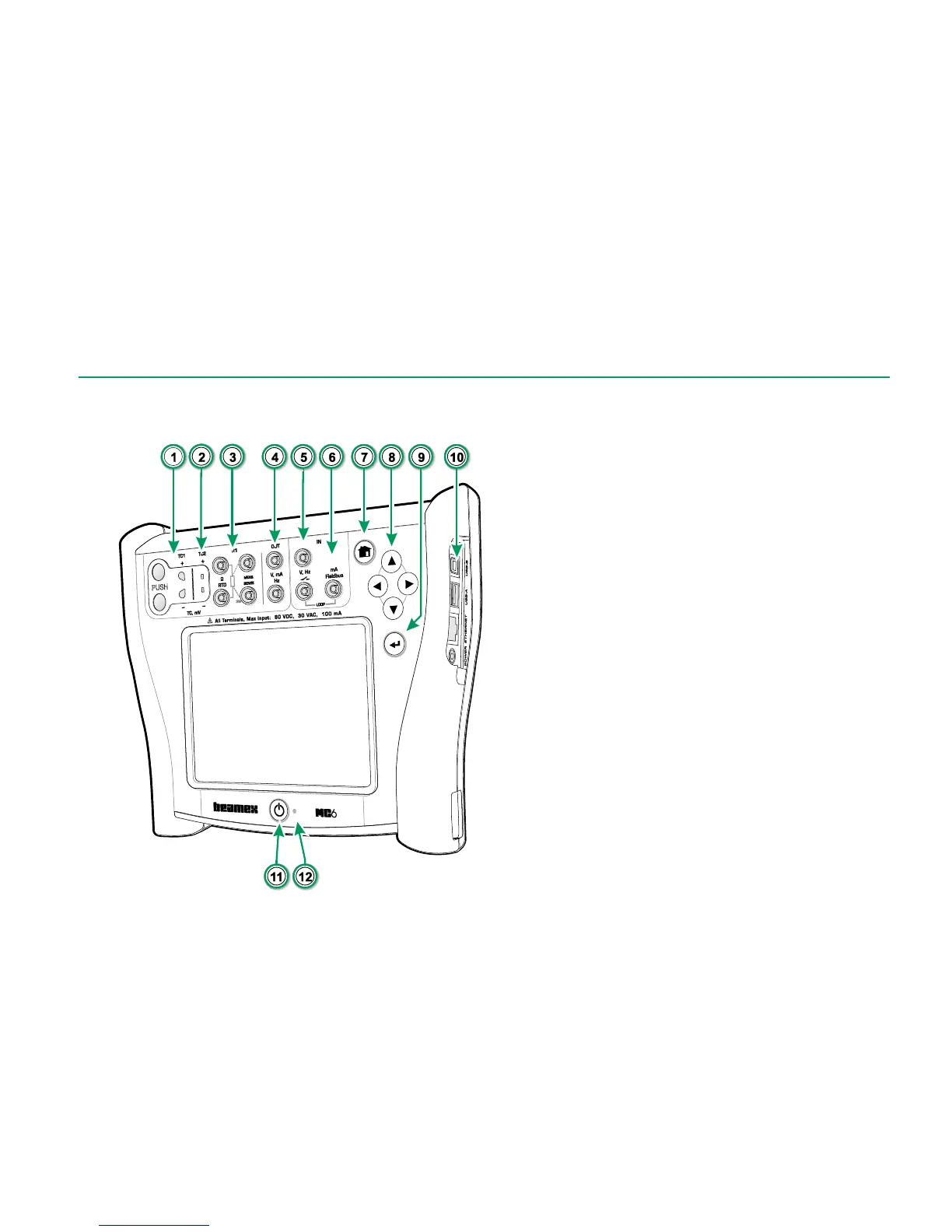
Legend:
1. Thermocouple connector (TC1) with release
buttons. For cables and standard TC plugs.
2. Thermocouple connector (TC2). For TC plugs
with flat contacts.
3. RTD and Resistor connector (R1). An R2
connector is on the top of MC6. More of R2
connector on next page.
4. Voltage, Current and Frequency output
(OUT).
5. Voltage, Frequency and Switch input (IN).
6. Current Measurement, Loop Supply,
HART
®
and Fieldbus connection (IN).
7. Home button. Press this button to return to
Home View.
8. Arrow buttons. First press displays the Hard-
ware Focus Indicator. Further presses move
the indicator on the touch screen.
9. Enter button for selecting the item surrounded
with the Hardware Focus Indicator.
10. Connectors on the right side of MC6. More in
chapter Connectors on the Right Side of
MC6 on page 8.
11. Power button. More in chapter Starting MC6
on page 4.
12. Light Emitting Diode (LED). More in chapter
About the Charger and the Charging Pro-
cedure on page 10 and LED on page 11.



 To Next Page