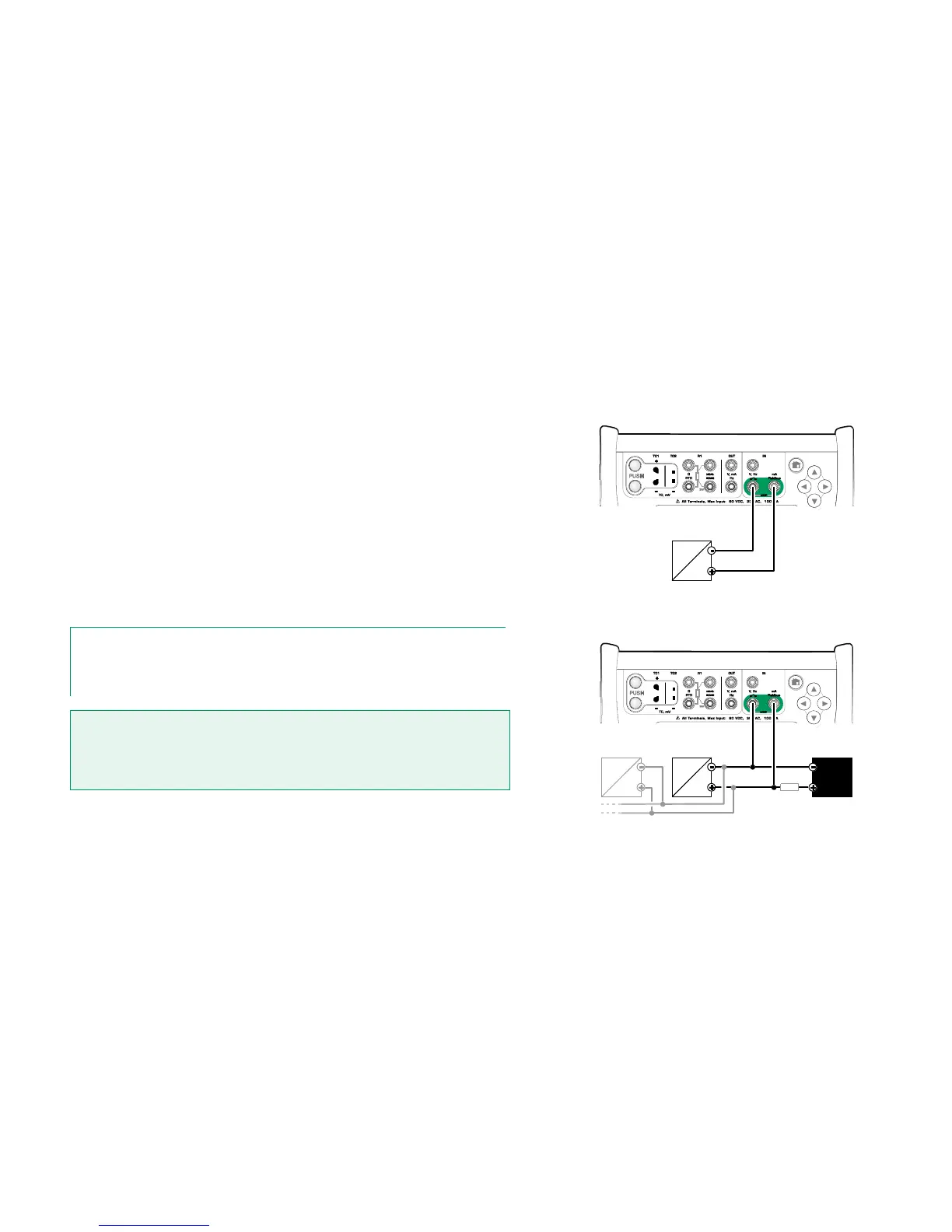
When communicating with Digital Communication Instruments, the connection
differs depending on whether MC6's internal power supply is used or not.
The upper picture to the right presents the connections when MC6's internal
power supply is used. MC6's power supply can safely provide supply power to
a single instrument. If connecting to a HART/fieldbus segment containing several
instruments, consider using an external power supply as presented further on.
The lower picture to the right presents the connections when an external power
supply is used. Then, to ensure communication, there may be need to include
an external resistor (250 ohm for HART and 50 ohm for fieldbuses). However,
when using a fieldbus compliant power supply, there is no need for an external
resistor. See also warning below.
Notes.
The connection between MC6 and the instrument/fieldbus may be done using pair of standard
measurement cables. However, when using longer connecting cables there may be need for
fieldbus terminators.
Warning!
When working in PROFIBUS PA: Do not connect two master devices (e.g. MC6, a Field
Communicator or a control system) at the same time to the same segment! They clash
and make the fieldbus segment unstable. Remove the instrument to be calibrated from
the live segment for calibration.
See also Warnings on page 61.



 To Next Page