<Close>: Select this icon to close any current window.
<Efficiency>: Select this icon to enter, measure or use factory defined efficiencies
for each isotope associated with wipe.
<Reports>: Advance to the available printout options for a selected patient, QA
function, etc.
<Spectrum Analysis>: After most counting functions select this icon to view a full page
display showing the Spectrum Analysis. You can then adjust ROIs,
add ROIs and move a cursor to see the energy and counts
associated with different energies.
NOTE: The <Delete> function is not an immediate action. The system provides the user the
opportunity to cancel the function if selected by mistake. A prompt is displayed and only
after selecting the <Accept> icon is the item/record deleted. Select <Cancel> to exit back to
the previous screen without deleting the item/record.
Turning The System Off
To turn OFF the Thyroid Uptake System:
1. Return to the Home screen by either selecting the <Home> icon or selecting <Back> to take
your back to the Home page.
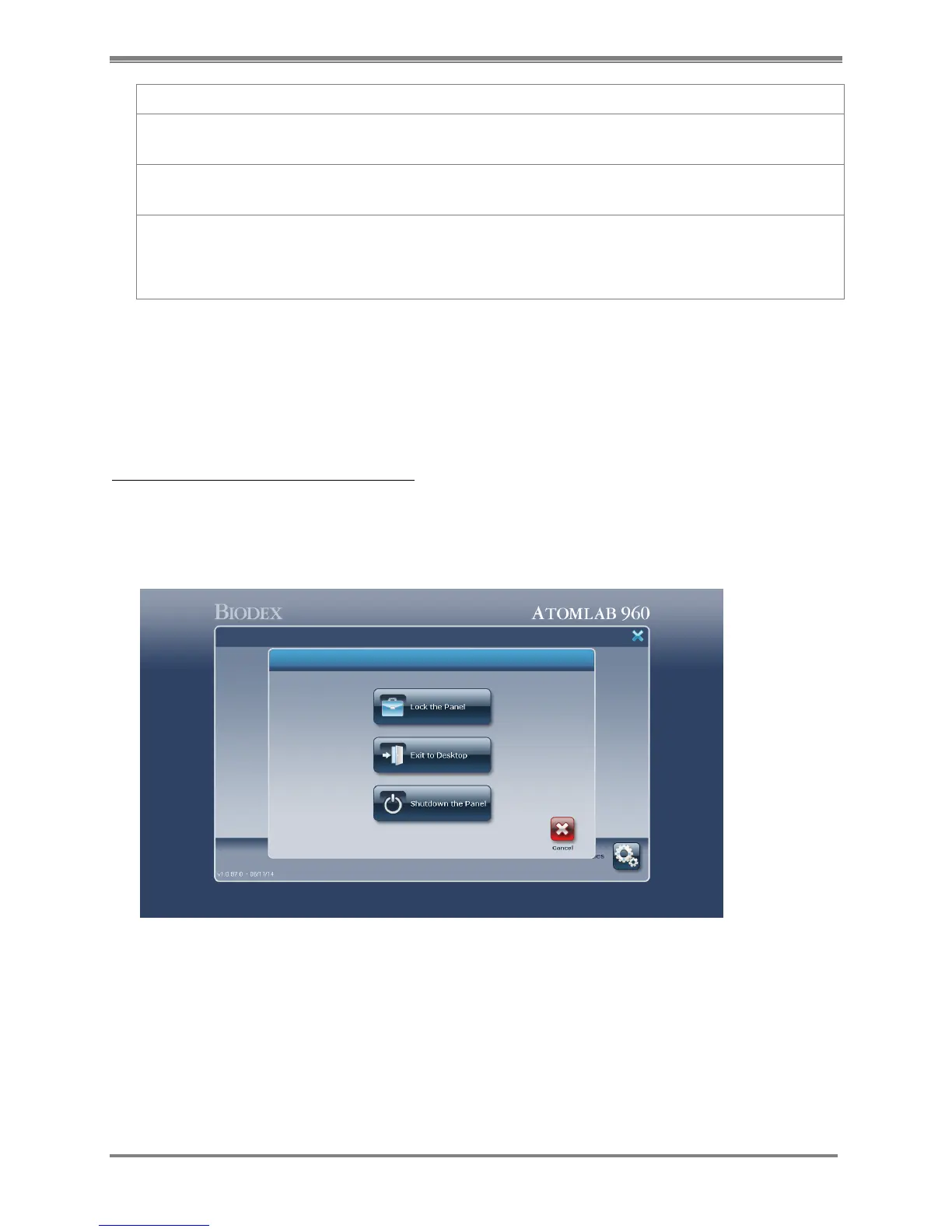
2. At the Home page, select <X> from the upper right corner to close the Atomlab 960
program.
Figure 3.3. Select <Exit to Desktop> to turn off the Thyroid Uptake System. !!
3. Select <Exit to Desktop>.
4. To turn the computer OFF, select the <Windows> icon in the lower left corner of the screen
and then select <Shut Down>. The computer will now power down.
5. You can also select <Shut Down the Panel> to turn off the computer.
NOTE: Step #4, above, is a standard Windows operation.



 To Next Page