180 S850 Operation & Maintenance Manual
MAINTENANCE CLOCK
Description
The Maintenance Clock alerts the operator when the next
ser
vice interval is due. EXAMPLE: The maintenance
clock can be set to a 500 hour interval as a reminder for
the next 500 hour planned maintenance.
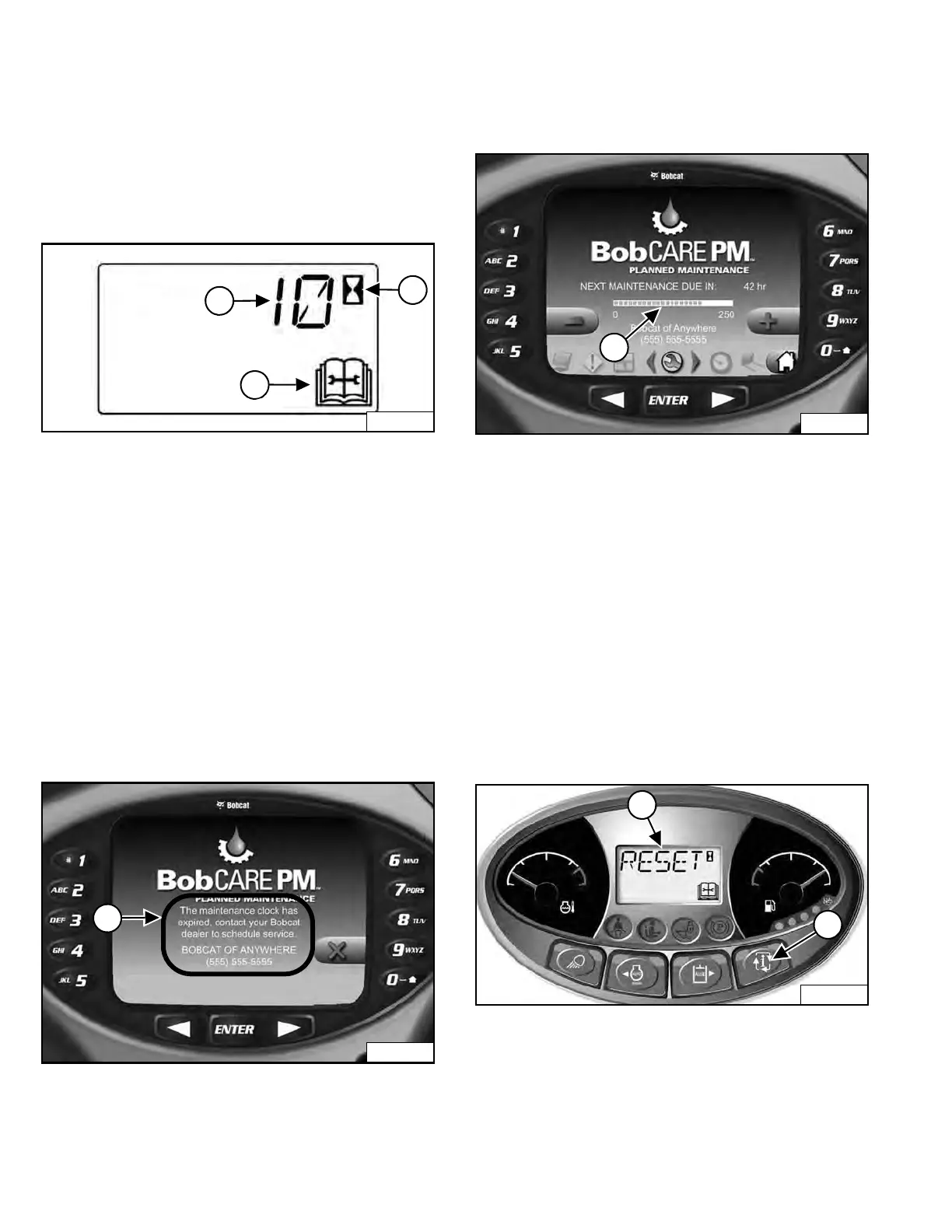
Figure 288
During machine operation, a 2 beep alar
m will sound
when there are less than 10 hours until the next planned
maintenance.
The remaining hours before maintenance is required
(Item 1) will appear in
the data display for 5 seconds
while the service icon (Item 3) and the hourmeter icon
(Item 2) [Figure 288] flash.
NOTE: The display will show negative numbers after
c
ounting down to zero.
The display will revert to the previous display and will
a
ppear for 5 seconds every time the machine is started
until the maintenance clock is reset.
Figure 289
The Deluxe Instrumentation P
anel (if equipped) will
display a message (Item 1) [Figure 289] alerting the
operator to service the machine.
This message will remain for 10 seconds and will appear
f
or 10 seconds every time the machine is started until the
maintenance clock is reset.
Figure 290
The Deluxe Instrumentation P
anel (if equipped) will
display a bar (Item 1) [Figure 290] showing the time
remaining until next service. Thi
s bar will turn red when
service is past due. NEXT MAINTENANCE DUE will
change to MAINTENANCE PAST DUE and display the
number of hours past due.
Keys [4
] and [9] can be used to adjust the service
interval when the owner is logged in [Figure 290].
Setup
See your Bobcat dealer about installation of this feature.
Reset
Figur
e 291
Press the Information button (Item 2) [Figure 291] until
the display screen shows the maintenance clock.
Press and hold the Information button (Item 2) for 7
seconds unt
il [RESET] (Item 1) [Figure 291] appears in
the display screen.
Dealer Copy -- Not for Resale



 To Next Page