43 S850 Operation & Maintenance Manual
OPERATOR CAB (CONT’D)
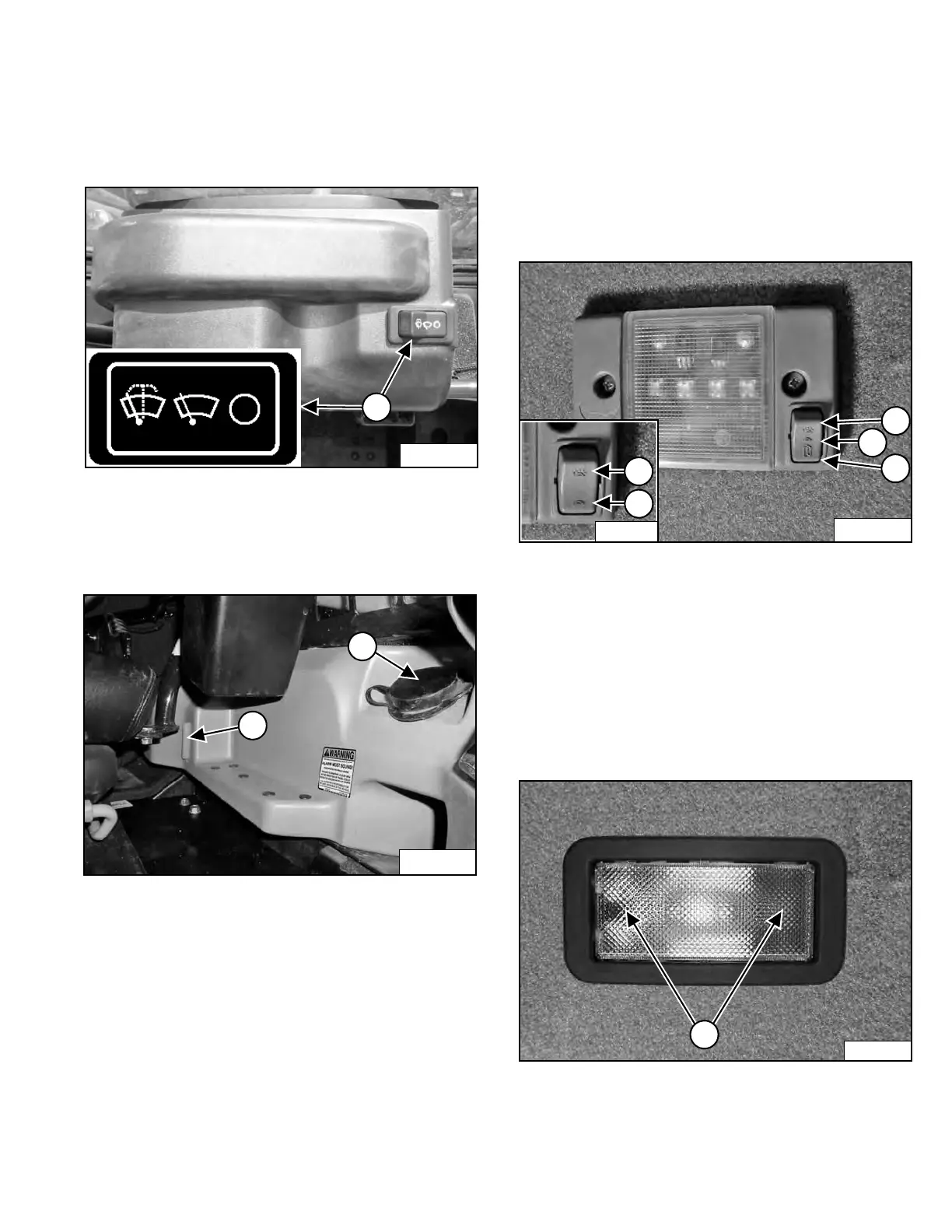
Front Wiper
This machine may be equipped with a Front Wiper.
Figure 29
Press the left side of the switch (Item 1) [Figure 29] to
start the front wiper (press and hold for washer fluid).
Pre
ss the right side of the switch to stop the wiper.
Figure 30
The washer fluid tank is located on the left side of the
o
perator cab. Check the fluid level in the sight gauge
(Item 1). Remove the cap (Item 2) [Figure 30] to add
washer fluid.
Cab Light
This machine may be equipped with a Cab Light.
The cab light is located above the operator’s left
shou
lder. More than one type can be found on this
machine. The operation of each is explained below.
Figure 31
Push this side of the switch (Item 1) to turn the light ON.
Pla
ce the switch in the middle position (Item 2) to turn the
light OFF. Push this side of the switch (Item 3)
[Figure 31] to turn the light ON and OFF with the door.
Some models use a cab light with a two-position switch
(
Inset). Push this side of the switch (Inset Item 4) to turn
the light ON. Push this side of the switch (Inset Item 5)
[Figure 31] to turn the light OFF.
Figure 32
Push either side of the lens (Item 1) [Figure 32] to turn
the light ON. Return the lens to the middle position to turn
t
he light OFF.
Dealer Copy -- Not for Resale



 To Next Page