56 S850 Operation & Maintenance Manual
SPEED MANAGEMENT
Operation
Speed Management allows the loader to be maneuvered
a
t a slower travel speed, even during maximum
movement of the controls.
This feature can be useful when installing attachments,
loa
ding or unloading, and certain applications.
(EXAMPLES: Landscaping, tilling, trenching)
NOTE: You must be in low range speed to engage
Spe
ed Management.
Figure 65
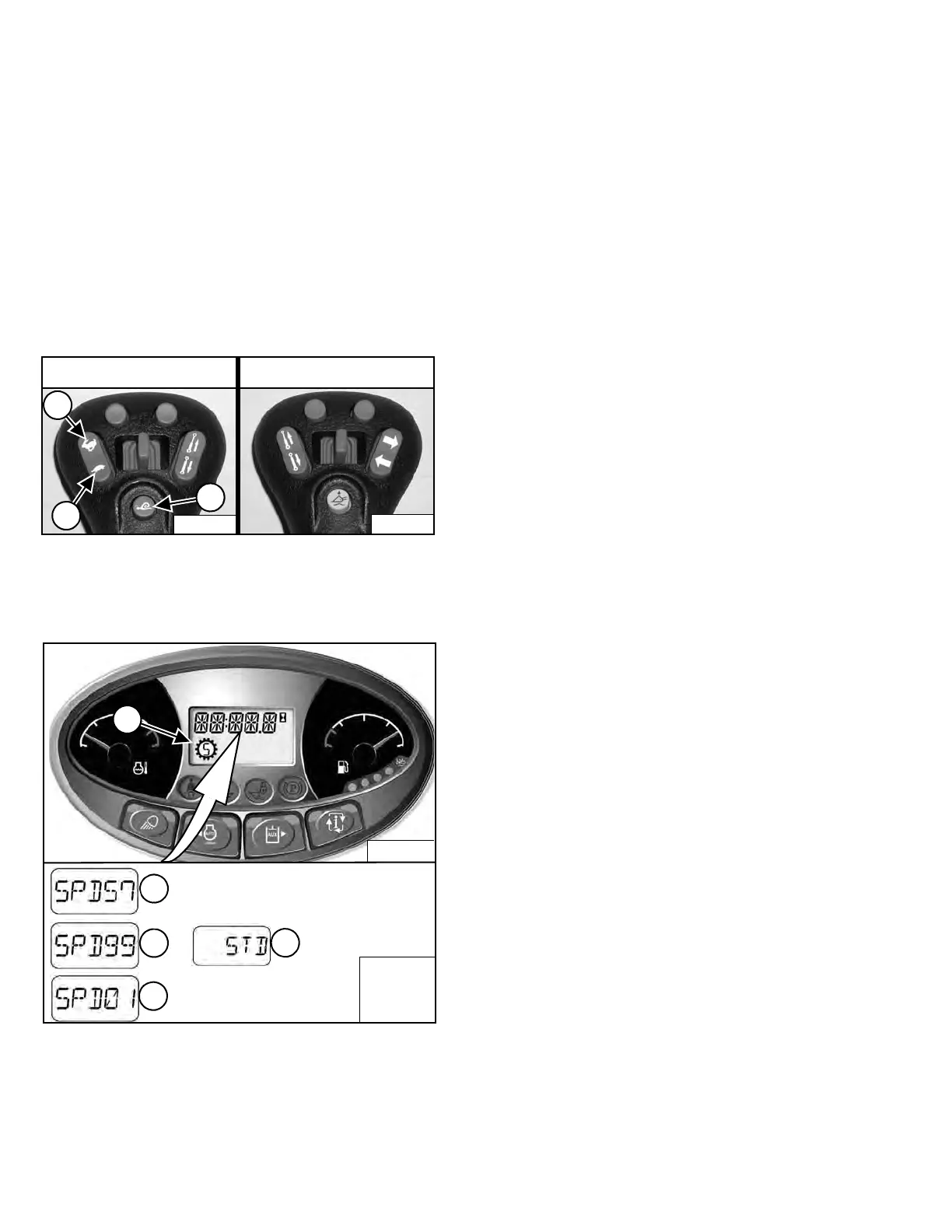
Press the button (Item 1) [Figure 65] on the left control
once to engage Speed Management.
Figure 66
The Speed Management icon (Item 1) [Figure 66] will
appear in the display and remain on until the Speed
Ma
nagement button is pressed again or the machine is
turned off.
When Speed Management is engaged,
the machine will
travel at the factory default setting of 57% of Standard
Travel Speed and the percentage [SPD 57] will appear in
the display (Item 2) [Figure 66].
NOTE: The factory default setting can be changed by
t
he operator. (See Changing The Factory
Default Setting on Page 57.)
While Speed Management is engaged, press the top of
t
he Speed Control switch (Item 2) [Figure 65] to increase
the speed up to 99% [SPD
99] or the bottom of the switch
(Item 3) [Figure 65] to decrease the speed down to 1%
[SPD 01]. The perc
entages will appear in the display
(Items 2, 3 and 4) [Figure 66].
Press button (Item 1) [Figure 65] again to disengage
Speed Management and return to Standard Travel
Spe
ed. [STD] (Item 5) [Figure 66] will appear in the
display.
The system will retain the speed percentage
as long as
the loader remains ON.
EXAMPLE: You can be using the machine at 40%
and then disengage Speed Management to
reposition the loader, then re-engage Speed
Management. The speed percentage will still be at
40%.
EXAMPLE: Turning the key OFF or pressing the
STOP button will return the Speed Management
setting to default. The next time you start the
engine and engage Speed Management, the
speed will be at 57% (factory default setting) or
the last default setting saved by the operator. (See
Changing The Factory Default Setting on Page
57.)
NOTE: You must disengage Speed Management
before you can select high range.
P-76461D
P-76461E
P-76461F
P-76461G
2
4
5
3
Dealer Copy -- Not for Resale



 To Next Page