33 S850 Operation & Maintenance Manual
INSTRUMENT PANEL IDENTIFICATION (CONT’D)
Right Panel (Deluxe Instrumentation Panel)
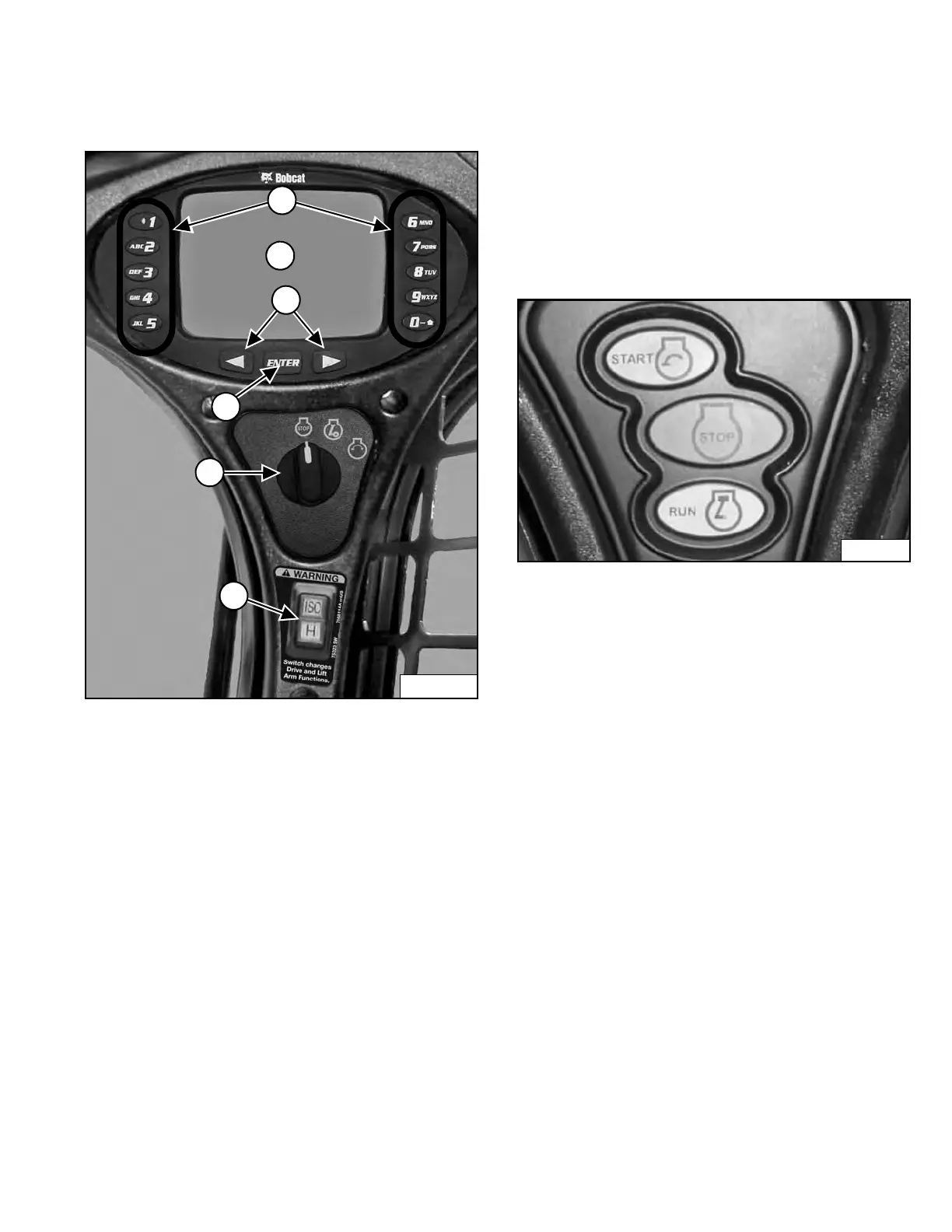
Figure 17
This machine may be equipped with a Deluxe
I
nstrumentation Panel [Figure 17].
1. K
eypad (1 through 0): The keypad has two
functions:
- To enter a number code (password) to allow starting
the engine.
- To enter a number as directed for further use of the
display screen.
2. Display Screen: The Display Screen is where all
system setup, monitoring and error conditions are
displayed.
3. Scroll Buttons: Used to scroll through display screen
choices.
4. ENTER Button: Used to make selections on the
display screen.
5. Key Switch: Used to turn the loaders electrical
system on and off, and to start and stop the engine.
6. Selectable Joystick Controls (SJC) Control
Pattern Switch (Option): Press the top to select
‘ISO’ Control Pattern; bottom to select ‘H’ Control
Pattern.
Figure 18
Earlier models used a push button switch assembly
[Figure 18] instead of a key switch.
Dealer Copy -- Not for Resale



 To Next Page