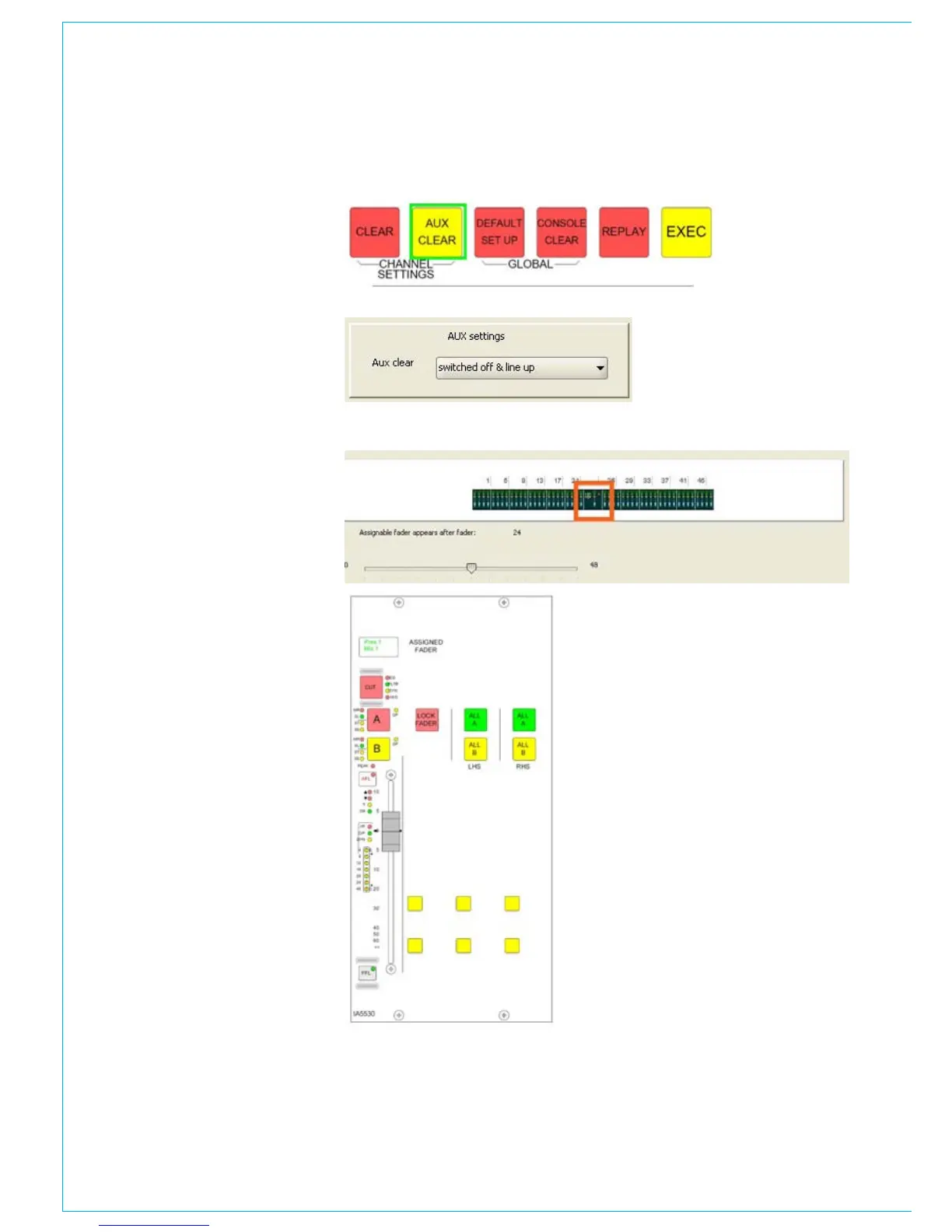
Assigned fader position
The slider above allows the user to set the
location of the assigned fader panel. The
assigned fader panel (see picture on the
right) duplicates the controls of the fader
currently selected. The assigned fader
panel is usually located near the centre
of the mixer, so it is close to the operator.
The mixer control system must know
the location of the assigned fader panel,
because the assigned fader panel has
buttons which can ‘flip’ the fader layers on
the right and left of the console between
the A and B layers, i.e., the control system
needs to know which faders are right and
left of the assigned fader panel.
The position is adjusted using the ‘slider’
and the settings are displayed above.
The red box indicated the location of the
assigned fader panel.
Aux clear
On the mixer control surface, is a button
to clear down the auxiliary settings of the
selected channel, as highlighted by the
green box to the right. The option below,
allows the user to define the aux clear
function. The auxiliaries send settings can
be switched on, but the send level control
set to off, or the auxiliary can be switched
off, but the send level control at line up.



 To Next Page