13-6
Machine Settings
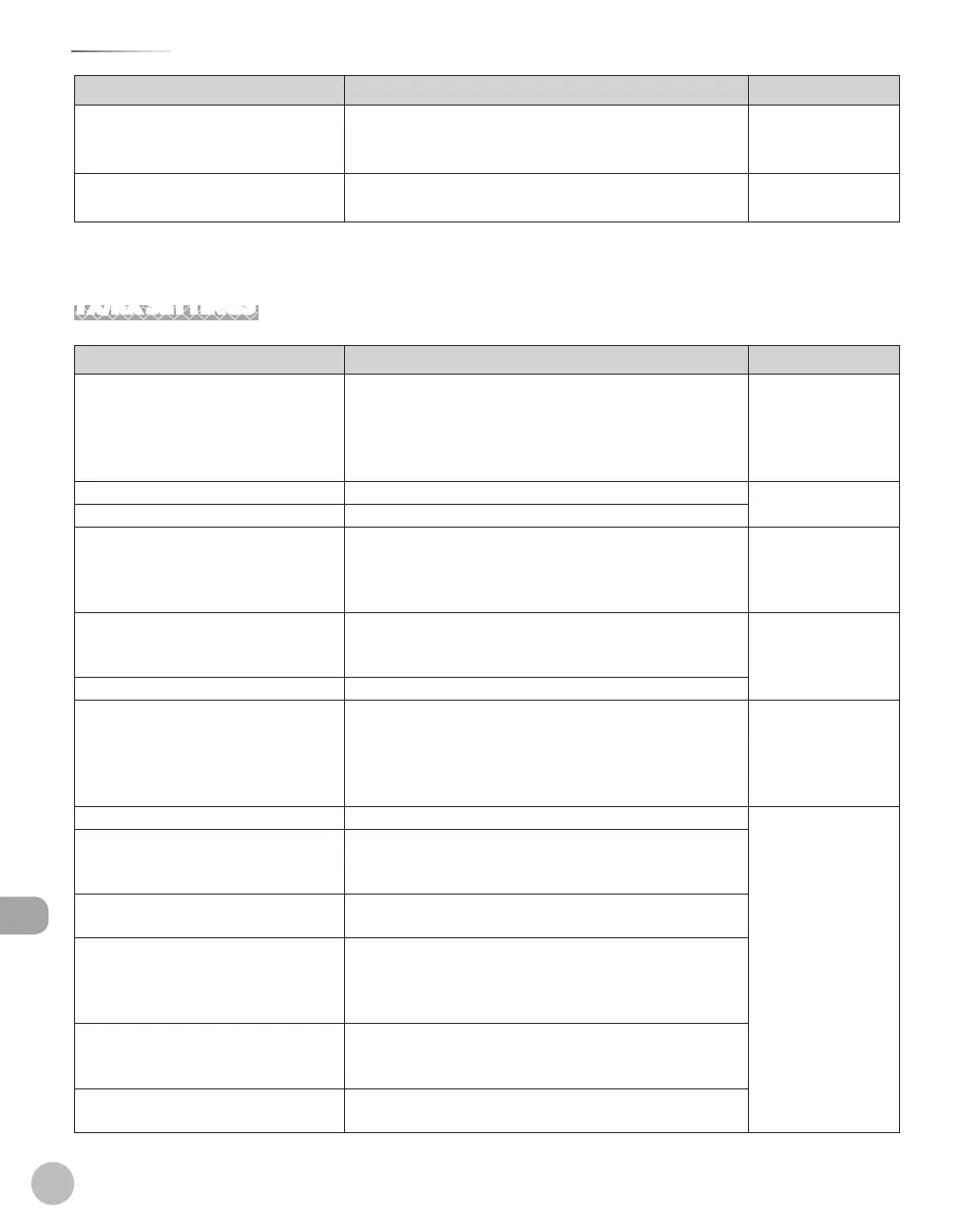
Setting Menu
Item Settings Applicable Page
3. PAPER SIZE GROUP INCHES
A
AB
–
–
–
p.
3-29
4.
INIT. COPY SET. YES
NO
–
–
p.
3-31
*
1
Available only for machines with the optional paper cassette.
TX/RX SETTINGS *
1
Item Settings Applicable Page
1. DELAYED SEND OFF
ON (00:00-23:59)
–
–
p.
6-32
e-Manual
“E-Mail”, “Scanning
Documents to a File
Server”
2.
TX/RX COMMON SET.
1. TX SETTINGS
1. UNIT NAME Maximum 24 characters Starter Guide
“Register User
Telephone Number
and Unit Name”
2.
DATA
COMPRESSION *
2
NORMAL
HIGH RATIO
LOW RATIO
–
–
–
e-Manual
“E-Mail”, “Scanning
Documents to a File
Server”
3.
RETRY TIMES*
2
0-5 TIMES (3 TIMES)
4. SCANNING DENSITY 1-9 (5) p.
6-34
e-Manual
“E-Mail”, “Scanning
Documents to a File
Server”
5.
STANDARD SETTINGS p. 6-35
e-Manual
“E-Mail”, “Scanning
Documents to a File
Server”
1.
DENSITY STANDARD
DK
LT
–
–
–
2.
RESOLUTION 100×100dpi*
1
, 150×150dpi*
1
, 200×100dpi, 200×200dpi,
200×400dpi, 300×300dpi*
1
, 400×400dpi, 600×600dpi*
1
3. IMAGE
FORMAT *
2
PDF
TIFF(B&W)
PDF(COMPACT)
JPEG
–
–
–
–
4.
ORIGINAL TYPE*
2
TEXT/PHOTO
TEXT
PHOTO
–
–
–
5.
DIVIDE INTO PAGES*
2
OFF
ON
–
–















 To Next Page