Fax (D1180/D1170/D1150)
6-4
Introduction to Using Fax Functions
Introduction to Using Fax Functions
This section describes the things that you must do before using fax functions. Make sure to
set the following items first:
Your fax number
Register your machine’s fax number. (See “Registering Your Machine’s Fax Number,
” on p. 6-12.)
Your personal name or company name
Register your name or company name. (See “Registering the Machine’s Name,
” on p. 6-11.)
Date and time
Set the current date and time. (See “Setting the Current Date and Time,
” on p. 6-10.)
Your telephone line type
Set the type of telephone line that is connected to the machine. (See “Setting the Type of Telephone
Line,
” on p. 6-11.)
Fax receiving mode
Set how the machine receives fax documents to suit your needs. (See “Methods for Receiving Faxes,”
on p
. 6-4.)
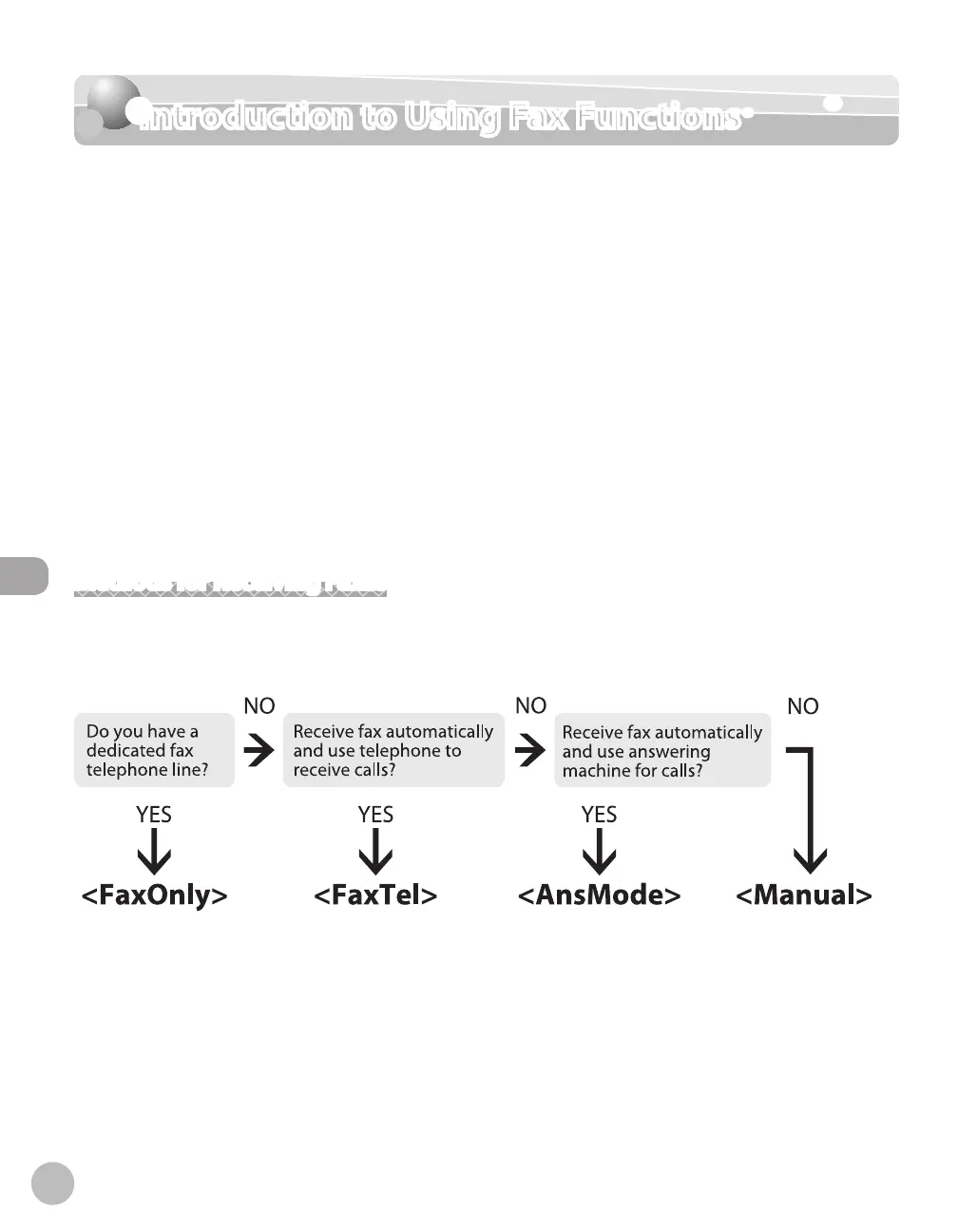
Methods for Receiving Faxes
Your machine provides several methods for receiving fax documents. You can receive documents
automatically or manually. Follow the chart below to choose the fax receive mode that best suits your needs.
The default setting is <FaxOnly>.
●
●
●
●
●















 To Next Page