Fax (D1180/D1170/D1150)
6-32
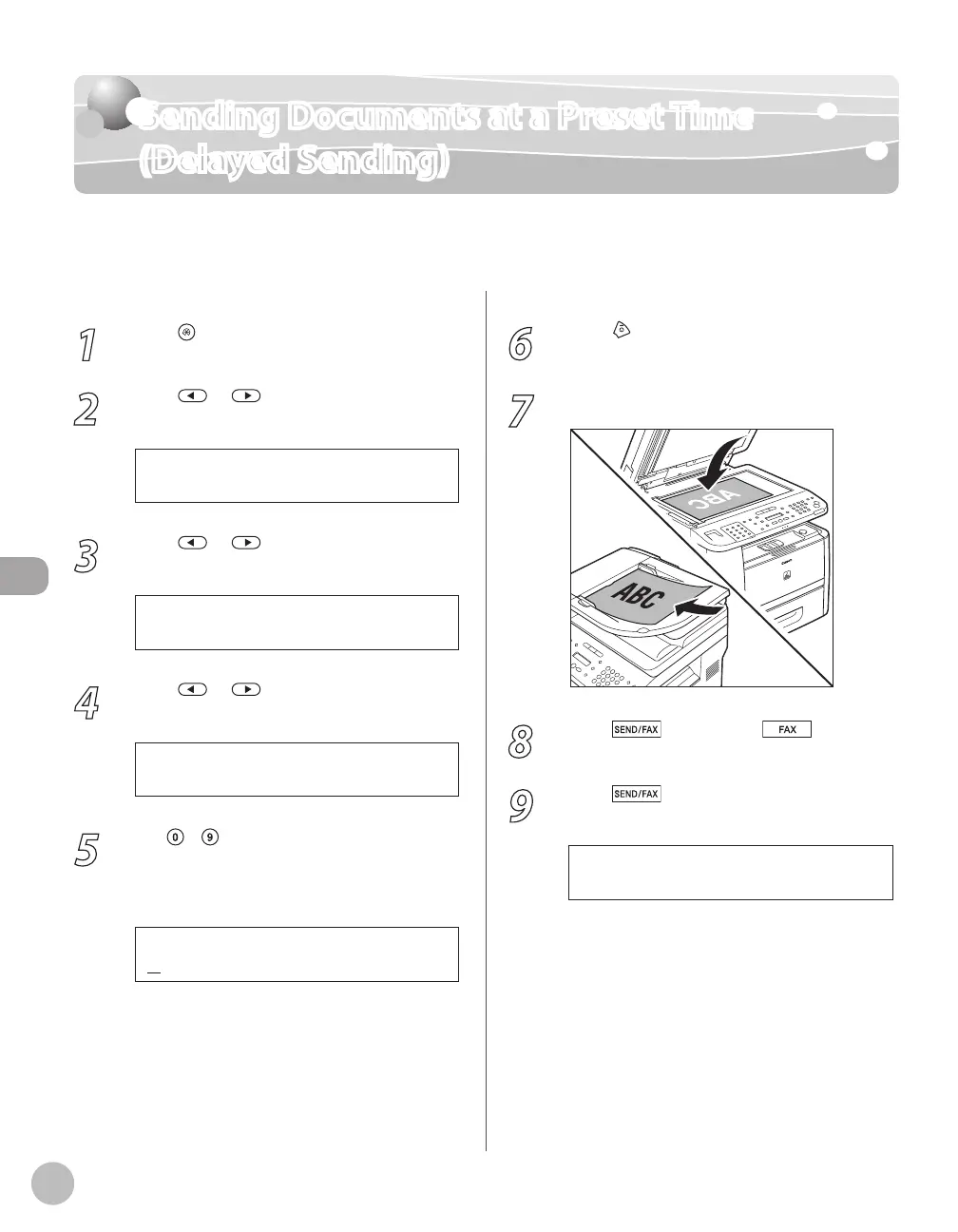
Sending Documents at a Preset Time (Delayed Sending)
Sending Documents at a Preset Time
(Delayed Sending)
Delayed sending enables you to start transmission at a specified time. You can store up to
70 delayed sending jobs. The default setting is <OFF>.
1
Press [Menu].
2
Press or to select <TX/RX
SETTINGS>, then press [OK].
4 . T X / R X S E T T I N G S
M E N U
3
Press or to select <DELAYED
SEND>, then press [OK].
1 . D E L A Y E D S E N D
T X / R X S E T T I N G S
4
Press or to select <ON>, then
press [OK].
5
Use
–
[numeric keys] to enter the
time you want to start sending, then
press [OK].
2 0 : 0 0
T X T I M E S E T T I N G
Ex.
Enter the time in 24-hour/military time format.
Enter all numbers, including zeros.
–
–
6
Press [Stop/Reset] to return to the
standby mode.
7
Place documents.
8
Press [SEND/FAX]/ [FAX].
9
Press
[SEND/FAX] repeatedly to
select <FAX>, then press [OK].
For the D1150, skip this step.





 To Next Page